Overview
Your customers increasingly expect conversations that feel clear and easy to act on, not only plain text updates. They want messages that are visually clear, branded, and help them complete tasks quickly.
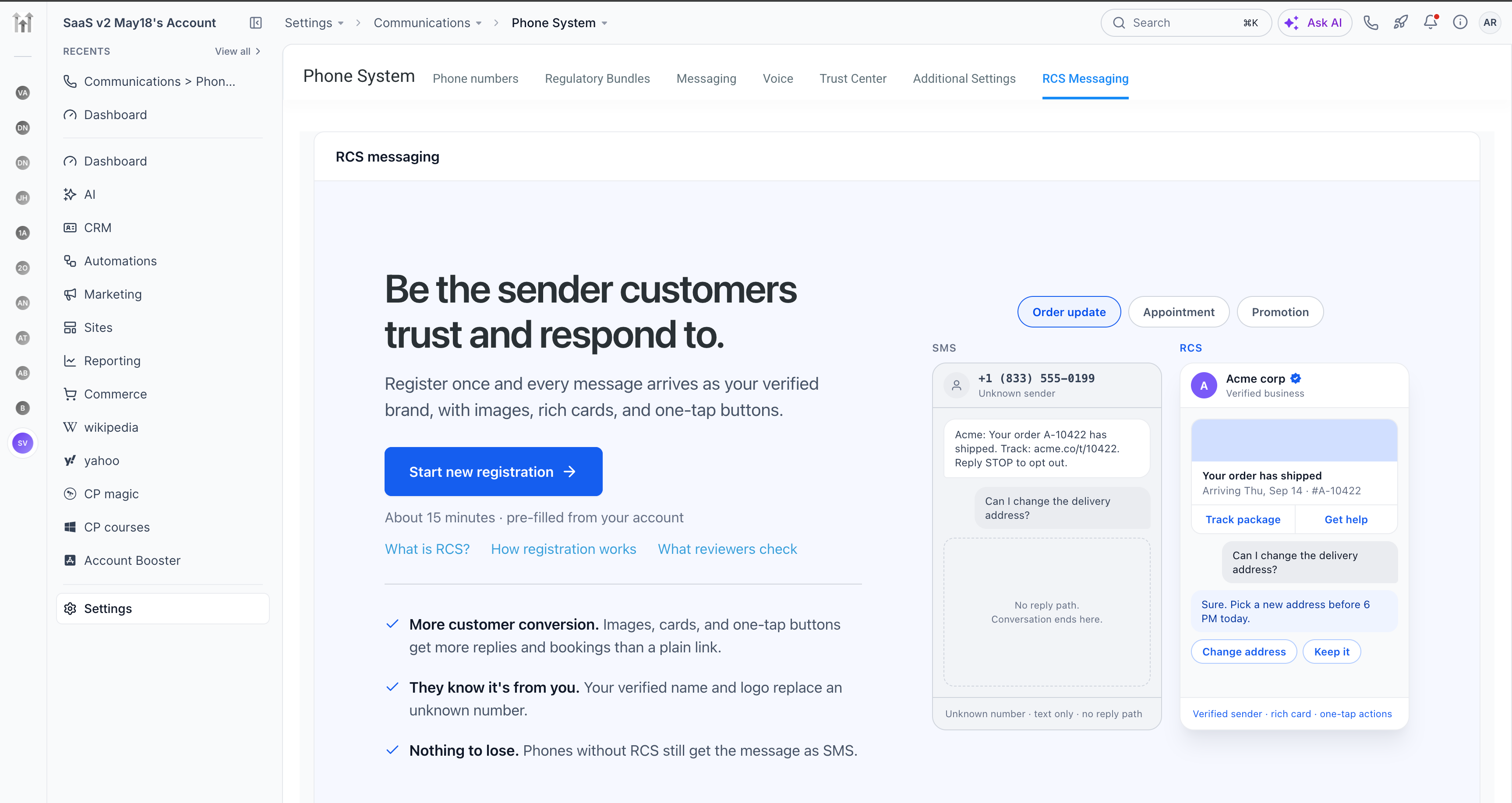
EveryCatch now offers RCS messaging in Labs, so you can start using richer, branded conversations with your customers directly from your existing account.
You can now complete the full RCS registration flow inside EveryCatch, without going out to external provider dashboards or juggling separate logins.
To get started, simply enable RCS in Labs for the accounts you want, then follow the guided registration steps to begin sending richer RCS messages to your customers.
What changed
RCS messaging is now available in labs
You can now turn on RCS messaging from Labs and select exactly which accounts you want to onboard to this channel.
You can begin with a few client accounts, test the experience, and then roll it out further when it makes sense for your business.
Complete RCS registration without leaving EveryCatch
EveryCatch now provides a guided onboarding flow that walks you step by step through everything needed to register your RCS sender, so you do not have to piece together requirements on your own.
Here's what the registration process looks like
- Brand identity: Add your business name, logo, description, contact information, and website details. You can preview how your brand will appear to customers in their messaging app.
- Countries: Choose the countries where you intend to send and receive RCS messages.
- Sender details: Describe how you plan to use RCS, what types of messages you will send, and how customers provide consent to receive them.
- US verification (if applicable): If you are registering for use in the United States, provide the additional business and messaging information requested.
- Review & submit: Double-check your information and submit your registration so it can be reviewed and approved.
Your progress is saved automatically, so you can complete registration at your own pace.
After you submit your details, you can monitor your sender’s approval status directly inside EveryCatch without any separate tracking tools.
Bring more engaging experiences to every conversation. Once your RCS sender is approved, you can extend your messaging beyond standard SMS with:
- Branded messaging: Show your business name and logo so customers can quickly recognize who is contacting them.
- Rich cards & carousels: Present products, services, and offers with images and structured layouts that customers can scroll through.
- Interactive buttons: Allow customers to tap to call, visit a page, confirm an appointment, or take other key actions right from the message.
- Suggested replies: Offer quick reply options that customers can send with a single tap, which helps keep conversations moving.
Use RCS across your existing EveryCatch tools
EveryCatch now lets you bring rich RCS messaging into the tools you already rely on, so you can keep your workflows familiar while upgrading the experience for your customers.
- 1:1 conversations: Chat with customers using interactive, branded RCS messages inside your existing conversation views.
- Bulk messaging: Send engaging RCS broadcasts to groups of contacts where RCS is supported.
- Workflows: Add RCS steps into automated journeys so customers receive rich, interactive messages triggered by their actions and status.
- RCS templates: Create reusable rich message templates so your team can send consistent, on-brand content quickly.
How to enable RCS messaging
You can turn on RCS and start the onboarding flow with a straightforward two-step setup.
Step 1: enable RCS in labs
- Go to Agency settings → Labs in your EveryCatch account.
- Search for "RCS messaging" in the Labs list.
- Toggle the feature on to enable it.
Step 2: start RCS onboarding
- Open the specific account where you want to configure RCS.
- Go to Settings → Phone system → RCS messaging.
- Click to start the guided RCS registration flow.
- Fill in all required business and messaging details, then submit your sender for review and approval.
After your sender is approved, its status will update to Live in EveryCatch, and you can begin sending RCS messages from that account.
Tip: You can repeat this setup and onboarding process for multiple accounts so each client can adopt rich RCS messaging when the timing is right for them.
Why it matters
RCS gives you a more engaging way to reach customers, while keeping setup, sending, and management all inside EveryCatch.
Make conversations more engaging: Enhance your messages with rich cards, images, and interactive buttons so information is clearer and easier to act on.
Make it easier for customers to take action: Let people view offers, answer questions, confirm details, and respond directly from their native messaging app.
Get started with less effort: Use the built-in registration flow in EveryCatch to set up and manage your RCS senders without switching between platforms.
Offer more value to your clients: Roll out richer, branded messaging experiences across the client accounts you manage to help them communicate more effectively.
Grow at your own pace: Start with a small set of accounts, learn what works for your use cases, and gradually expand as you see results.
RCS is designed to help every message carry clearer information, stronger branding, and more convenient actions, so each interaction feels more useful for your customers.
Good to know
RCS messaging is currently available as a Labs feature in EveryCatch, which means you can try it early while we continue to refine the experience.
RCS sender registrations must go through carrier and provider review. Live RCS messaging can begin only after your sender is approved.
RCS availability depends on supported countries, local carriers, and whether the recipient’s device and messaging app support RCS.
Your registration form progress is saved automatically, so you can pause and return later without losing your work.
You can register test devices during onboarding so you can send trial RCS messages and review the experience before your sender is fully live.
Your feedback matters!
This Labs release is a key step toward making RCS messaging available to more EveryCatch users and use cases.
As you walk through the onboarding flow and begin sending RCS messages, your input will help guide what we improve and prioritize next.
We welcome your thoughts on what feels smooth, what could be simpler, and which additional capabilities would make RCS more valuable for your business and clients.
Thank you for using EveryCatch and for helping shape how messaging evolves on the platform.