Overview
You can now check your email campaigns for likely spam issues before you send them, using the new pre-send spam check in EveryCatch email campaigns.
The check reviews your email content, sender setup, and trust and reputation signals. It then gives you clear, itemized recommendations so your campaign has a stronger chance of reaching the inbox instead of landing in spam.
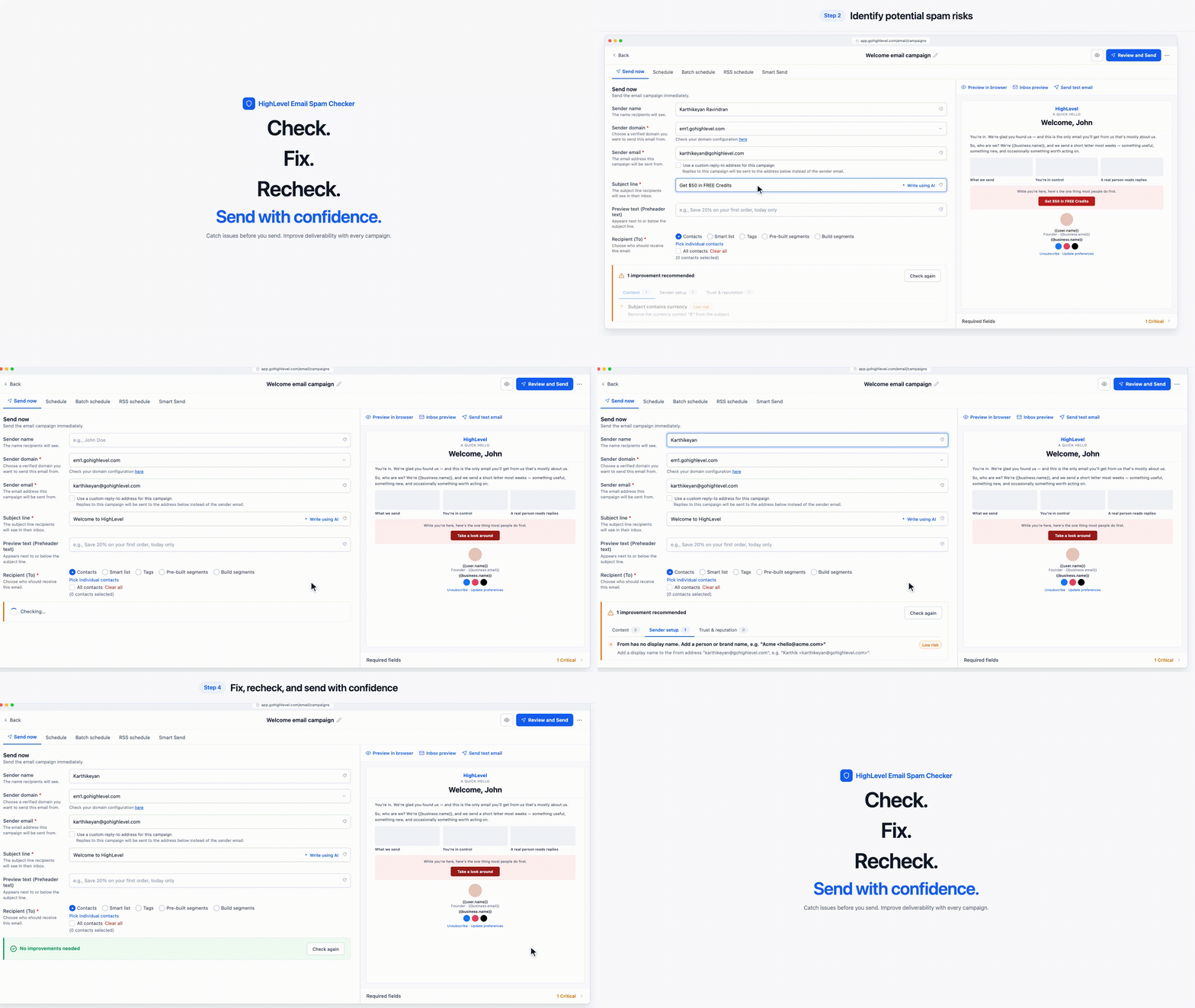
Watch the walkthrough video to see the spam check in action and how to apply the recommendations in your own emails.
What changed
Pre-send spam analysis
- Run a spam check directly from the send screen, before a single email is delivered to your list.
- See the results in three tabs (Content, Sender setup, and Trust & reputation), with a count of how many recommendations were found in each area.
Content checks
- Scan your subject line and email body for spam-like phrases, scam-style wording, excessive urgency, unrealistic guarantees, and unsubscribe wording that can look suspicious to filters.
- See the exact phrases or sections that need to be removed or adjusted so you know precisely what to change.
Sender setup checks
- Review your sender name, sender domain, and sender email configuration for issues that can hurt deliverability.
- Get practical recommendations, such as choosing a verified sending domain or aligning your sender email address with that domain.
Trust & reputation checks
- Spot links and other elements in your email that can reduce how much mailbox providers trust your message, so you can clean them up before sending.
Risk levels & recommendations
- Each recommendation shows the specific issue, its risk level (High or Medium), and a suggested fix so you know what to do next.
- Tackle High risk items first, then click Check again to confirm the issues have been resolved.
How to use
- Go to Marketing > Emails > Campaigns in EveryCatch, then create a new email campaign or open an existing one.
- Build your email using the email builder as you normally would.
- Click Send or Schedule in the top-right corner of the campaign screen.
- Fill in the sender name, sender domain, sender email, and subject line fields.
- Scroll to the bottom of the send screen and click Check now on the spam check banner.
- Review the recommendations, make your updates in the campaign, and click Check again until you are comfortable with the results.
Why it matters
- Improved deliverability: Catch common spam risks before your emails are sent.
- Better inbox placement: Refine your sender setup and content so your messages are more likely to land in the inbox.
- Proactive issue prevention: Address deliverability problems before they affect your campaign performance and reporting.
- Simplified experience: Get practical, in-context guidance inside EveryCatch email campaigns without switching to separate spam testing tools.
Availability
The pre-send spam check is available on the send screen of email campaigns in Marketing > Emails > Campaigns. Support for additional EveryCatch products will be added later.
Good to know
- Running the check does not send your email, and the recommendations do not block you from sending if you choose to continue.
- A clean result removes the most frequent spam triggers, but it cannot guarantee inbox placement. Mailbox providers also rely on engagement, list quality, and historical behavior.
- Learn more: Pre-Send Spam Check help article



