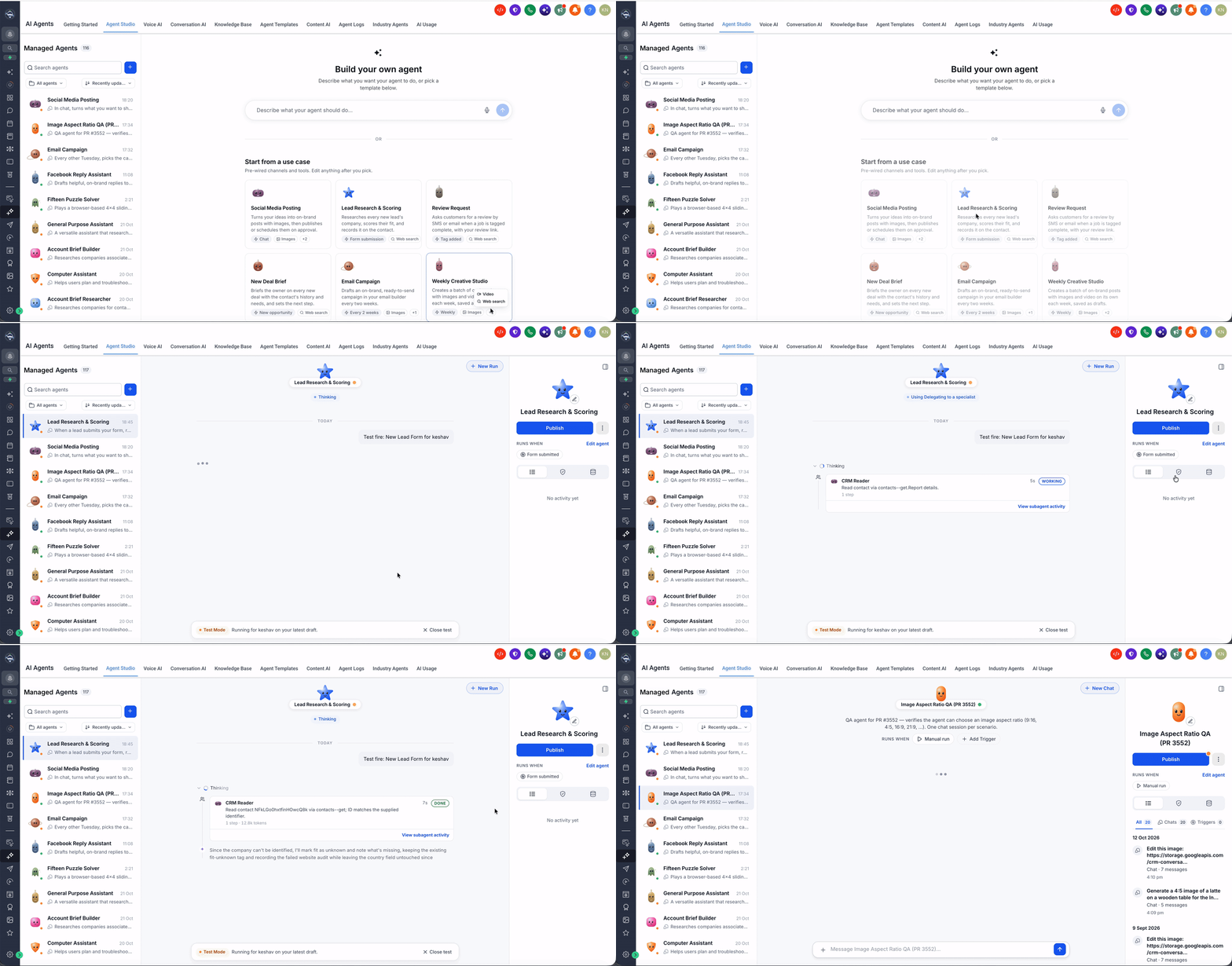
You can now build, test, manage, and publish your managed agents from a single, streamlined workspace in EveryCatch.
The managed agents experience in Agent Studio has been redesigned so you can work with your AI agents in a way that feels faster, clearer, and easier to work through.
Previously, you needed to move between several pages to edit agents, run test conversations, check activity, and publish updates. The new layout brings these tasks together into one unified workspace so you can manage everything side by side.
What changed
All-in-one agent workspace
Left panel: Browse, search, filter, and switch between agents in your account without losing your place.
Center panel: Chat with an agent, explore how it responds, run test conversations, and access existing threads.
Right panel: Adjust agent settings, handle publishing, review activity, and manage configurations tied to that agent.
You can move between agents instantly from the same screen so you stay in context while you compare behaviors or apply consistent changes.
Easier agent discovery and management
Use search to find agents by name, and organize them into folders so related agents stay grouped together.
Sort your agent list by recently updated, creation date, or name to quickly surface what you need.
Status indicators make it simple to see which agents are in Draft and which are Published at a glance.
Create new agents, rename existing ones, move them into folders, or manage them directly within the unified workspace without opening separate views.
Chat, test, and debug in one place
Start new test conversations or pick up existing chats with your agents to see how they handle real scenarios.
Use Test Mode to try out draft agents before you publish them so you can refine prompts and behavior safely.
For trigger-based agents, you can test executions by selecting a specific contact and running the agent as it would run in production.
Conversation history and detailed execution logs are available in the same workspace, so you can follow how an agent reached a response while you tune it.
Simplified agent configuration
Quickly rename agents and update their avatars so they are easy for your team to recognize in EveryCatch.
Publish or unpublish agents with fewer clicks, helping you roll out changes or pause agents without extra steps.
Visual cues highlight when an agent has unpublished changes, so you know when test updates still need to be pushed live.
When you need deeper control, you can open the Agent Builder directly from the workspace to access advanced configuration options.
From the same view, you can also manage folders, API deployments, and other key actions that control where and how your agent runs.
Better activity and execution visibility
Activity: Track your agent’s conversations and trigger executions so you can see how often it runs and what it is handling.
Waiting on you: Quickly find activities that need your review or follow-up, such as places where an agent requested human input.
Agent logs: Open detailed execution logs directly from conversations to understand each step an agent took while generating its responses.
Memory: When agent memory is enabled through Labs, you can review what the agent has stored so you can confirm or adjust what it remembers.
Faster agent creation
Use Build Your Own Agent to create agents from natural-language instructions. Describe what you want the agent to do, and the setup experience will guide you from there.
You can get started quickly with suggested prompts and prebuilt templates designed for common use cases, so you do not have to start from a blank page.
EveryCatch also generates avatars automatically, giving each new agent a distinct look that helps your team tell them apart.
How to get started
In your EveryCatch account, open Labs from the main menu.
In Labs, enable the setting for the managed agents new UI.
Next, go to AI Agents → Agent Studio → Managed Agents to access the updated workspace.
From there, use the unified workspace to create new agents, test their behavior, adjust configurations, and manage publishing without leaving the page.
Why this matters
Everything in one place: You can handle building, testing, and managing agents from a single workspace instead of juggling separate screens.
Faster testing: Run tests, debug issues, and review executions directly where you edit the agent, which shortens the feedback loop.
Simpler management: Manage multiple agents, their configurations, and their publishing status in a more organized and predictable way.
Better visibility: Access agent activity, logs, memory (when enabled), and status from one location so you can understand performance quickly.
Improved productivity: Spend less time moving between tools and more time designing and refining agents that support your workflows.