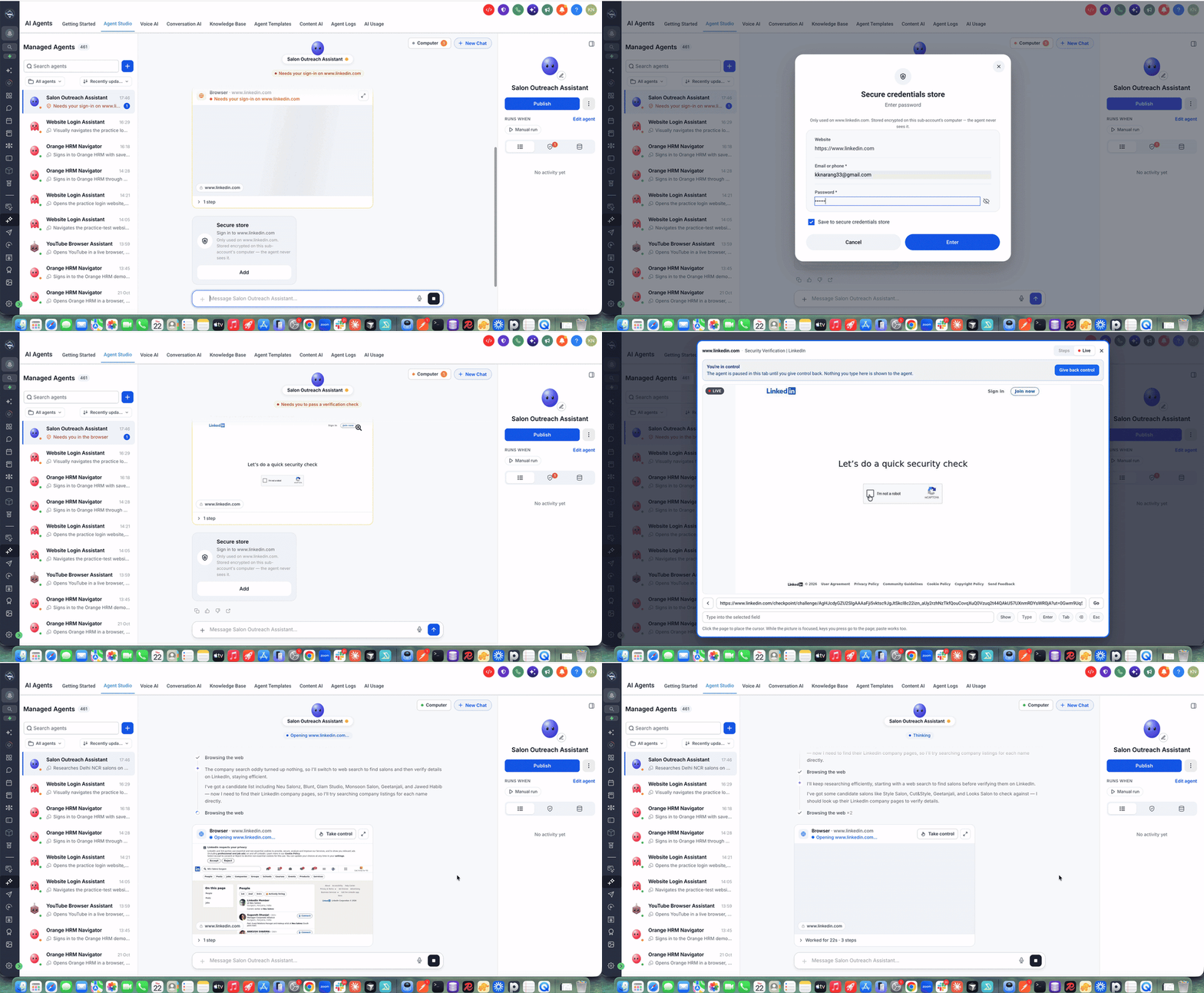
Your managed agents in EveryCatch can now work across the wider web and your files, not only inside your CRM. They can browse websites, create and manage files, run code, and handle complex tasks that extend beyond your EveryCatch workspace.
With the new Computer capability, your managed agents can work with websites, documents, and data, and automate tasks across multiple applications, all from a single chat with you.
Recent updates to performance, parallel execution, security, and the overall interface make Computer faster, smoother, and more effective for everyday work.
What changed
Browser automation
Your agents can now browse websites, research information, and interact directly with web applications on your behalf.
They can click buttons, fill out forms, move between pages, and complete multi-step online tasks for you.
You can watch your agent work in real time and immediately take control of the browser whenever you want to step in.
File creation & management
Agents can create, read, edit, and export documents, spreadsheets, reports, and other supported files inside their Computer workspace.
You can ask your agent to analyze data and generate reports that are ready to share with your team or your clients.
Files are stored in a persistent workspace so you and your agent can come back to them across multiple conversations.
Terminal & code execution
Computer lets your agents execute Python scripts and terminal commands when you need more advanced processing.
They can process datasets, run calculations, and automate complex operations that would take much longer by hand.
You can combine browser actions, file work, and code execution in a single flow so agents can complete end-to-end tasks for you.
Dedicated computer & parallel execution
Each managed agent now runs in its own dedicated computer environment, separate from other agents.
You can run about 8–10 browser-based chats in parallel on a single agent, with each conversation using its own browser tab in Computer.
These improvements to performance and concurrency help browser automation run faster and stay reliable, even when several tasks are in progress at once.
Secure sign-ins & approval controls
Website credentials are stored securely through EveryCatch Keychain so your agents can log in without exposing passwords in chat.
Agents will ask for your approval before they complete sensitive actions such as payments, sending messages, submitting important forms, or deleting files.
You can review and respond to these requests from the Waiting on you section so you stay in control of what your agents do.
Improved Computer & Take Control experience
The Computer interface has been redesigned so it is easier to move around and understand what your agent is doing at each step.
Browser interactions now feel faster and smoother when your agent is working through online steps.
The Take Control experience is improved, so you can switch cleanly between agent automation and manual control of the browser whenever you want to adjust something yourself.
You also get clearer visibility into ongoing browser activity so you can see progress and context at a glance.
What you can do with Computer
Here are a few examples of what your managed agents can now handle using Computer:
Competitor research: Have an agent browse competitor websites, compare pricing and offers, and then create a detailed comparison spreadsheet for you.
CRM automation: Ask an agent to move through EveryCatch, set up or adjust workflows, configure settings, and help manage other agents.
Lead generation: Let your agent research potential customers from online business directories and then add qualified leads into your CRM.
Document creation: Generate reports, presentations, spreadsheets, and other business documents that your agent can draft and refine with you.
Data analysis: Use Python scripts through Computer to analyze datasets, calculate metrics, and surface insights from your data.
Website automation: Have your agent fill out online forms, work through web applications, and handle repetitive tasks that follow clear steps.
Product research: Ask your agent to compare products and prices across sites, then assist with purchasing steps once you review and approve.
How to get started
1. In EveryCatch, go to AI Agents → Agent Studio → Managed Agents. 2. Open an existing managed agent or create a new one. 3. Go to the Capabilities section and enable Computer for that agent. 4. Set your Ask Before approval preferences so the agent knows when it must request confirmation. 5. Open the agent's chat and clearly describe the task you want it to handle with Computer.
Once Computer is enabled, any new chat with that managed agent can use the browser, files, and code tools as needed to complete your request.
You can adjust Computer settings or approvals at any time by returning to the agent's Capabilities section.
When you start a task, keep approvals in mind so your agent does not get blocked on a step that needs your confirmation.
Then, use chat to guide your agent through multi-step work, and watch Computer handle the details.
Example prompt
"Research competitor pricing from their websites, compare their offerings, and create a spreadsheet with the results."
With Computer enabled, your agent can browse competitor sites, collect key information, analyze the differences, and then build a spreadsheet for you to review or download.
Why this matters
Expanded scope: Your agents can now work across websites, external applications, and files using Computer, instead of being limited to CRM-only tasks.
End-to-end execution: Agents can carry out complex, multi-step workflows in one place so you do not have to keep switching tools.
Faster performance: Parallel browser conversations help larger research or operations tasks finish more quickly.
More productivity: You can delegate research, reporting, data processing, and repetitive computer work to managed agents and keep your focus on decisions and strategy.
Secure & controlled: Approval workflows and secure authentication keep sensitive actions under your control while still allowing agents to move work forward.
Persistent workspace: Your agent’s files and work-in-progress stay available across conversations, so longer projects can continue where they left off.
Important notes
Computer currently supports chat-based and manual executions and does not yet support automation-triggered runs.
Each managed agent has its own dedicated computer environment, and environments are isolated from each other.
Payments and file deletions always require explicit user approval for security reasons.
You can monitor and manage all pending approvals in the Waiting on you section to keep work moving safely.
From browsing websites and creating documents to running code and coordinating complex workflows, your managed agents in EveryCatch can now support a wider range of day-to-day tasks.
One managed agent. Its own computer. Many new ways to get work done.