Quizzes in EveryCatch now give you much more control over what happens after someone finishes answering your questions.
EveryCatch is rolling out one of the most requested quiz features: conditional logic that you can apply directly inside your quizzes.
With new Redirect to URL conditional logic, you can now send each respondent to a specific URL based on their answers, overall score, category scores, and other quiz outcomes, so the follow-up experience fits what they actually did in the quiz.
EveryCatch also now supports quiz score-based conditions, so you can build deeper personalization than what is currently available in standard forms and surveys.
What changed
1. Conditional logic is now available in quizzes
Previously, you could not apply conditional logic inside quizzes in EveryCatch, which meant everyone reached the same generic end result, no matter how they interacted with the quiz.
That has now been updated.
The Redirect to URL conditional logic type is now supported in quizzes, so you can automatically send respondents to different destinations based on the conditions you set.
Here is what you can do now:
- Conditional URL redirects: Send respondents to specific URLs based on their quiz responses.
- Personalized quiz journeys: Create different end-to-end experiences for each respondent depending on the conditions they meet.
- Use familiar logic: Apply the same Redirect to URL conditional logic you may already be using in EveryCatch forms and surveys.
- Go beyond the results page: Route respondents to custom pages instead of only sending them to the default quiz results page.
You can direct people to a personalized landing page, a specific product or offer, a tailored next step, or any other URL you choose, giving you much finer control over what happens after someone completes your quiz.
2. Quiz score-based conditional logic for deeper personalization
Score awareness is where conditional logic in quizzes becomes especially useful.
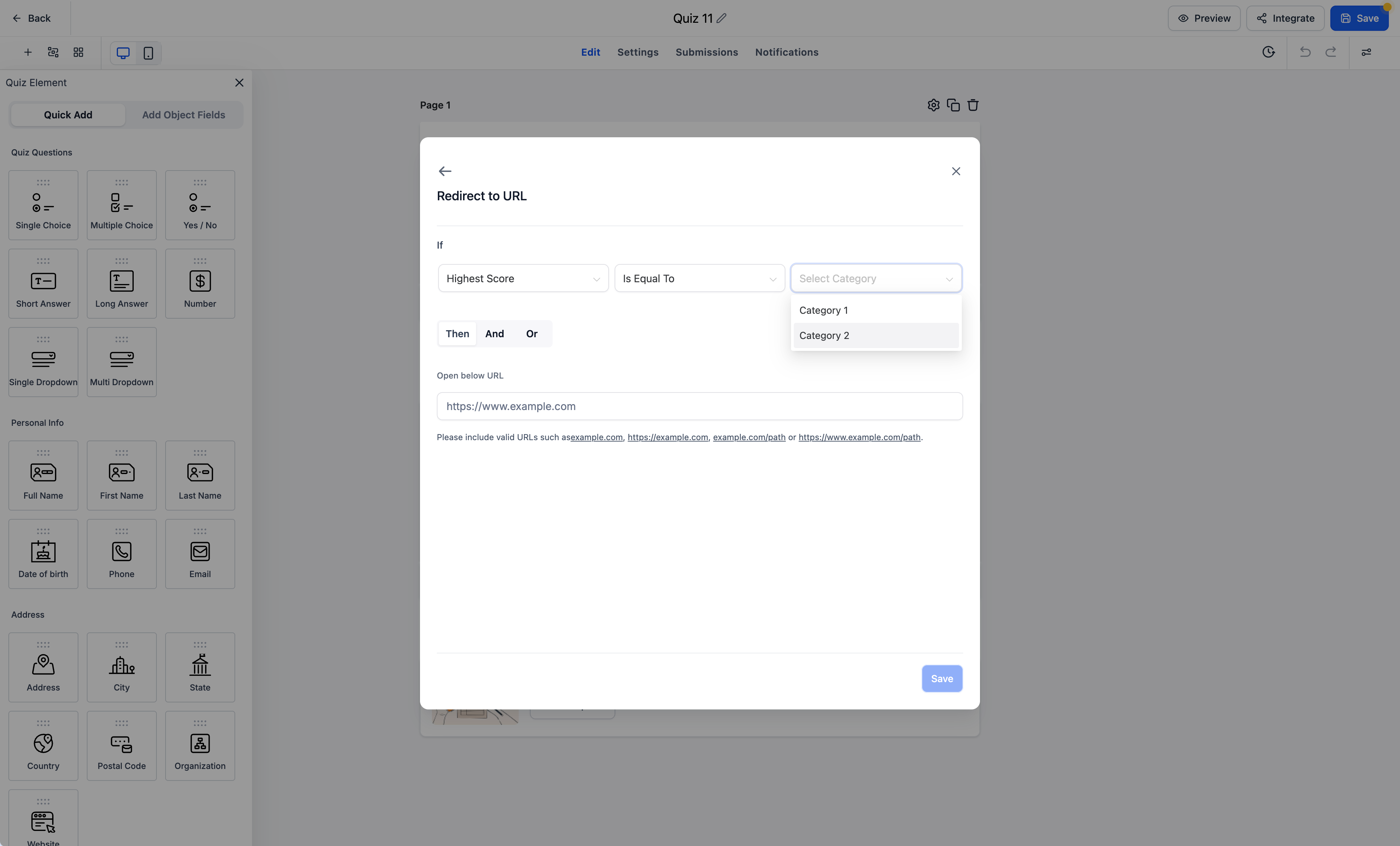
Alongside the existing Redirect to URL conditions you may know from forms and surveys, EveryCatch quizzes now include four quiz-specific score fields you can use when building your logic.
You can now create conditions using:
- Highest category: Redirect respondents based on the category where they scored the highest.
- Lowest category: Trigger redirects based on the category where they scored the lowest.
- Overall score: Send respondents to different URLs based on their total quiz score.
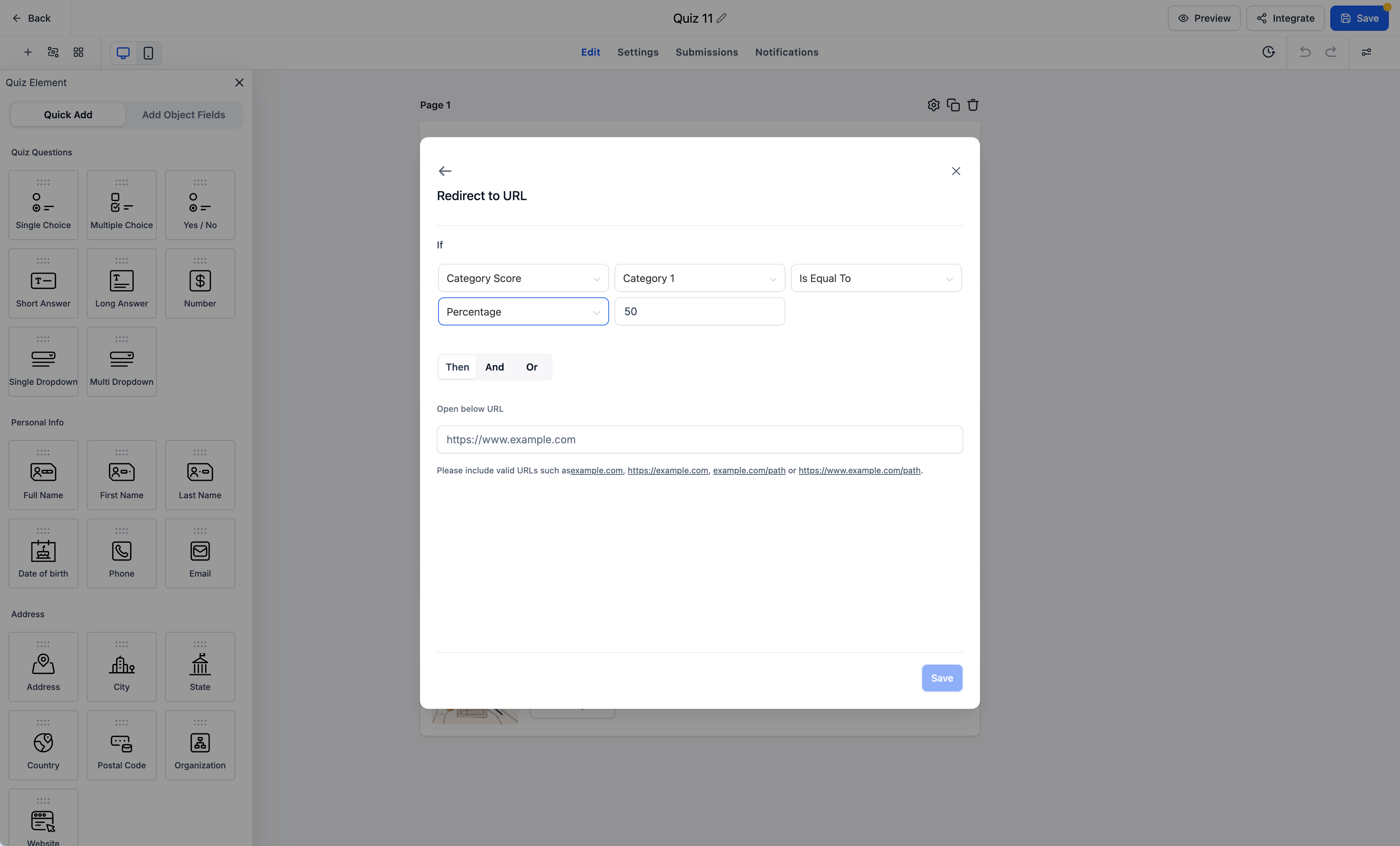
- Category score: Set conditions using a respondent’s score in a particular category.
Here is what that enables in practice:
If you are building a quiz to assess knowledge, preferences, or performance, you can now map specific outcomes to the exact scores or categories that matter to you.
- Knowledge assessments: Send high scorers to an advanced training or upsell page, and route lower scorers to foundational resources or onboarding content.
- Product recommendations: Direct people to different product or service pages based on their highest scoring category.
- Performance assessments: Use overall score to send respondents to a tailored follow-up flow, such as a review call booking page or improvement plan.
- Category-specific journeys: Build targeted experiences that depend on how someone performed in a specific category that you care about.
This means you can replace a single, static quiz results page with dynamic, score-driven paths that fit each respondent’s outcome.
3. Custom redirects instead of the default quiz results page
Previously, everyone who completed a quiz in EveryCatch was sent straight to the default quiz results page. With conditional logic in place, you can now override that behavior and redirect respondents to your own URLs based on their quiz results, so quizzes can sit neatly inside your wider customer journeys.
For example, you can:
- Redirect respondents to personalized recommendation pages aligned with their quiz outcomes.
- Send respondents directly to relevant product or service pages that match their needs.
- Route respondents to learning or support resources that reflect their score.
- Guide respondents into different funnels or website pages, depending on what their quiz results show.
This turns quizzes into a practical way to trigger tailored actions and next steps for each respondent, instead of stopping at a single results screen.
How it works
- Open your quiz builder: In EveryCatch, open the quiz you want to configure.
- Go to conditional logic: In the quiz builder, open the Conditional Logic section.
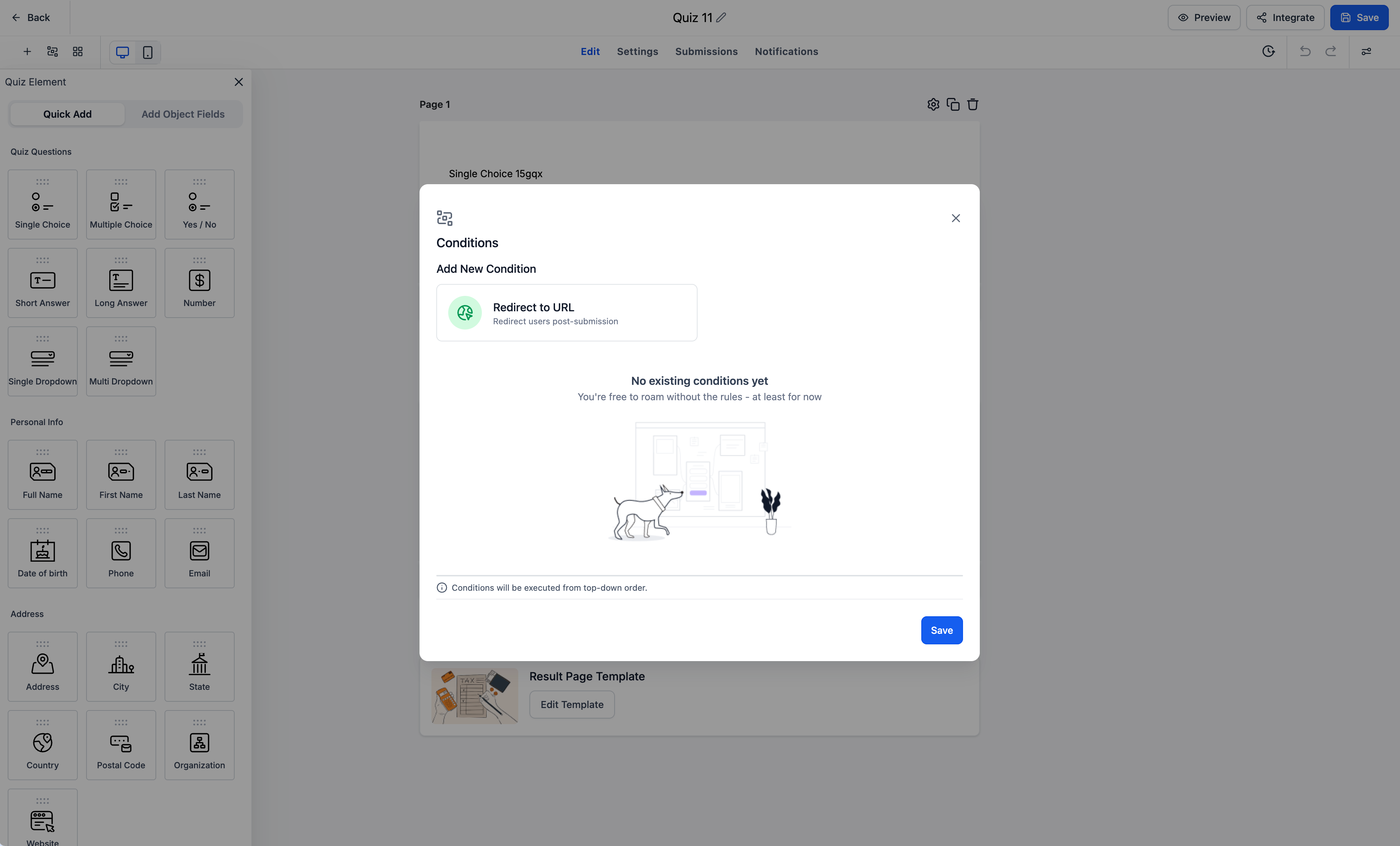
- Choose Redirect to URL: Select the Redirect to URL conditional logic type that is now supported for quizzes.
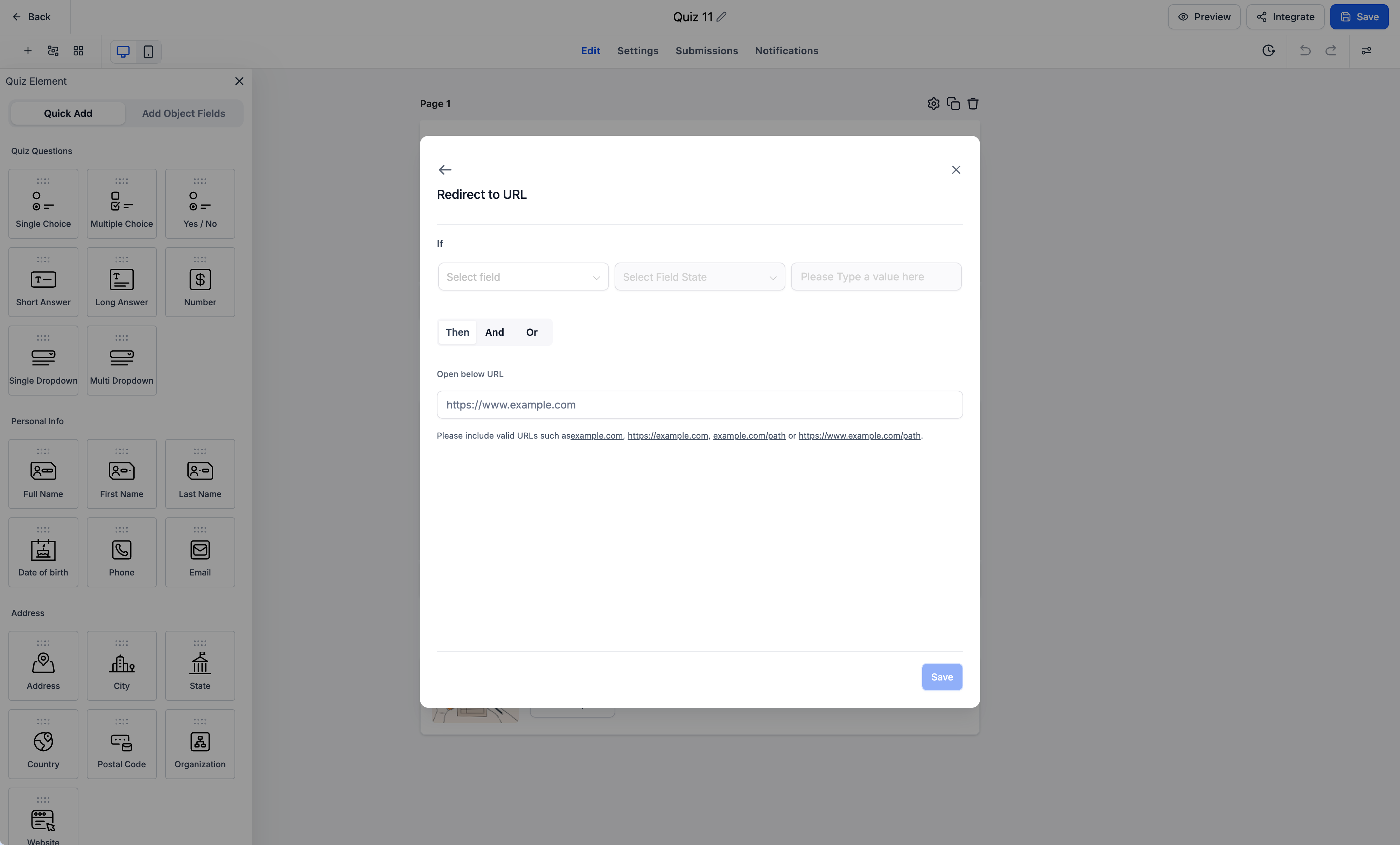
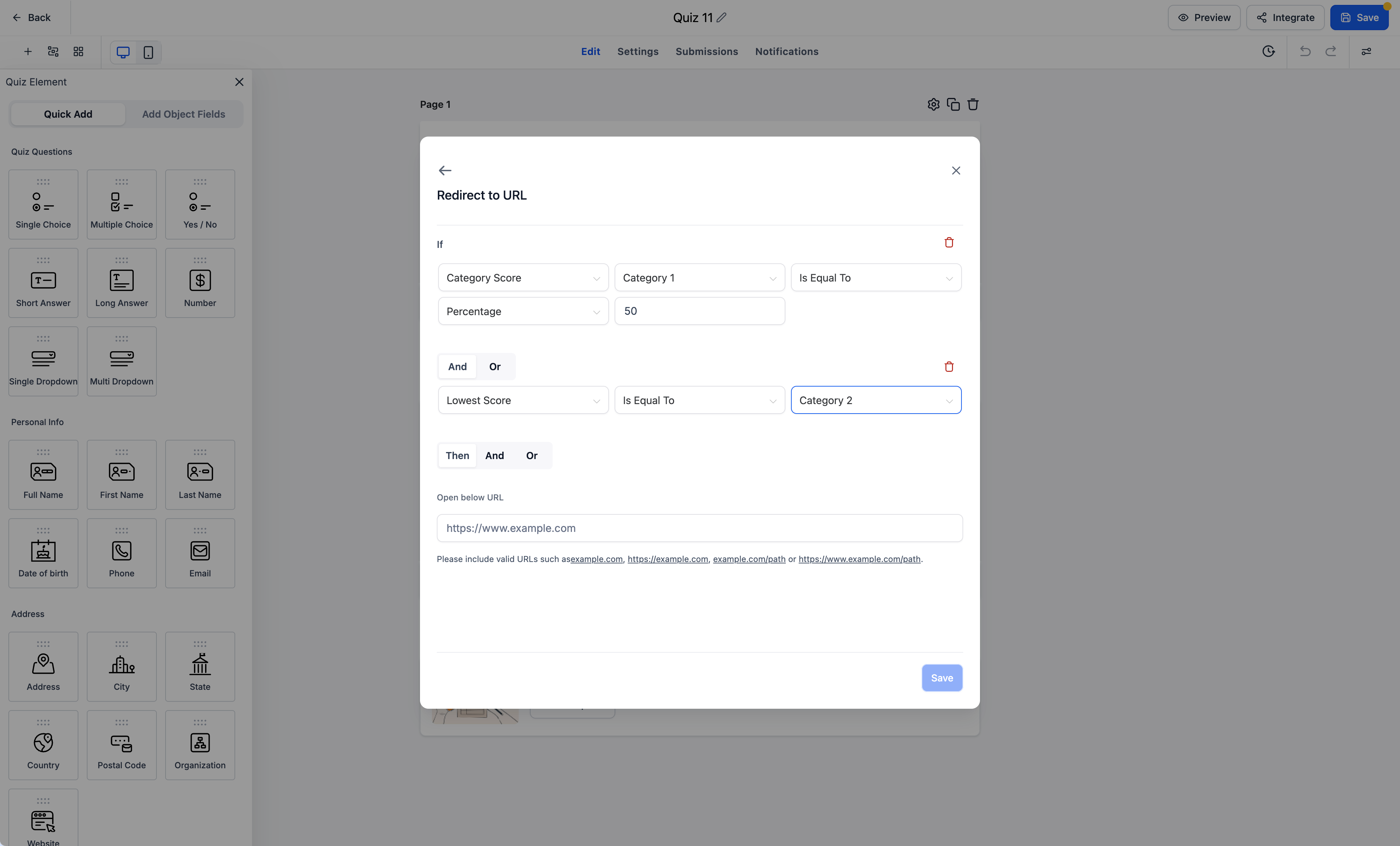
- Configure your conditions: Add rules based on quiz responses or any of the four quiz score fields: Highest Category, Lowest Category, Overall Score, or Category Score.
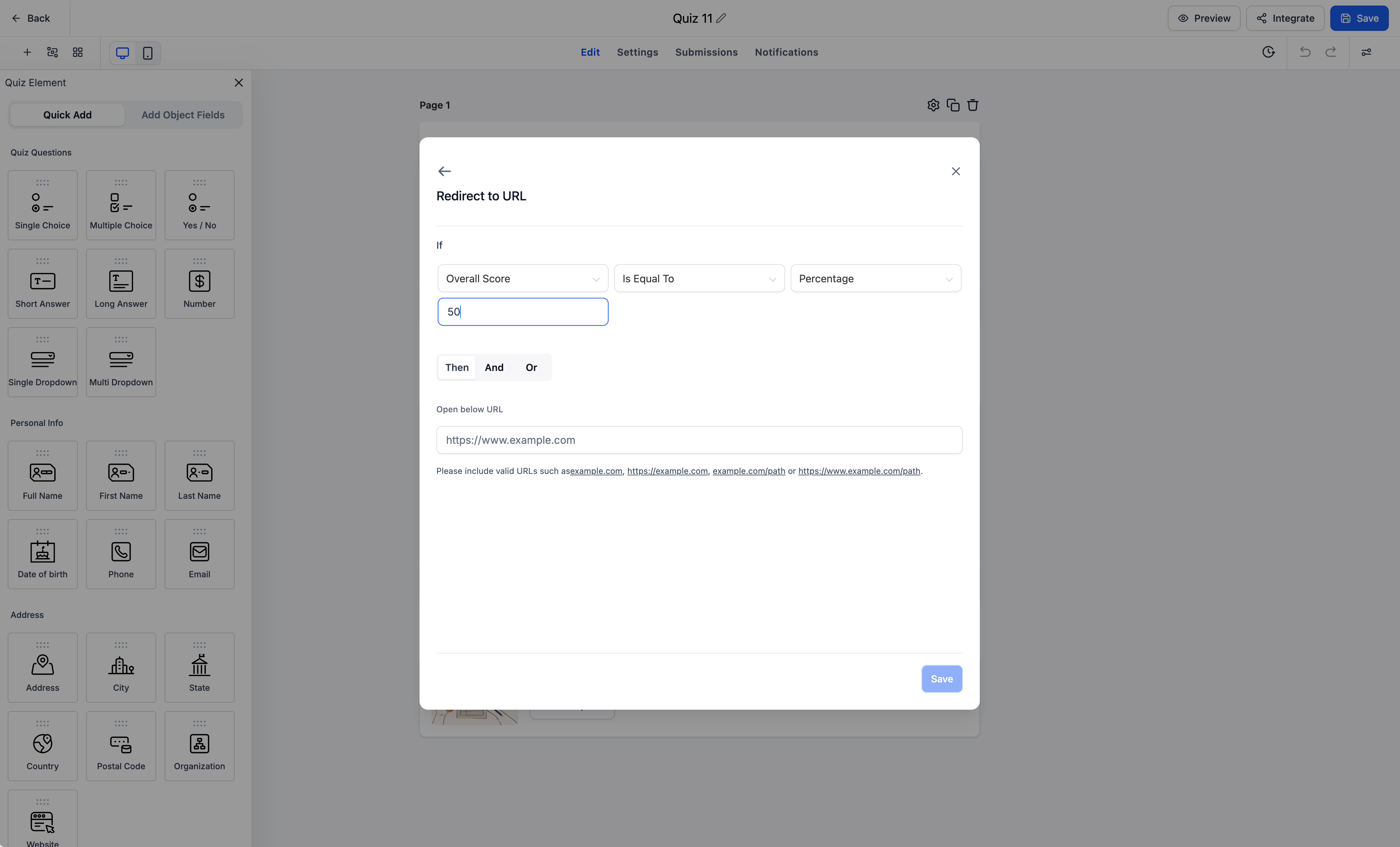
- Set your destination URL: Enter the URL that respondents should be redirected to when the conditions you defined are met.
- Create personalized journeys: Add additional redirect rules so different groups of respondents are routed to the most relevant pages based on their quiz outcomes.
Key highlights
- Conditional logic in quizzes: You can now apply conditional logic directly within EveryCatch quizzes.
- Redirect to URL support: Dynamically redirect each respondent based on the conditions you configure.
- Highest and lowest category conditions: Use a respondent’s strongest or weakest category to control where they are sent next.
- Overall and category score conditions: Design score-based redirect flows using total or category-specific quiz scores.
- Personalized quiz outcomes: Replace the default quiz results page with your own custom URLs when conditions are met.
- Reuse existing logic patterns: Take advantage of the same Redirect to URL conditional logic already available in EveryCatch forms and surveys.
- More useful quiz experiences: Use quiz results to connect people with the right content, offers, and next steps at the right time.
Notes
Availability: Conditional logic is now live and supported in EveryCatch quizzes.
Supported logic type: Redirect to URL is the first conditional logic type available in quizzes today.
Quiz-specific conditions: The Highest Category, Lowest Category, Overall Score, and Category Score fields are available as conditional logic inputs when you set up your rules.
Existing conditions: The Redirect to URL logic type in quizzes supports the same conditional logic options that are already available in EveryCatch forms and surveys.
Custom redirects: When your configured conditions are met, respondents are sent to the custom URLs you define instead of the standard quiz results page.
Upcoming enhancements
EveryCatch plans to extend quiz conditional logic further and bring the remaining three logic types used in other tools into quizzes as well:
- Display a custom message: Show tailored messages on completion based on specific conditions.
- Disqualify a lead: Automatically disqualify respondents based on their answers or logic rules you set.
- Show or hide fields: Control which fields appear for each respondent based on their choices.
Once released, these additions will give you more ways to build intelligent, personalized quiz flows that adapt to each person in real time.
Why this matters
Quizzes are a practical way to engage your audience, learn about their needs, assess knowledge, and point them to suitable next steps. Until now, it has been harder to act on quiz data without extra manual work. With conditional logic and quiz score-based redirects in EveryCatch, you can use quiz results immediately to route people into the right follow-up experience.
You can now turn quiz responses and scores into personalized journeys in EveryCatch, guiding each respondent to the most relevant destination based on how they performed and what they told you.
With additional conditional logic types planned, quizzes in EveryCatch will continue to become more dynamic, flexible, and closely aligned with your customer flows.
Smarter quizzes, personalized redirects, and targeted customer journeys are now available directly from your EveryCatch quiz builder.