QR code analytics in EveryCatch is now significantly more detailed and useful for your day-to-day work.
EveryCatch now includes advanced QR code analytics, so you can see who is scanning your QR codes, where scans are happening, and which devices and browsers people are using.
Previously, QR code analytics focused on Total Scans and Unique Scans. You now get a fuller view with device, browser and geographic analytics to help you understand your audience and track QR code performance in greater depth.
What changed
1. Device-level analytics - know how your audience scans
Until now, you could see how many times your QR codes were scanned, but you had limited insight into the devices people used.
This update improves that visibility.
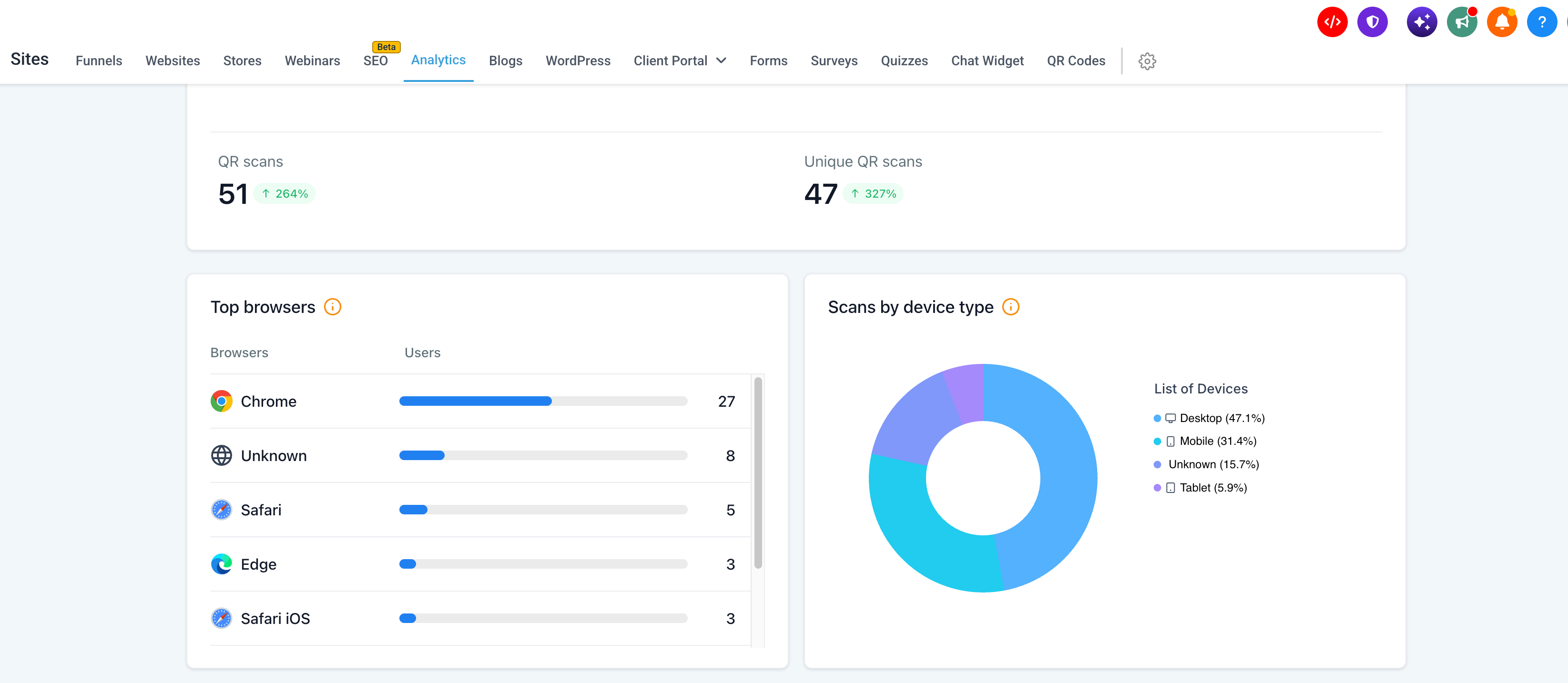
With device-level analytics, you can now see which types of devices your audience uses when they scan your QR codes.
Here is what is new:
- Device breakdown: See QR code scan data grouped by device type.
- Audience insights: Understand how scans are split across different devices.
- Better optimization: Use device-level insights to fine-tune landing pages and on-page experiences for your audience.
For example, if most of your QR code scans come from mobile devices, you can focus on improving the mobile experience of the pages or content people see after scanning.
2. Browser-level analytics - understand your audience's browsing preferences
EveryCatch now also includes browser-level analytics, so you can see which browsers people are using when they scan your QR codes and visit your links.
Here is what you can now see:
- Browser breakdown: View scan data grouped by browsers such as Chrome, Safari and other supported browsers.
- Browser usage insights: Understand which browsers account for most QR code scans.
- Experience optimization: Focus your testing on the browsers your audience prefers, so your destination pages work smoothly for them.
You can now clearly see which browsing environments matter most to your QR campaigns.
3. Geographic analytics - know where your scans are coming from
Geographic analytics adds another important layer to your QR reporting in EveryCatch.
You can now see where your QR codes are being scanned, so you can understand the locations that are driving activity.
You get richer insight than basic country-level data and can work with a more detailed regional view.
You can now explore geographic insights across three levels of detail:
- Country-level analytics: See which countries your QR code scans are coming from.
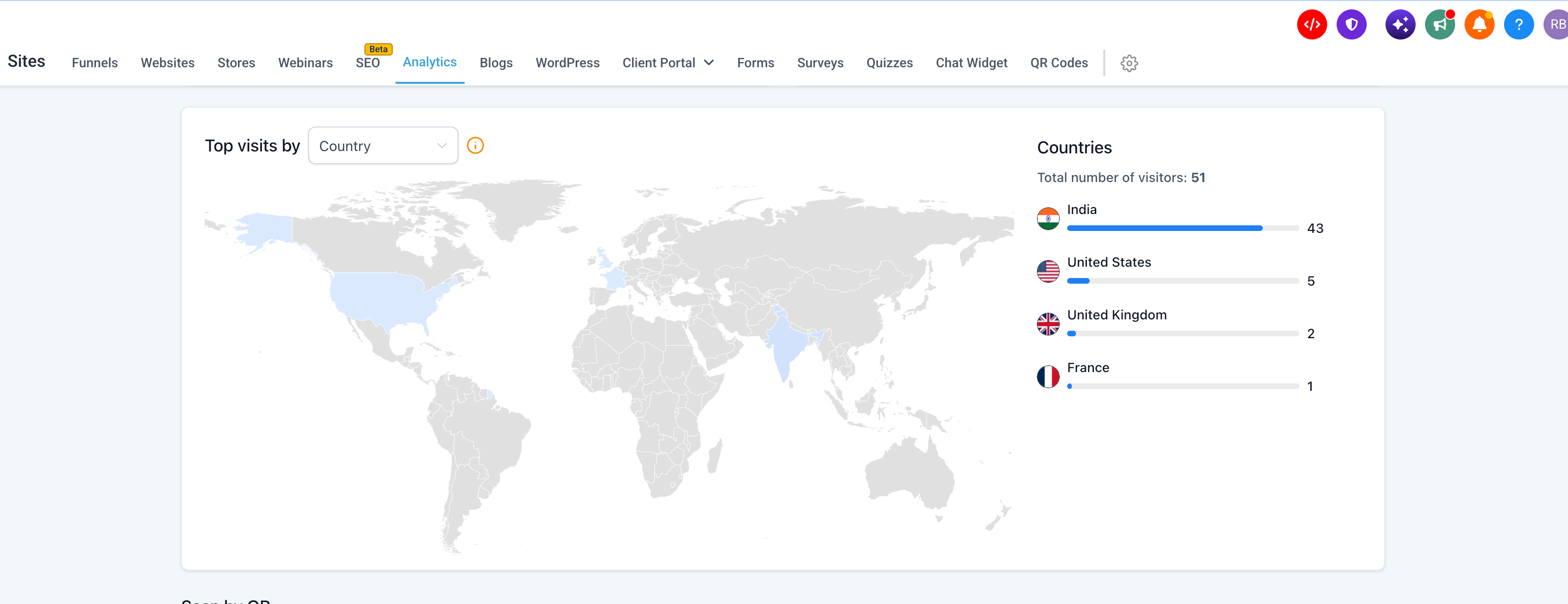
- State-level analytics: Drill down to understand scan activity across different states or regions.
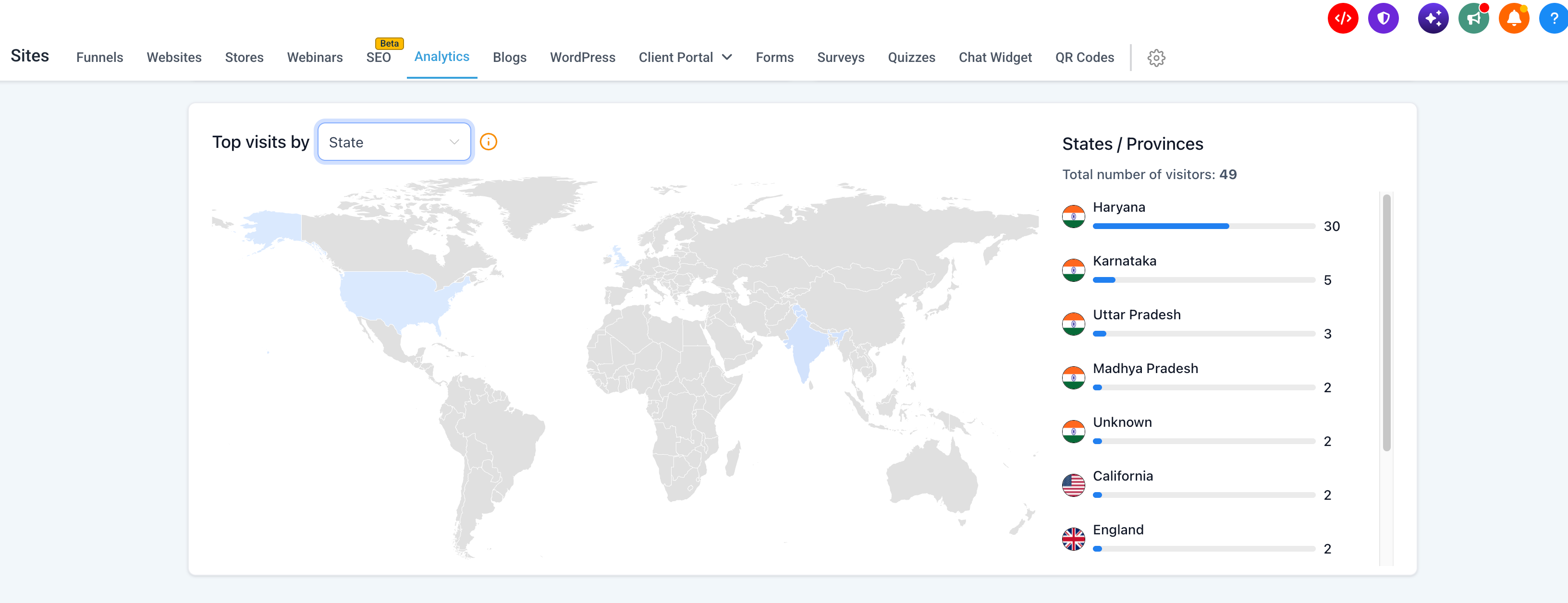
- City-level analytics: View detailed insights into the cities where QR code scans are happening.
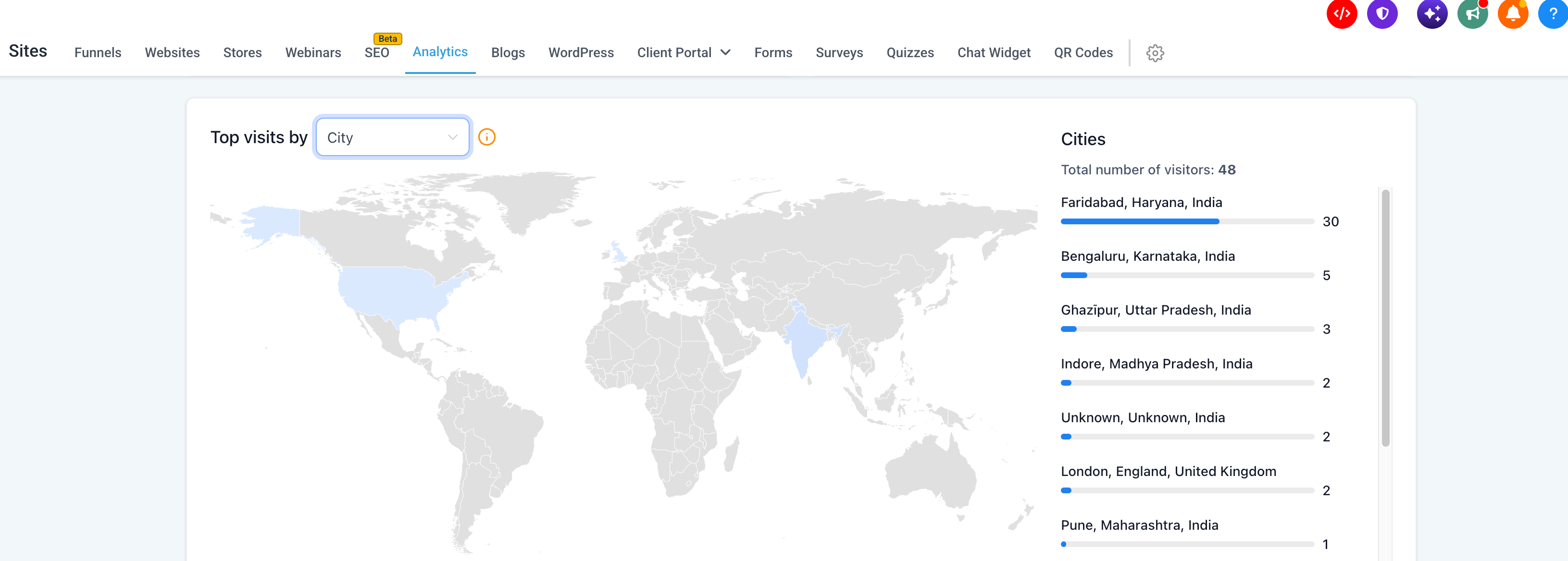
Here is what this level of geographic data can help you do:
If you have QR codes in different marketing campaigns, physical locations or printed materials, you can now see which areas are driving engagement.
You can now:
- Identify high-engagement locations: Discover which countries, states or cities are generating the most scans.
- Optimize local campaigns: Use geographic insights to see where your QR code campaigns are performing strongly or need attention.
- Understand audience distribution: Build a clearer picture of where your QR code engagement comes from.
- Make data-driven decisions: Use location data to plan where to place QR codes, how to localize content and how to target future campaigns.
Whether you focus on a single region or work with audiences across multiple countries, you now have location data to understand how people interact with your QR codes.
4. Historical analytics - your past data is available too
This release also unlocks value from your existing QR activity.
Advanced analytics in EveryCatch applies not only to new QR code scans. Historical scan data is available from August 28, 2024 onward, so you can explore device, browser and geographic insights for scans that were already recorded in that period.
Here is what that means in practice:
- Historical data support: Access supported QR code analytics data going back to August 28, 2024.
- Existing QR codes included: View advanced insights for past scans, as well as new scan activity.
- Accurate historical reporting: Scans recorded during the supported period are included in the upgraded analytics view.
You do not need to recreate QR codes or restart campaigns to benefit from these new reports. Your existing QR code scan history is already part of the experience.
How it works
- Go to QR codes: Open the QR code section in EveryCatch and select the QR code you want to review.
- Open analytics: Switch to the QR code analytics view.
- Review scan metrics: Continue to track your existing Total Scans and Unique Scans as before.
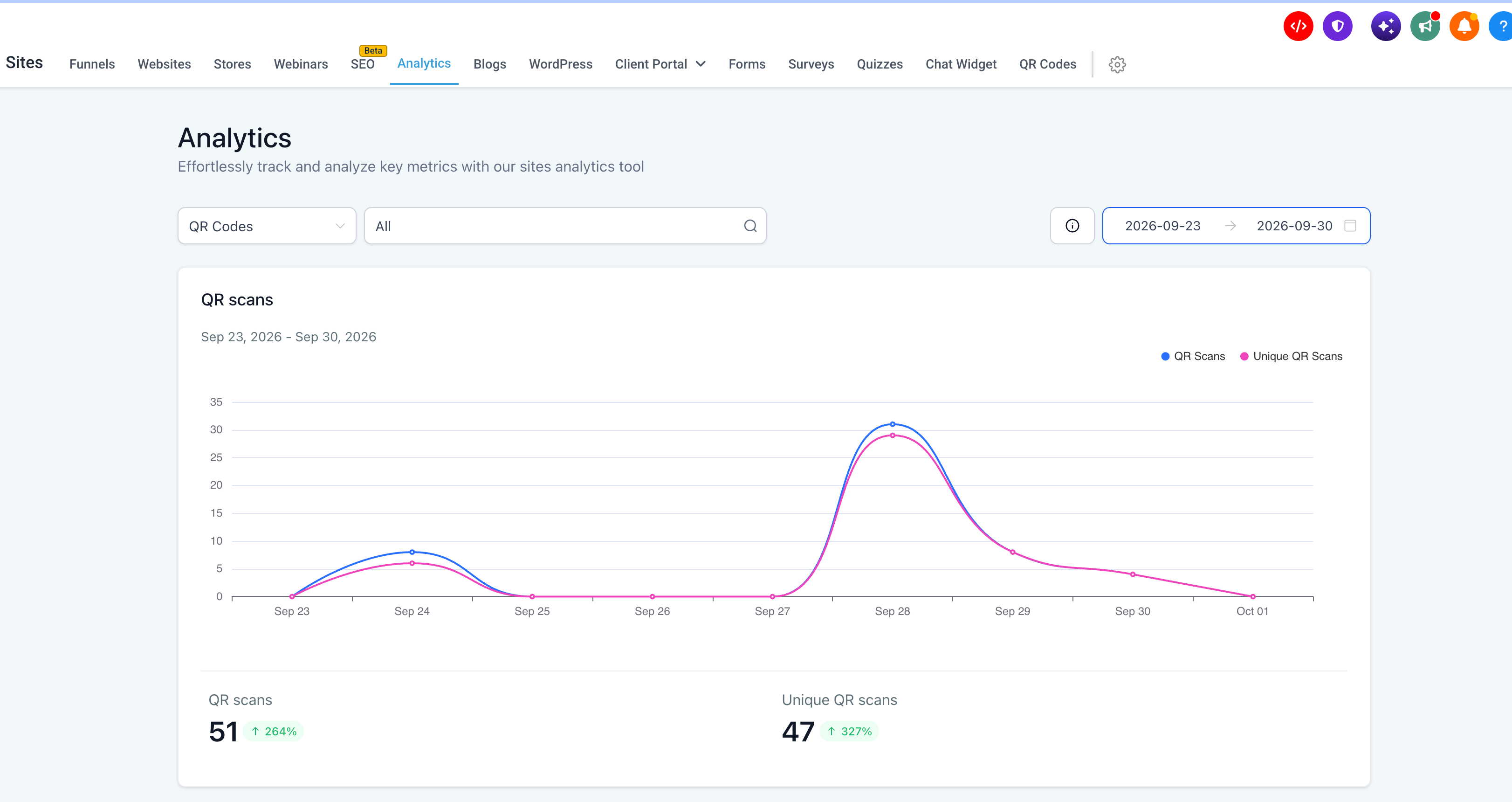
- Explore device insights: View scan activity broken down by device type.
- Analyze browser usage: See which browsers people use when they access your QR codes.
- Explore geographic data: View scan distribution at the country, state or city level.
- Review historical data: Access supported historical scan insights dating back to August 28, 2024.
Key highlights
- Enhanced QR code analytics: Access deeper audience insights in addition to Total Scans and Unique Scans.
- Device-level breakdown: See which devices are most commonly used to scan your QR codes.
- Browser-level breakdown: Understand which browsers your audience relies on when scanning QR codes.
- Country-level insights: Identify the countries where QR code engagement is strongest.
- State-level insights: View scan distribution in specific states or regions.
- City-level insights: See which cities are driving QR code scans.
- Historical data support: Access analytics for scans recorded from August 28, 2024 onward.
- Better campaign optimization: Use these insights to improve your marketing campaigns and the experiences people see after scanning.
Notes
- Availability: Advanced analytics is available for QR codes in EveryCatch.
- Existing metrics: Total Scans and Unique Scans remain available alongside the new analytics.
- New analytics: Device-level, browser-level and geographic analytics have been added.
- Geographic breakdown: Scan data can be viewed at country, state and city levels.
- Historical data: Supported analytics data is available for scans recorded from August 28, 2024 onward.
- Existing QR codes: Historical scan data for existing QR codes is included in the enhanced analytics experience.
Why this matters
QR codes are a key way to connect offline interactions with digital experiences. Knowing how many people scanned a QR code is useful, and to understand performance properly you also need visibility into where your audience is based, which devices they use and how they access your content. Advanced QR code analytics in EveryCatch gives you that visibility.
With device, browser and geographic insights, along with historical data support, EveryCatch helps you make informed decisions, refine campaigns and gain a clearer understanding of the people engaging with your QR codes.
You now get deeper insights so you can make smarter decisions and benefit from stronger QR code analytics in EveryCatch.



