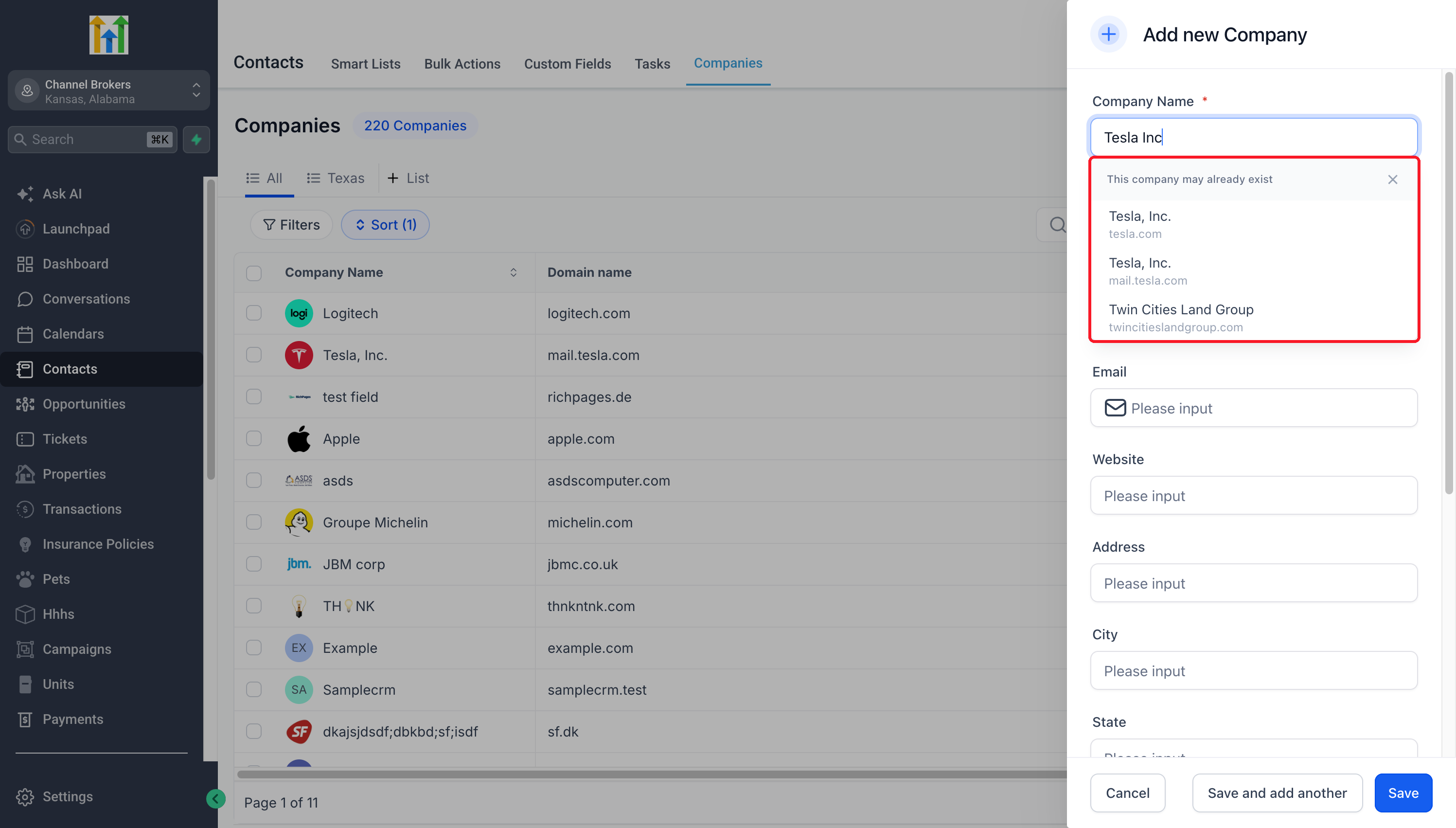
It is easy to end up saving the same company in your CRM multiple times, such as “Tesla, Inc.” and “Tesla Inc” or a version with a small typo. When this happens, contacts, deals, and activity history can end up split between two records. EveryCatch now includes preemptive duplicate detection for companies, which checks the name and domain as you type in Add company and shows you records that may already exist, so you can open the right one instead of creating another copy.
What changed
- Suggestions as you type: When you start entering a company name or domain in Add company, EveryCatch now suggests existing companies that look like what you are typing.
- Names that look alike: Partial names, punctuation differences, and common typos still surface the company you already have. For example, typing “Tesla Inc” will suggest “Tesla, Inc.” if it exists in your account.
- Open the existing company: If you see the company you meant to add, you can click it to open and review the record that is already in your CRM.
- Control over what you save: If none of the suggestions match, you can ignore them and continue creating a new company. Suggestions do not merge records and they do not block you from saving a separate company when that is what you want.
Why this matters
You can keep a single, complete view of each customer account instead of spreading information across duplicates. By checking for an existing company while you enter a new one, EveryCatch helps your team consistently work from the same record, so deals, notes, and communication history stay together.
How to use
- Turn on preemptive duplicate detection for companies in Labs for your EveryCatch account.
- Go to Contacts > Companies and click Add company.
- Start typing a company name or domain and look through the suggested matches that appear.
- If you see the right company, open that record. If not, keep entering the details and save your new, distinct company.
Pro tips
- Check the details: Companies with similar names or a shared domain can still be different businesses, so confirm before selecting a suggestion.
- Try a fuller query: If the company you expect does not appear, type more of the name or its domain to refine the suggestions.
- Use it at the point of entry: This feature helps you avoid creating new duplicates when adding companies. It does not scan your existing CRM for duplicates or merge records that are already there.