QR codes in EveryCatch are now more flexible and practical for handling everyday bookings.
EveryCatch now supports new QR code types for calendars, services, and rentals, so you can link QR codes directly to the booking tools you already rely on.
You can also use prebuilt QR codes that live inside calendars, services, and rentals. This helps you access, customize, track, and share QR codes without needing to build each one manually.
What changed
1. New QR code types for calendars, services & rentals
EveryCatch now includes built-in QR code support for calendars, services, and rentals. You can create QR codes for a wide range of booking and scheduling flows directly from the QR code builder.
Here is what you can link a QR code to:
- Calendars: Create QR codes for calendars, calendar groups, and other supported calendar destinations.
- Services: Generate QR codes for services, service groups, staff, landing pages, and booking pages.
- Rentals: Create QR codes for rentals, rental categories, booking pages, and other supported rental destinations.
Whether you want to share a booking link, promote a specific service, or highlight a rental, you can now generate a QR code that takes customers straight to the correct destination.
These extra QR code options give you more ways to connect customers to your EveryCatch booking experience in a consistent way.
2. Prebuilt QR codes already set up for your bookings
We also focused on making it easier to bring QR codes into your workflow.
Previously, if you wanted a QR code for a calendar, service, or rental, you needed to open the QR codes area, create a new QR code, and then manually select the destination.
That extra setup step is no longer required.
EveryCatch now includes dedicated QR code touchpoints inside calendars, services, and rentals. From there, you can open prebuilt QR codes that are already connected to the right destination.
Here is what is new:
- Automatically mapped QR codes: Open a prebuilt QR code that is already linked to your specific calendar, service, or rental.
- No manual creation required: Skip going to the QR code builder and setting up a new QR code from scratch.
- Access QR codes where you work: Find QR codes directly inside the calendars, services, and rentals sections you already use.
- Quick setup: QR codes are pre-linked to the right destination, so they are ready to put into your marketing or customer journeys right away.
You no longer need to treat QR code creation as its own separate task. Your QR codes are available in the same place where you manage your bookings.
3. QR code performance insights to track, customize & download
EveryCatch now gives you easier access to QR codes and clearer insight into how they perform.
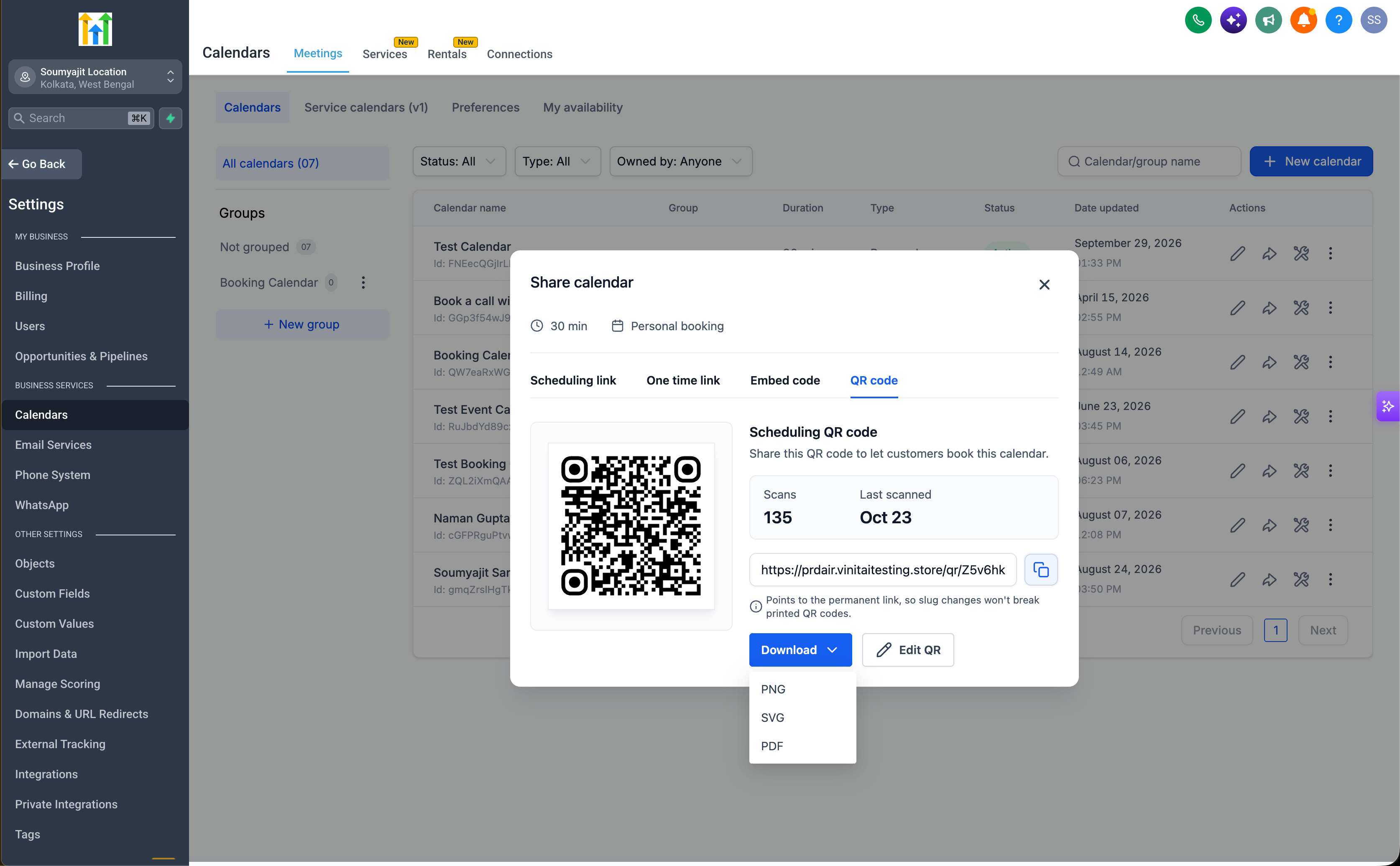
The new QR code touchpoints show key performance metrics and quick actions, so you can monitor and manage each QR code without leaving the calendar, service, or rental you are working in.
Here is what you can see and do:
- Total scans: View how many times your QR code has been scanned to understand how often customers are engaging with it.
- Last scanned date: See when the QR code was last scanned to understand recent activity.
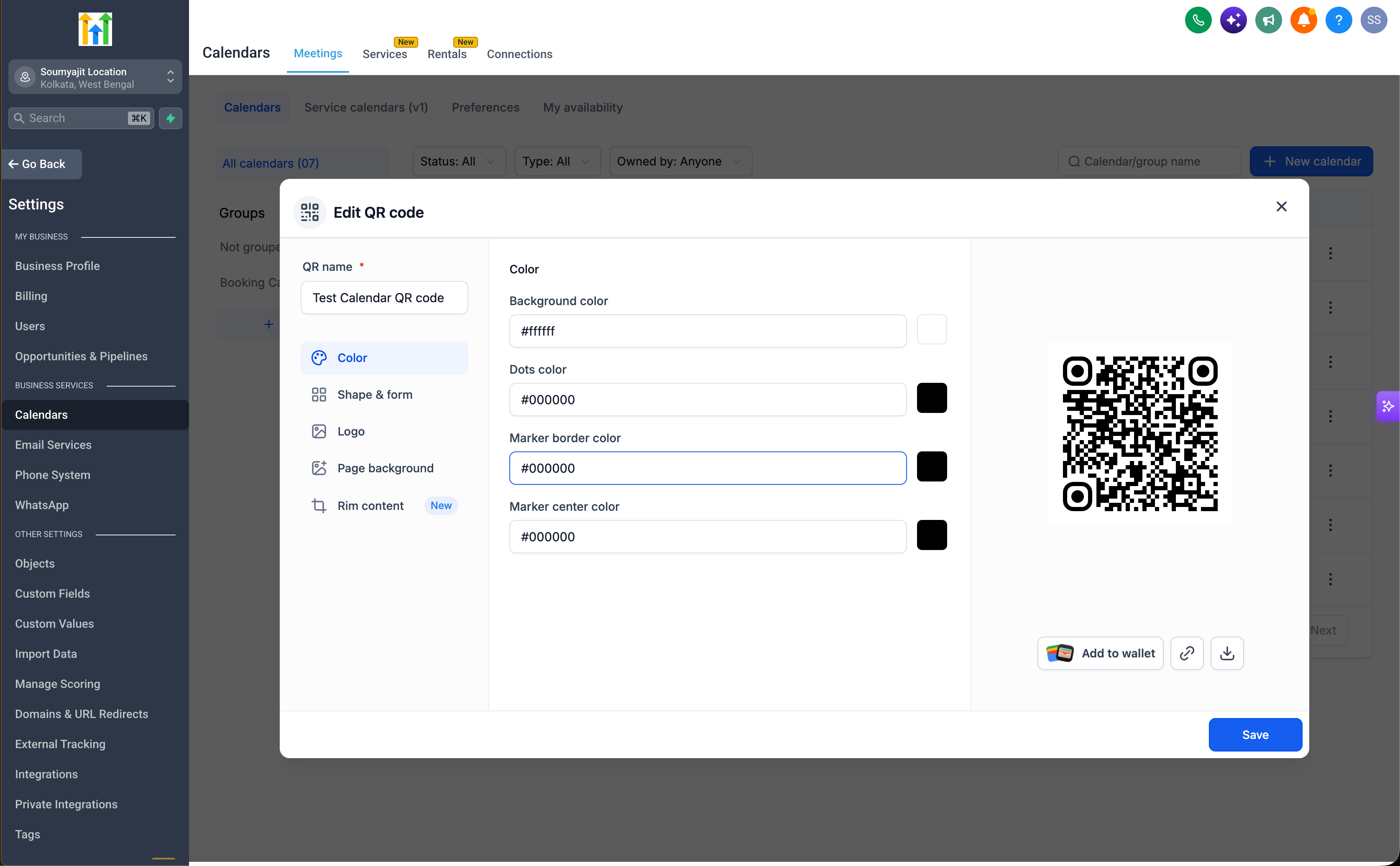
- Edit QR code design: Adjust the look and feel of your QR code directly from the touchpoint without opening extra screens.
- Download QR code: Download the QR code file quickly for use on printed materials, web pages, or offline campaigns.
Why this is helpful
For example, if you place a QR code for your booking calendar on a flyer or add one to a service brochure, you can open that calendar or service in EveryCatch and immediately review how many times the code has been scanned and when it was last used. If you want to refresh the design or download a new file, you can handle those updates right from that same screen.
You do not have to move between different areas or search for the correct QR code. Management, tracking, and customization are all available in the place where you already manage that booking.
4. All your prebuilt QR codes in one place
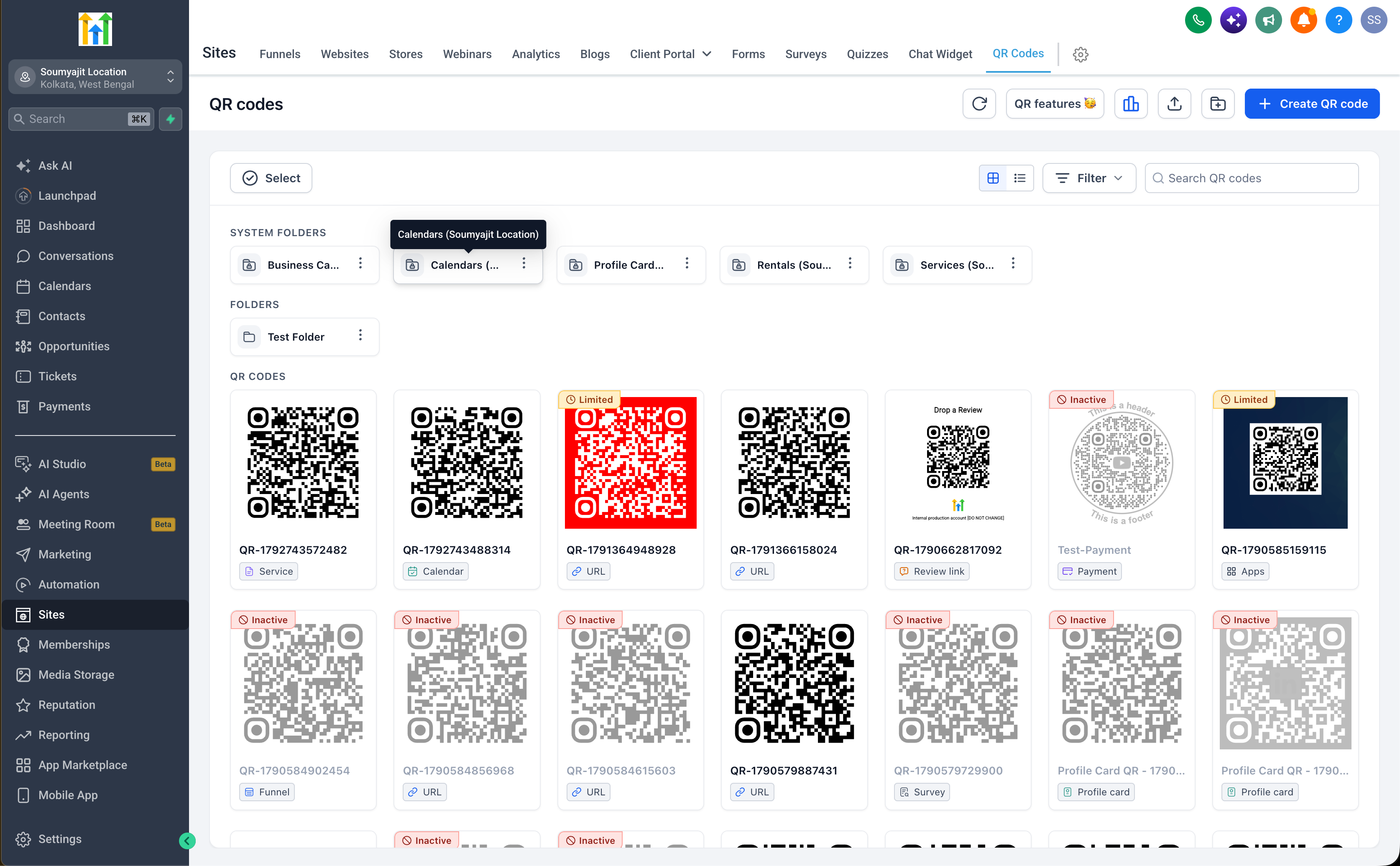
Prebuilt QR codes are also available centrally, so you can find and manage them alongside any manually created QR codes. You will see them on the QR codes list page in the QR code section.
From there, you can:
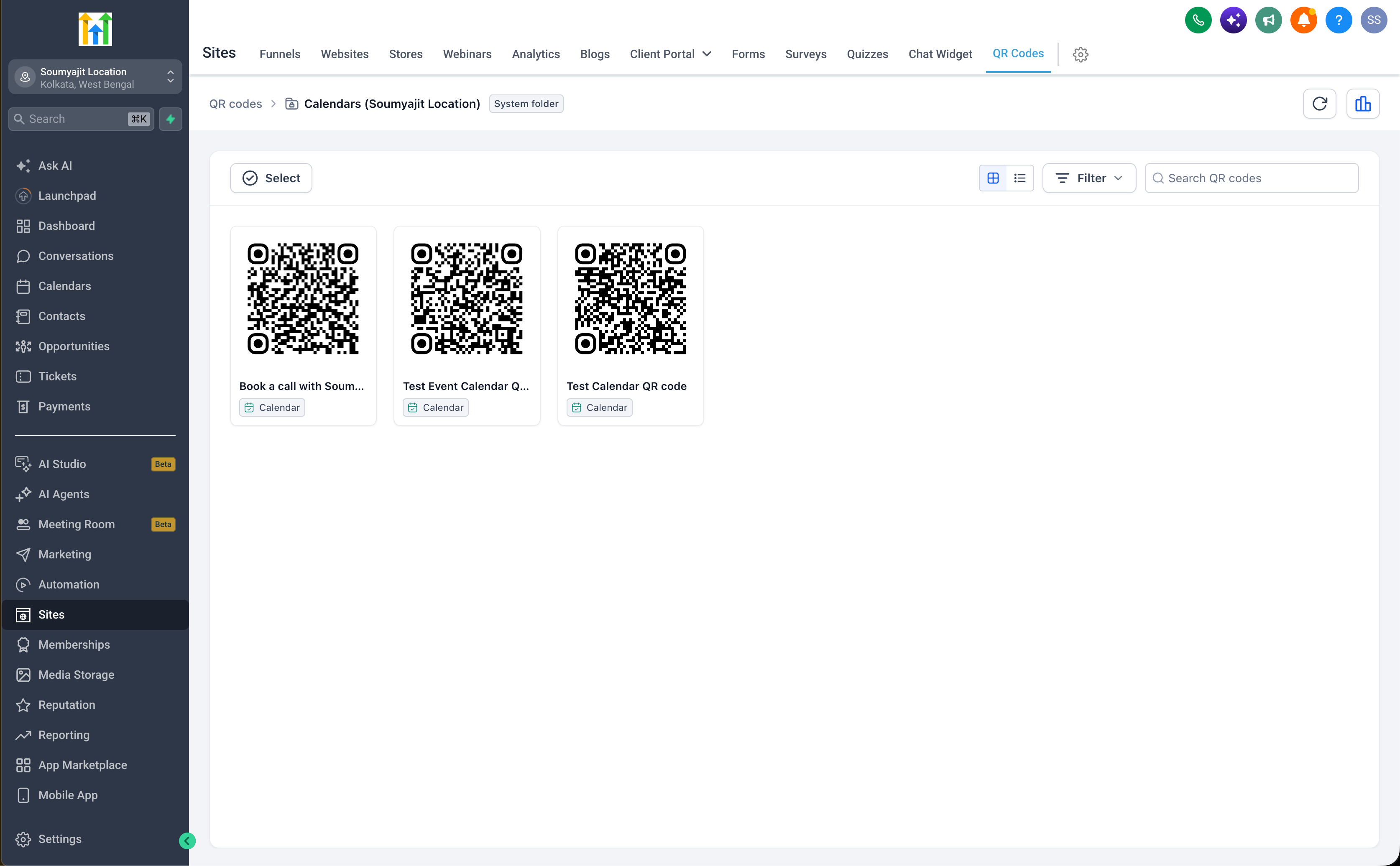
- View prebuilt QR codes: Locate QR codes linked to calendars, services, and rentals directly from the QR codes list page.
- Centralized visibility: See both manually created and prebuilt QR codes together in one overview.
- Flexible access: Either open QR codes from their dedicated touchpoints in calendars, services, and rentals, or manage them from the QR codes list page.
You can choose whether you prefer to work with QR codes from the booking product itself or from the central QR codes area, depending on what suits your workflow best.
How it works
Option 1: create a QR code from the QR code builder
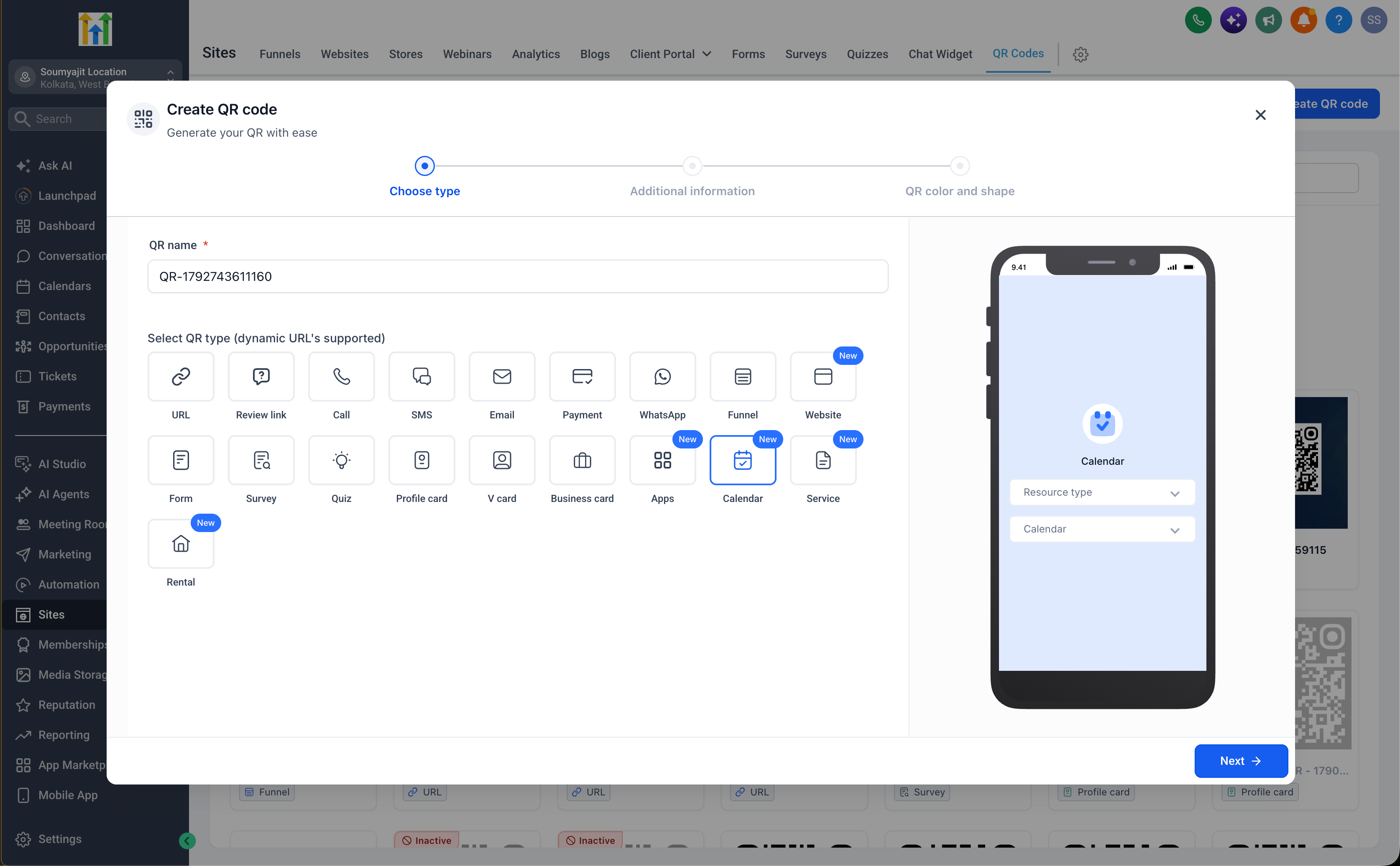
- Go to QR codes: Open the QR codes section in EveryCatch.
- Choose a QR code type: Select calendars, services, or rentals.
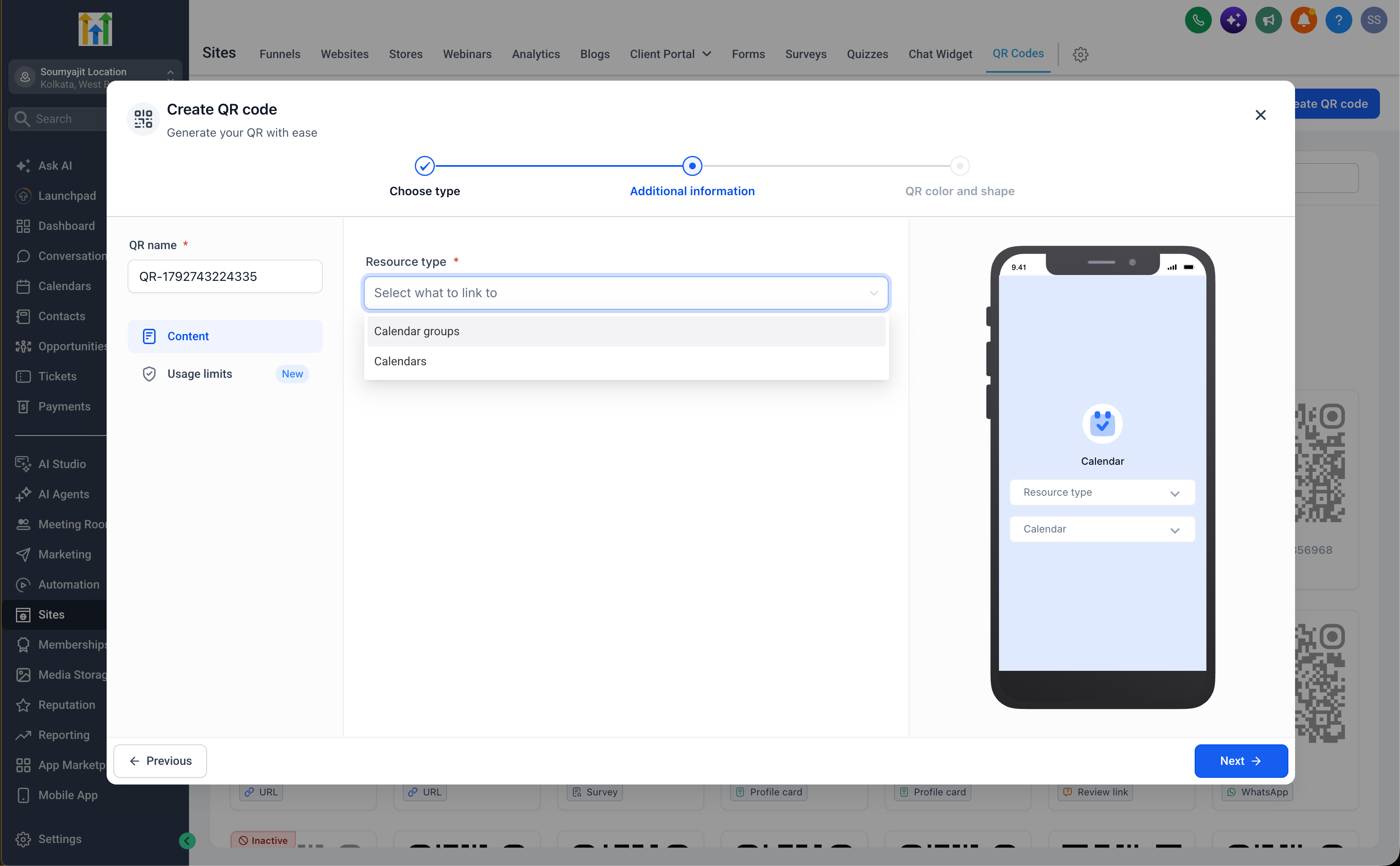
- Select your destination: Choose the calendar, calendar group, service, service group, staff member, rental, booking page, or other supported destination you want the QR code to open.
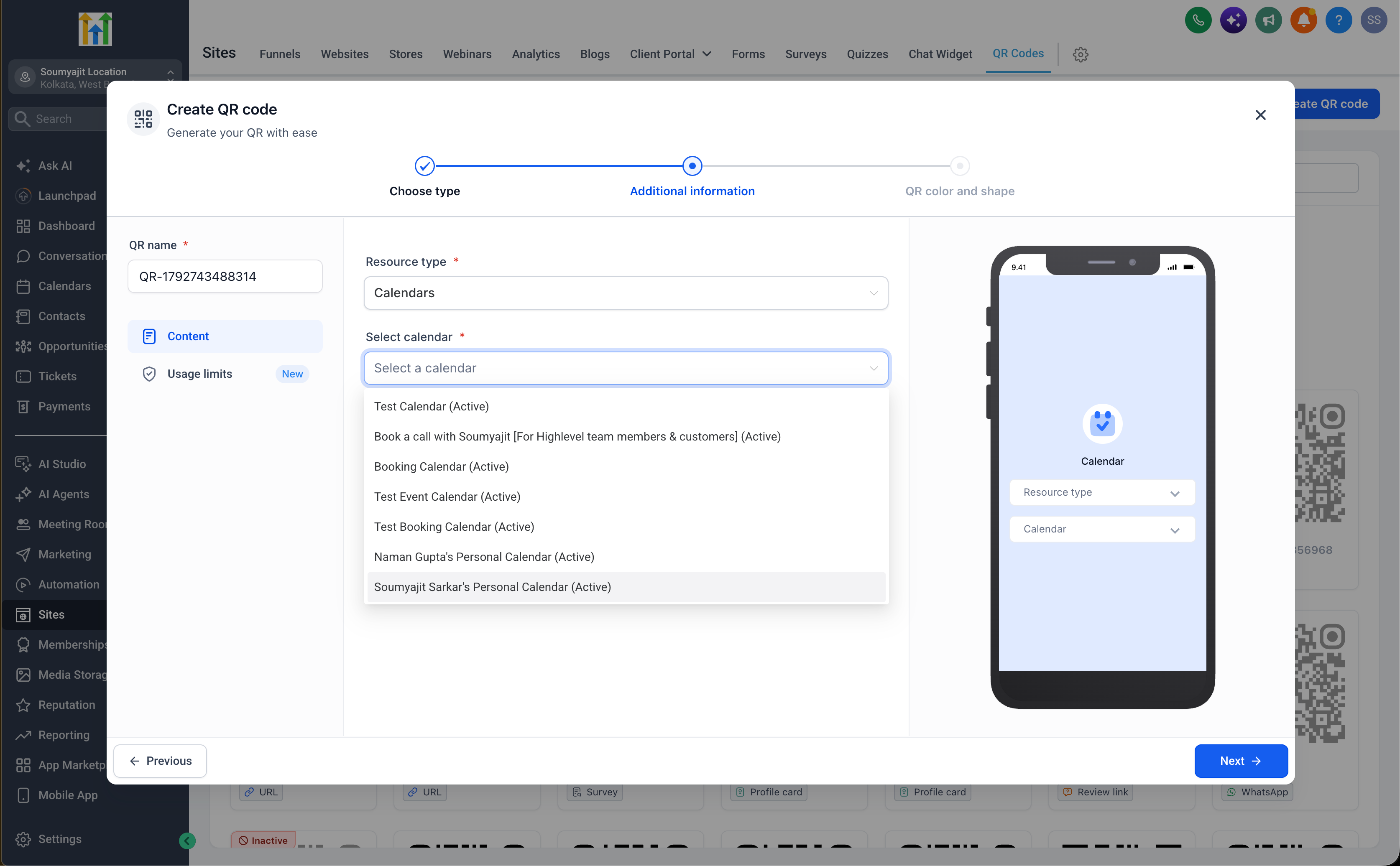
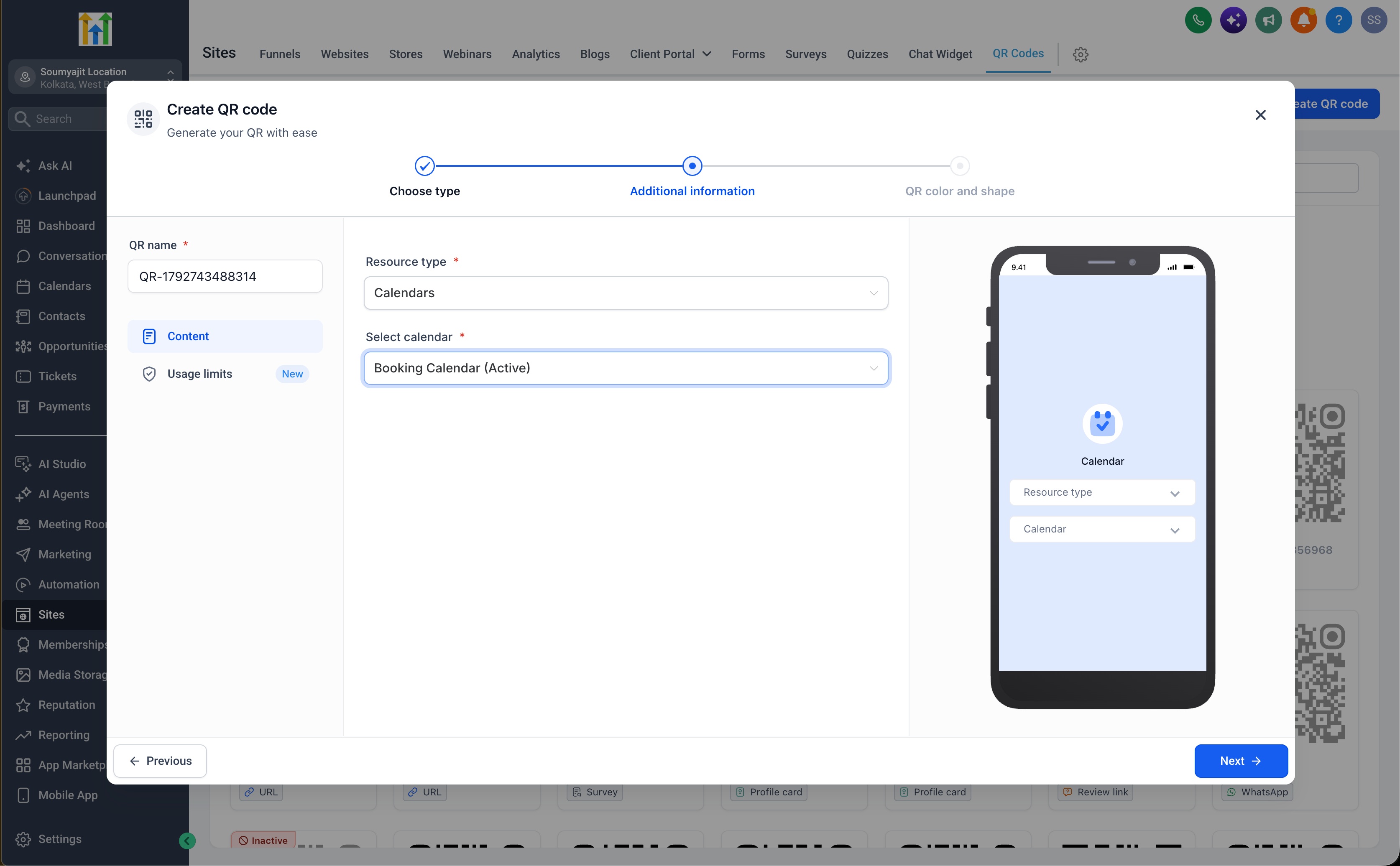
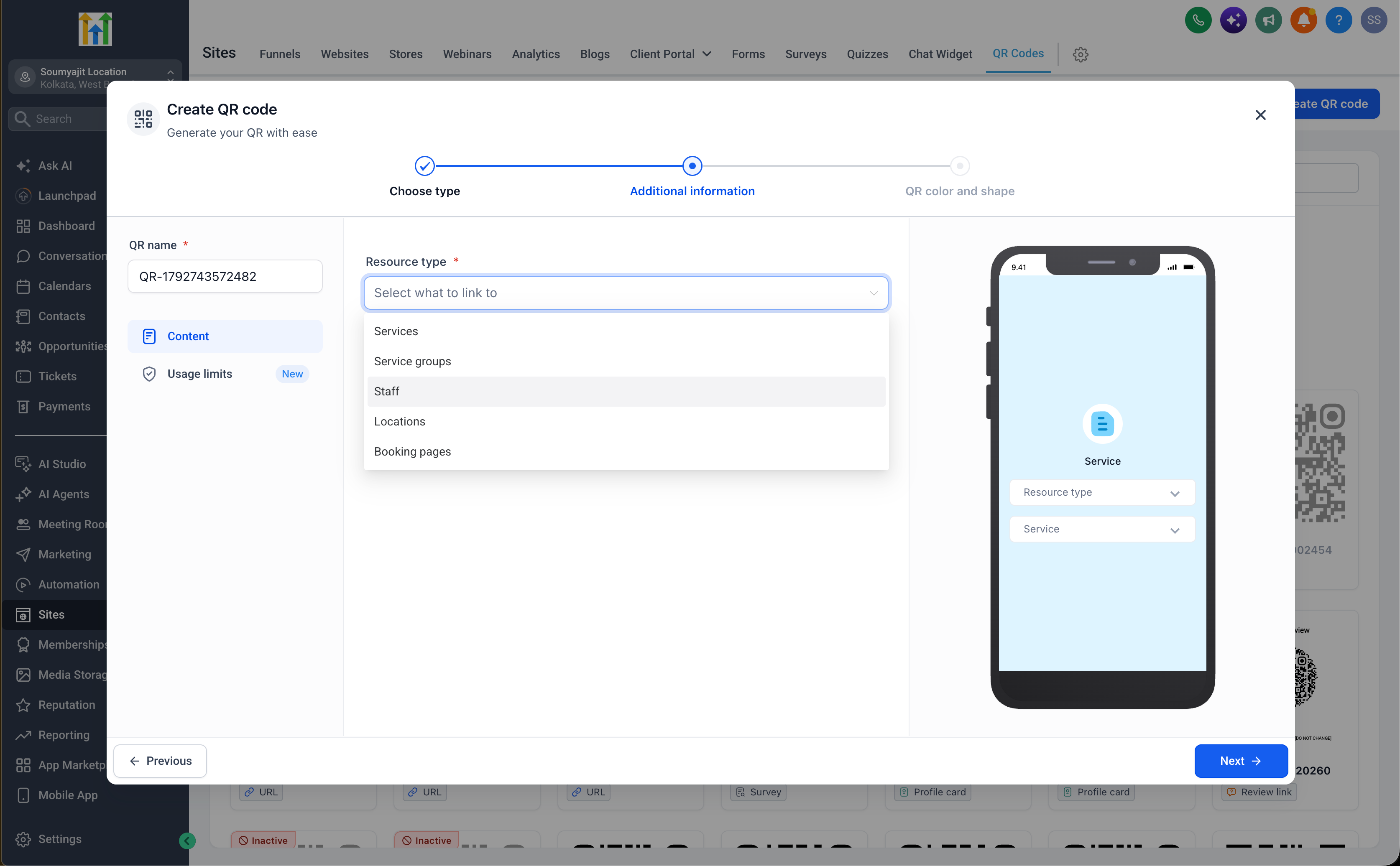
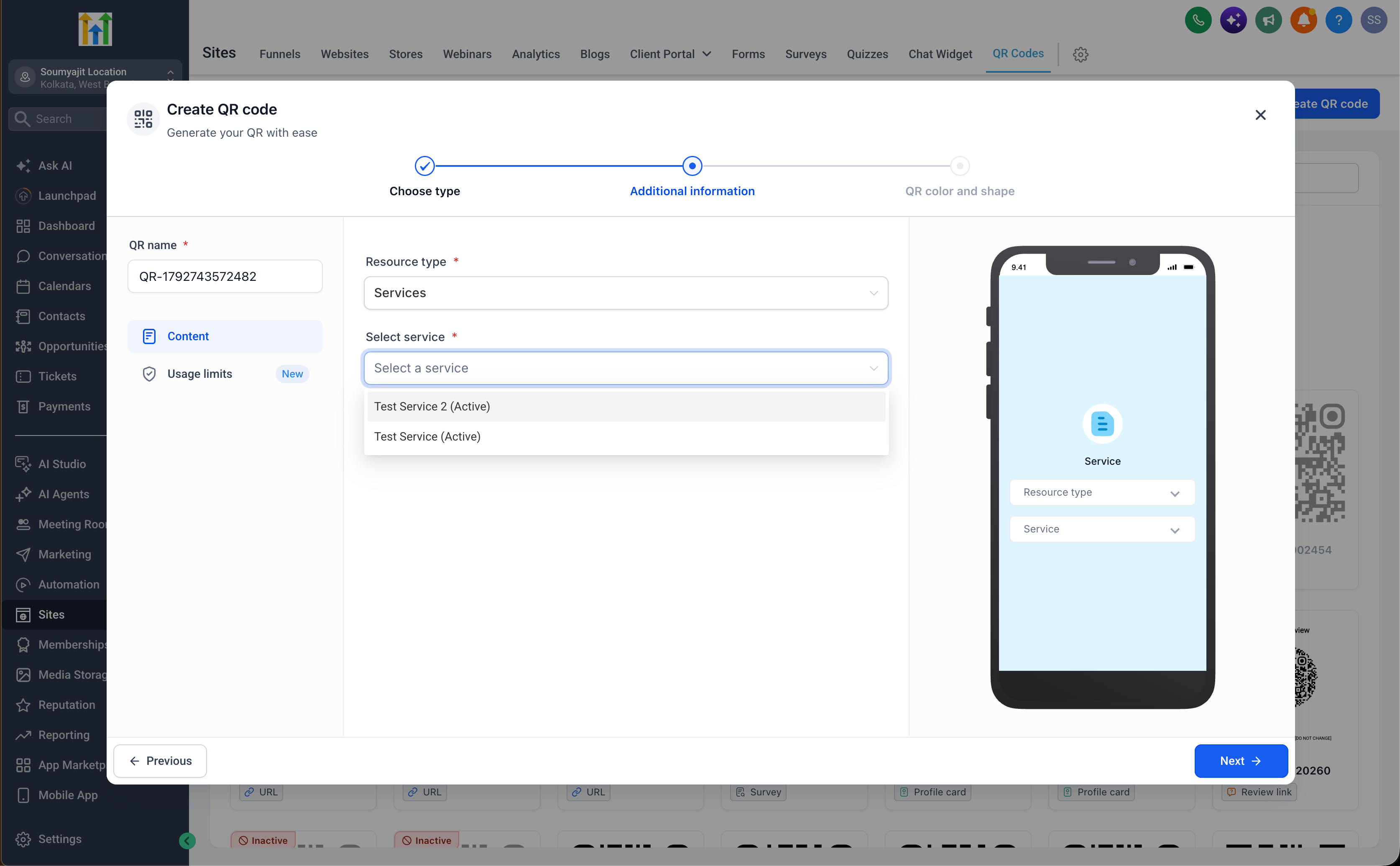
- Create your QR code: Generate a QR code that is mapped to the destination you selected.
Option 2: access a prebuilt QR code
- Open your product area: Go to the calendars, services, or rentals section that matches the QR code you need.
- Find the QR code touchpoint: Use the new QR code option available inside that calendar, service, or rental.
- Access your QR code: Open the prebuilt QR code that is already mapped to that specific calendar, service, or rental.
- Track performance: Review the total number of scans and the last scanned date for that QR code.
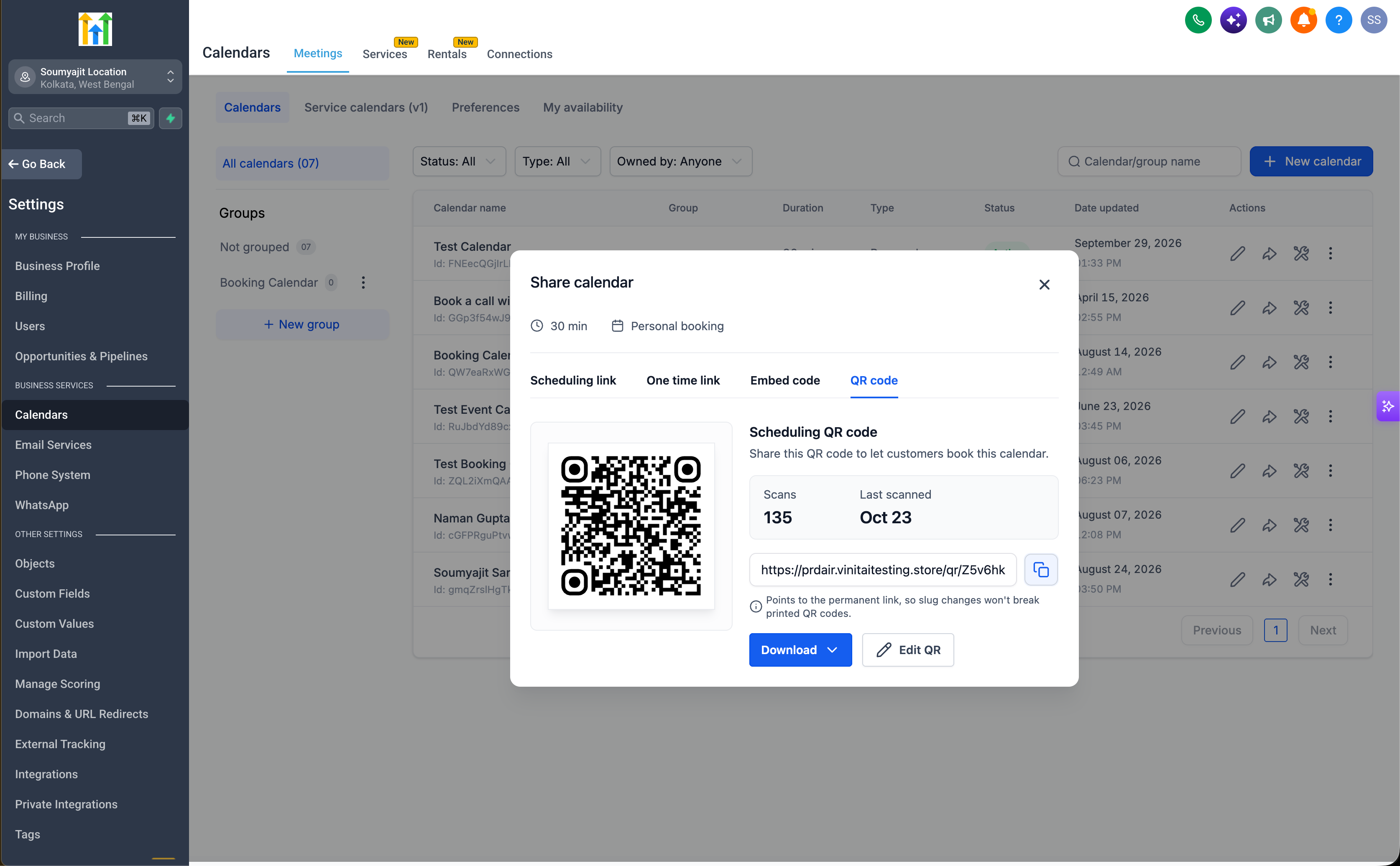
- Customize or download: Update the QR code design or download it directly from the touchpoint for use in your campaigns.
- Find it in QR codes: You can also see the same prebuilt QR code on the QR codes list page in the QR code section.
There is no extra configuration required and no need to switch between multiple areas just to manage QR codes. Everything is available from the place that fits your workflow best.
Key highlights
- New calendar QR codes: Generate QR codes for calendars, calendar groups, and supported scheduling destinations.
- Services integration: Create QR codes for services, service groups, staff, landing pages, and booking pages.
- Rentals integration: Generate QR codes for rentals, rental categories, and supported booking destinations.
- Prebuilt QR codes: Use QR codes that are already mapped to specific calendars, services, and rentals.
- Zero manual setup: Use the new product touchpoints without manually creating each QR code.
- Native QR code touchpoints: Access QR codes directly from calendars, services, and rentals.
- Performance metrics: Track total scans and last scanned date within the QR code touchpoint.
- Easy customization: Adjust QR code design without leaving the QR code touchpoint.
- Quick downloads: Download QR codes straight from their product touchpoints.
- Centralized QR code visibility: View prebuilt QR codes on the QR codes list page alongside manually created ones.
- Deeper EveryCatch integration: QR codes are now closely tied into the wider EveryCatch booking and scheduling tools.
Notes
- Availability: The new QR code types work with calendars, services, and rentals in EveryCatch.
- Supported destinations: Supported destinations include calendars, calendar groups, services, service groups, staff, landing pages, rentals, rental categories, booking pages, and other compatible destinations.
- Prebuilt QR codes: Dedicated QR code touchpoints now appear inside calendars, services, and rentals where available.
- Automatic mapping: Prebuilt QR codes are automatically mapped to their calendar, service, or rental destination.
- Performance metrics: Total scans and last scanned date are visible directly in each QR code touchpoint.
- Customization & downloads: You can edit QR code designs and download files directly from the touchpoint.
- QR codes list: Prebuilt QR codes also appear on the QR codes list page for centralized management.
- Manual creation: You can still create QR codes manually at any time from the QR code builder.
Why this matters
With new QR code types, built-in touchpoints, scan metrics, and direct customization across calendars, services, and rentals, QR codes are now a more integrated and accessible part of how you manage bookings in EveryCatch.
You can now connect customers to booking and scheduling experiences with a quick scan, monitor how each QR code is performing, and manage design and downloads without needing to keep switching between different products.
You get fewer manual steps, clearer insight into engagement, and smoother QR code workflows across your EveryCatch account.



