When you add an Inbound Webhook trigger, the EveryCatch workflow builder now highlights suggested actions for contacts, opportunities, and tasks. You can pick what your workflow should do with each record type directly from these suggestions.
What changed
The Suggested for Inbound Webhook section now organizes five commonly used actions by record type:
- Contact: Create contact or Find contact.
- Opportunity: Create opportunity or Find opportunity.
- Task: Add task.
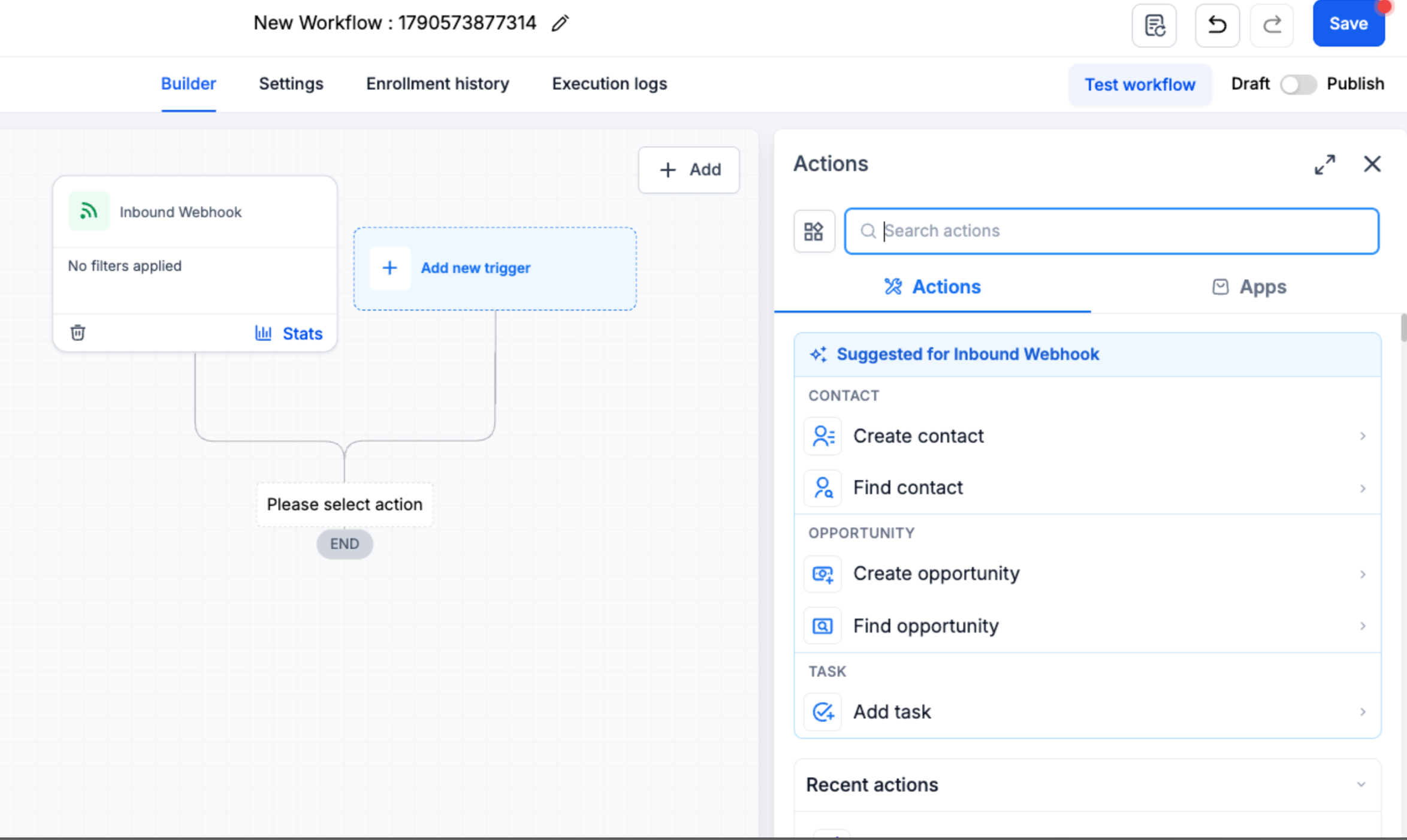
This layout helps you quickly choose the right next step for the records your webhook data should create or update, without searching through the full list of workflow actions.
How to use it
- Go to Automation > Workflows and open a workflow.
- Add an Inbound Webhook trigger and select a sample request as its mapping reference, then save the trigger.
- Under Suggested for Inbound Webhook, choose a contact, opportunity, or task action that matches what you want to do with the incoming data.
- Configure and save the action, then continue adding the rest of your workflow steps as needed.
Good to know
Inbound Webhook is a premium trigger, and additional charges apply each time it runs in a workflow.