
Admins can now manage which team members are allowed to use the Create pipeline action with a dedicated permission setting in EveryCatch.
What changed
There is a new permission specifically for the Create pipeline action.
Admin users can now allow or block pipeline creation for each role, so you decide which roles are trusted to create pipelines.
Anyone who does not have this permission will be blocked from creating new pipelines, as well as from using Clone or Duplicate on existing pipelines.
Who's affected
Agency admins and account admins who configure user roles and permissions in EveryCatch.
Account users whose ability to create pipelines now depends on the role and permissions assigned by an admin.
How to use
- Go to Settings → My staff → select a user → Roles & permissions.
- Scroll to the Opportunities section.
- Use the Create pipeline permission toggle for the roles that should be allowed to create pipelines.
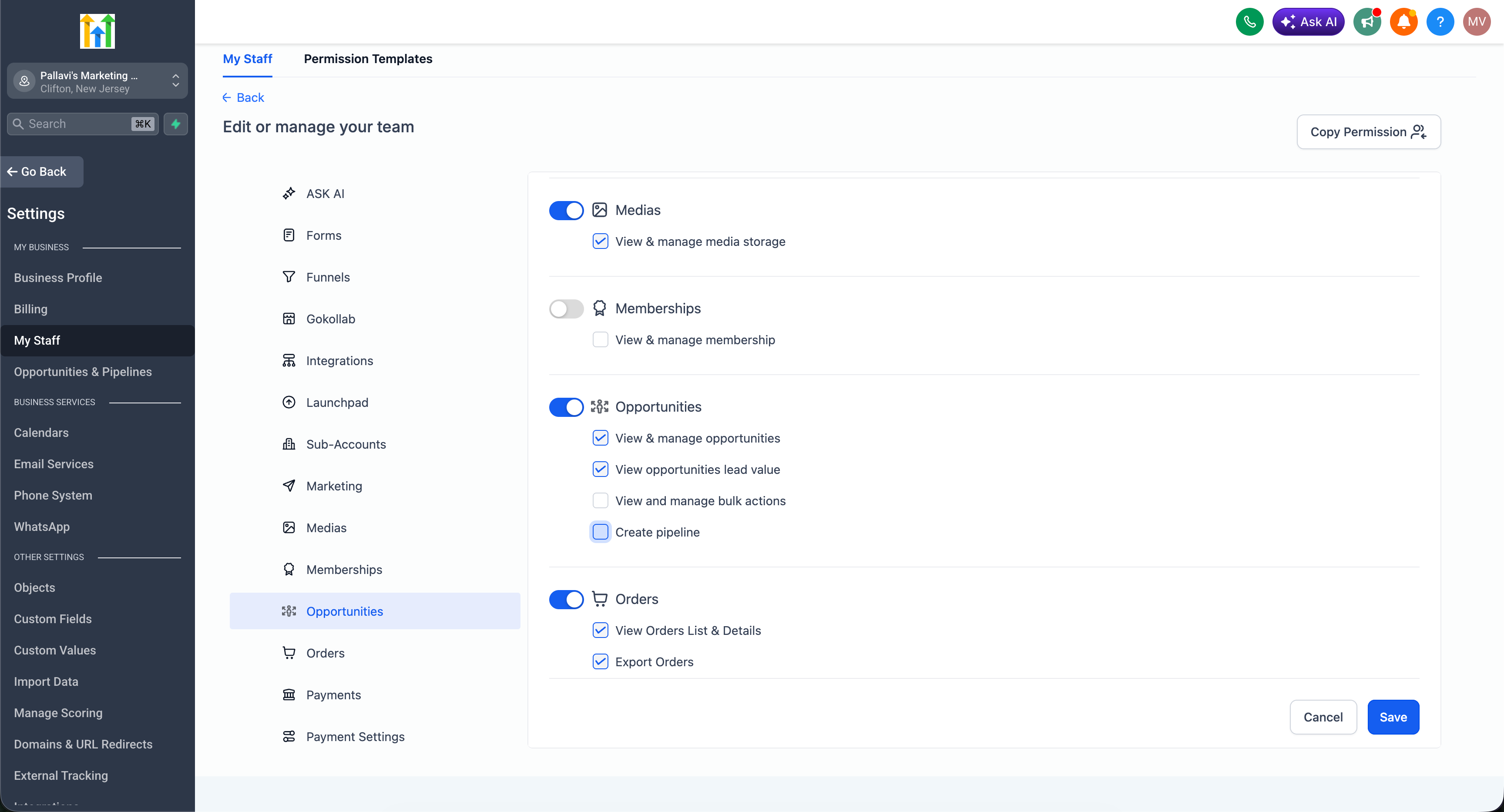
- Save your changes. The updated access control for pipeline creation, cloning, and duplicating takes effect right away.
Note: The Create pipeline permission controls all pipeline creation actions, including Clone and Duplicate. Users without this permission will not be able to perform any of these actions.



