You can now gently grow the value of each order by guiding guests toward a few well-chosen extras at just the right moment.
Right before checkout, guests see a short list of suggested extras. EveryCatch now lets you decide exactly what appears there, or you can let the system build the list from your menu for you.
What changed
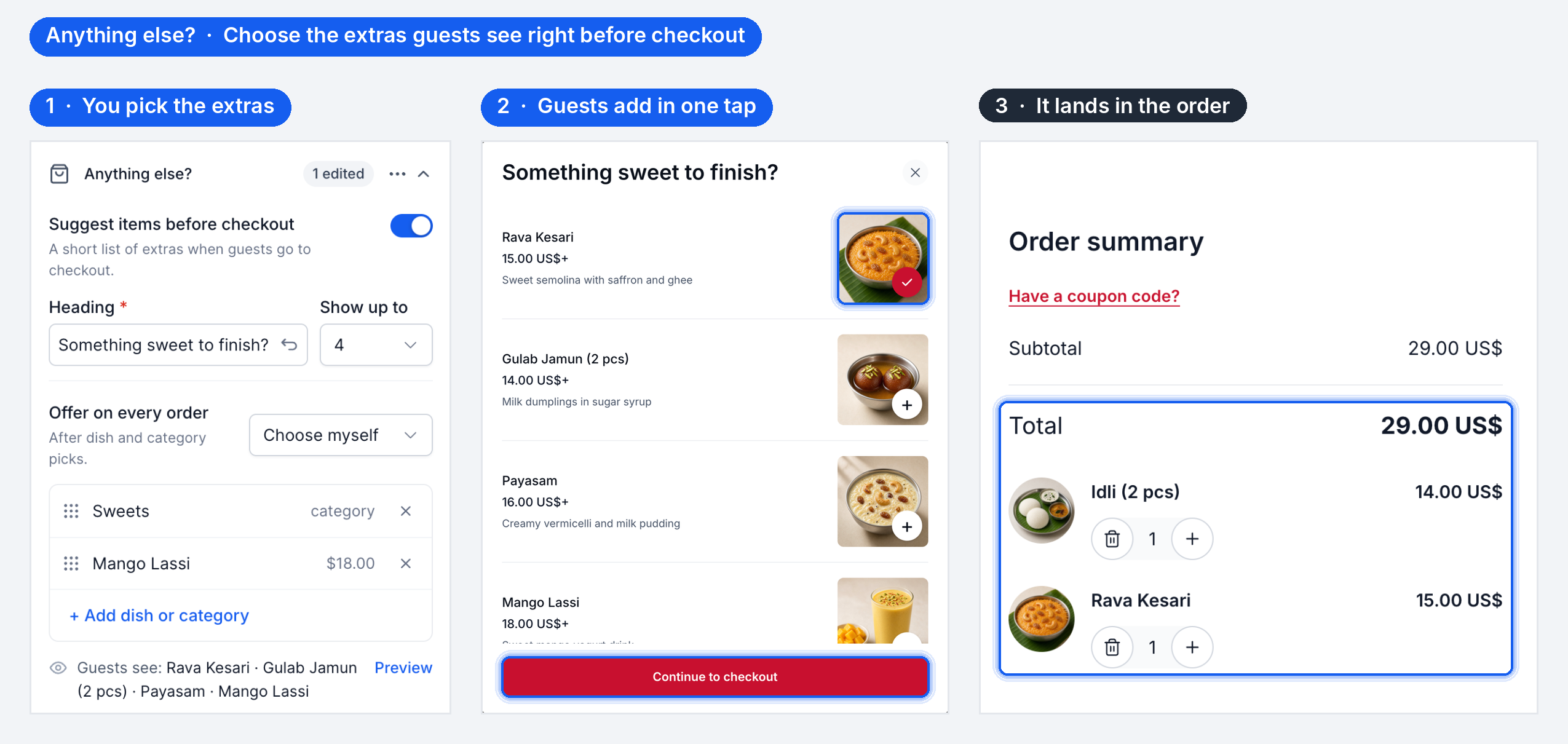
- Your own heading: Set the title guests see, such as "Something sweet to finish?" so the suggestions feel on-brand and timely.
- Choose how many: Decide how many extras appear in the list, from 1 up to 8 items.
- Choose myself or Pick for me: Either hand-pick specific dishes or entire categories, or let EveryCatch automatically fill the list with suitable items from your menu.
- One-tap add: Guests tap + once to add an item, and it is added straight into their order with no extra steps.
- No repeats: Items guests already have in their cart are automatically skipped so the suggestions stay relevant.
- Live preview: You can see exactly how the list will look on desktop, tablet, and phone before you save any changes.
How to get started
- Go to Restaurant Website → Restaurant pages → Cart drawer, then open the Anything else? section.
- Turn on Suggest items before checkout.
- Add a heading, choose how many items to show, and select either Choose myself or Pick for me based on how much control you want over the list.
- Review the preview on different devices, then click Save when you are happy with how it looks.
Why it matters
- More add-ons per order: Bring desserts, drinks, or sides into view right at checkout when guests are ready to decide on final extras.
- Your menu, your call: Highlight a new special, promote high-margin items, or keep your best dessert in the spotlight.
Availability
This feature is available to agencies using Restaurants on the Founder's plan.
One more tap can turn into one more treat in every order.