You can now see what people are saying about your brand, follow industry trends, and watch competitors directly inside EveryCatch.
Social intelligence gives you a clear view of conversations across social platforms so you can surface practical insights, monitor key topics, and stay current with configurable alerts.
This feature is in a limited beta and currently available only to selected users.
What changed
- AI-powered brand and industry overview
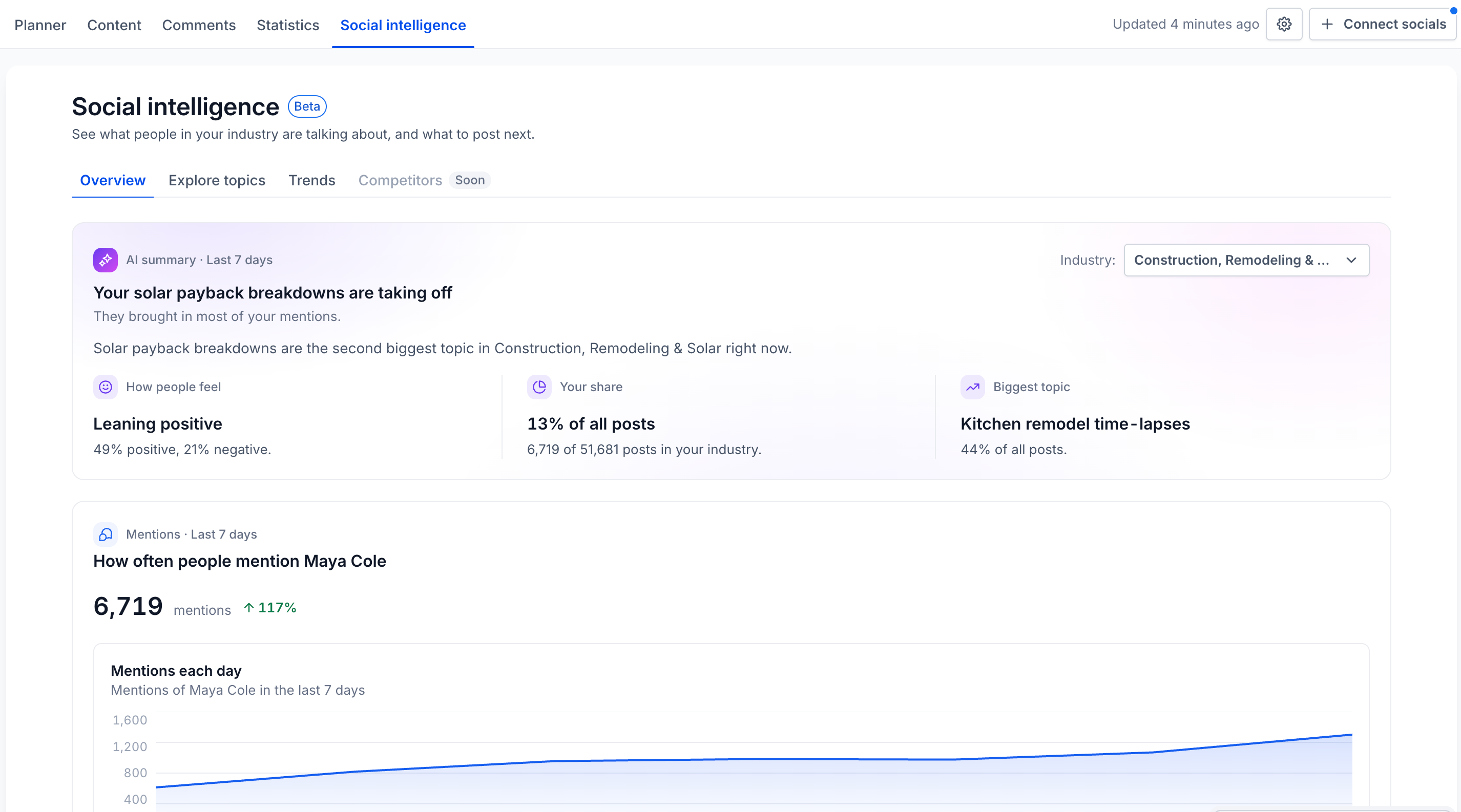
- See a personalized snapshot of your social landscape, including:
- Brand mentions: Track conversations where people mention your business.
- Industry trends: Discover popular topics and new themes that are gaining traction.
- Competitor performance: Compare your share of conversation with up to 3 competitors.
- What to post next: Review relevant posts from different social platforms to shape your content ideas.
- AI summary: Get clear takeaways in plain language without checking multiple charts.
- Explore conversations and insights
- Search for brands, keywords, hashtags, or topics to discover:
- Mention volume and how conversations change over time.
- Audience sentiment and engagement patterns.
- Where conversations are happening and when activity increases.
- Personalized AI search suggestions so you can get started quickly.
- Save and monitor topics
- Save any search as a topic to view deeper insights and track conversation changes over time.
- View historical insights across 7, 15, or 30 days.
- Analyze engagement, conversation volume, specific posts, and audience details for each topic.
- Manage all your monitored topics in one place, with the option to pause or resume any topic as needed.
- Get notified with smart alerts
- Stay informed when key metrics shift so you can act quickly.
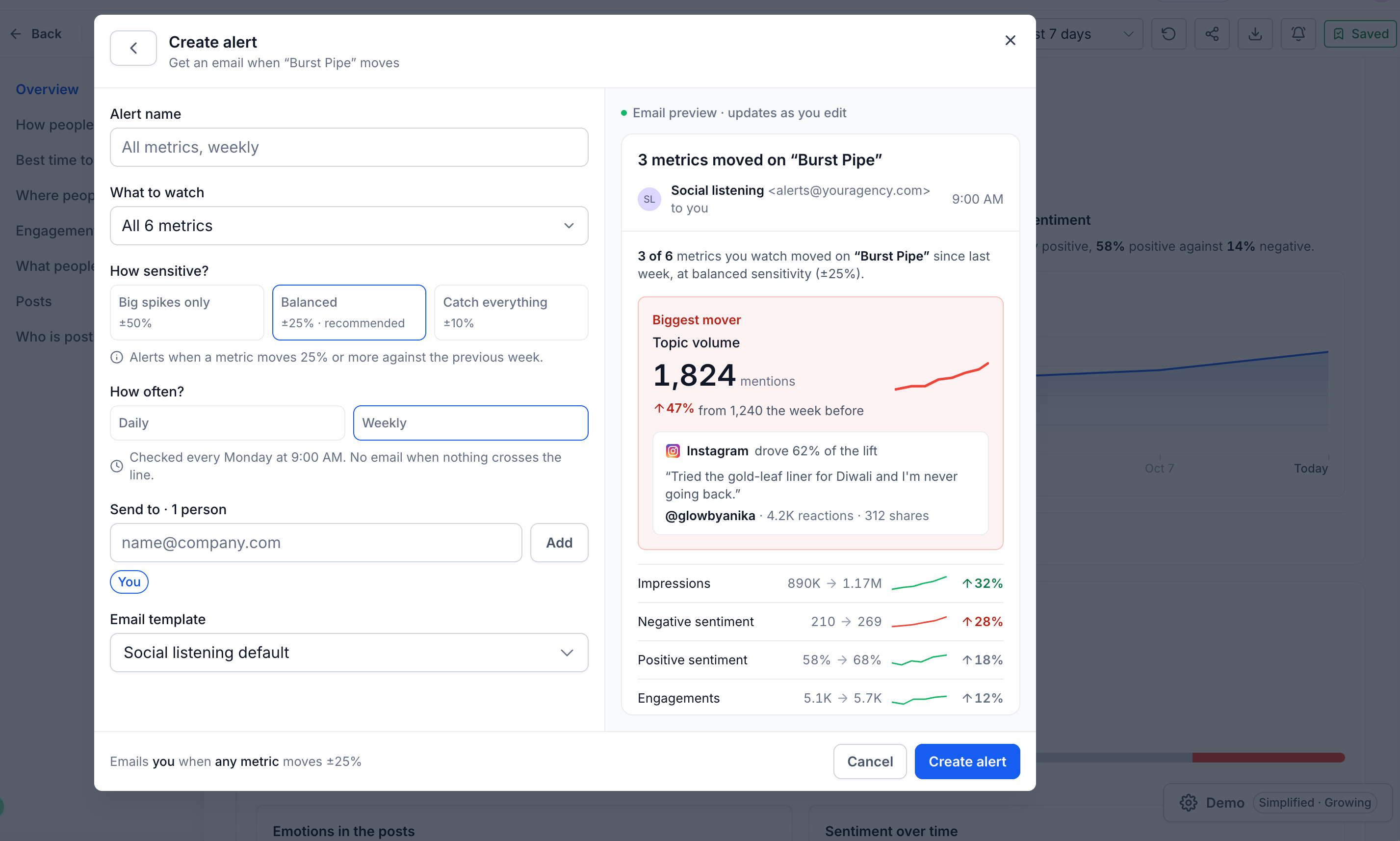
- Track alerts for mentions, sentiment, engagement, impressions, and share of voice.
- Adjust alert sensitivity and choose who should receive each alert.
- Receive daily or weekly email notifications so you do not miss important changes.
- Social listening is now under Trends
Your existing social listening view now lives under the Trends tab within social intelligence, alongside the new Overview, Explore, and topic monitoring tools.
How to use this feature
- Go to Marketing → Social Planner → Social Intelligence.
- Open Overview to review high-level insights about your brand and industry.
- Use Explore to search for a brand name, keyword, or topic you want to analyze.
- Click Save as topic on a search to get detailed insights and ongoing monitoring for that topic.
- Set up Alerts to receive notifications whenever your chosen metrics change.
Why it matters
- Know your audience: See what people are talking about, how they feel, and what is starting to gain interest.
- Spot opportunities: Find relevant topics and content ideas based on real conversations.
- Stay ahead: Track competitors and get notified when there are meaningful shifts in the market.
- Save time: Bring discovery, monitoring, and social insights together in a single workspace inside EveryCatch.
Notes
- Social intelligence is available only to selected users during the limited beta period.
- Each location can run up to 100 searches across the entire beta period.
- You can actively monitor up to 50 topics per location. Paused topics do not count toward this limit.
- Each topic can have up to 3 alerts configured.
- Overview shows insights from the last 7 days. Saved topics support 7, 15, and 30 day lookback options.
- Available platforms and specific metrics depend on the underlying social data source and may vary.
- A dedicated Competitors tab is coming soon. For now, competitor comparisons are available within Overview.



