What changed
- General Widgets on your account dashboard are now editable - configure what data each widget shows by adding permanent filter conditions and setting custom date ranges. Also compare performance across periods, rename widgets, apply themes, and duplicate them
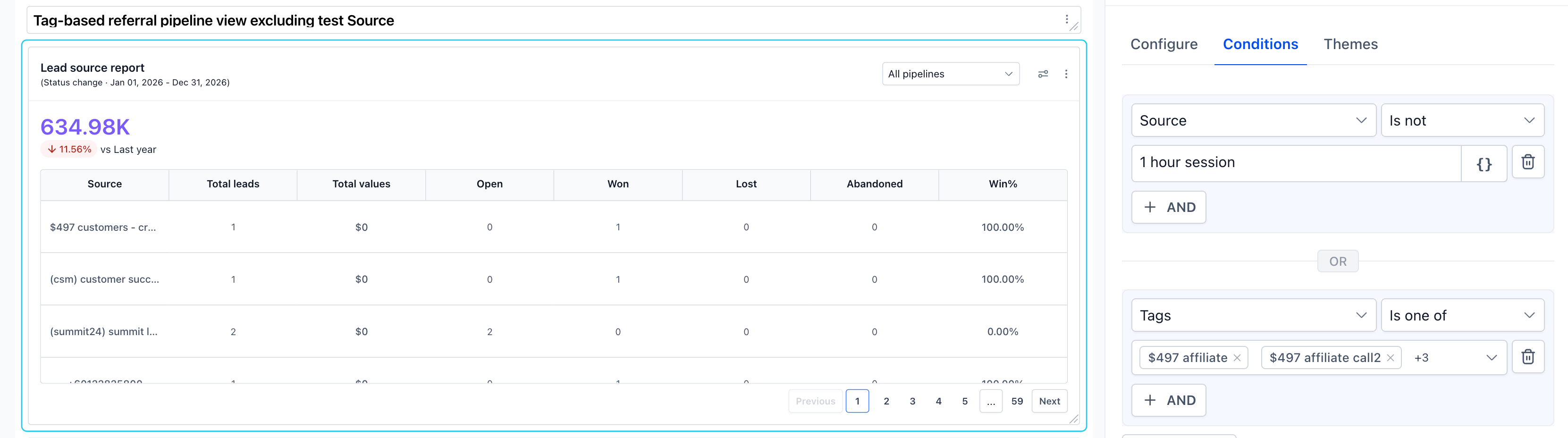
- New Conditions tab lets you permanently filter any general widget by assigned user, tags, source, lead value, custom fields, and attribution - filters persist every time the dashboard is opened
- Date range override lets you lock a widget to a specific time period, independent of the dashboard-level date filter
- Date property and date range are now shown explicitly on each widget face so you always know what time period you are looking at
- Comparison mode lets you see current period vs last year or last period directly on the widget
How it works
- Go to Dashboard and click Edit dashboard (top right)
- Hover over any general widget and click the three-dot menu (⋮) → select Edit
- In the Configure tab - edit the widget title and set a date range override under Advanced Settings
- In the Conditions tab - add permanent data filters by selecting a field, operator, and value
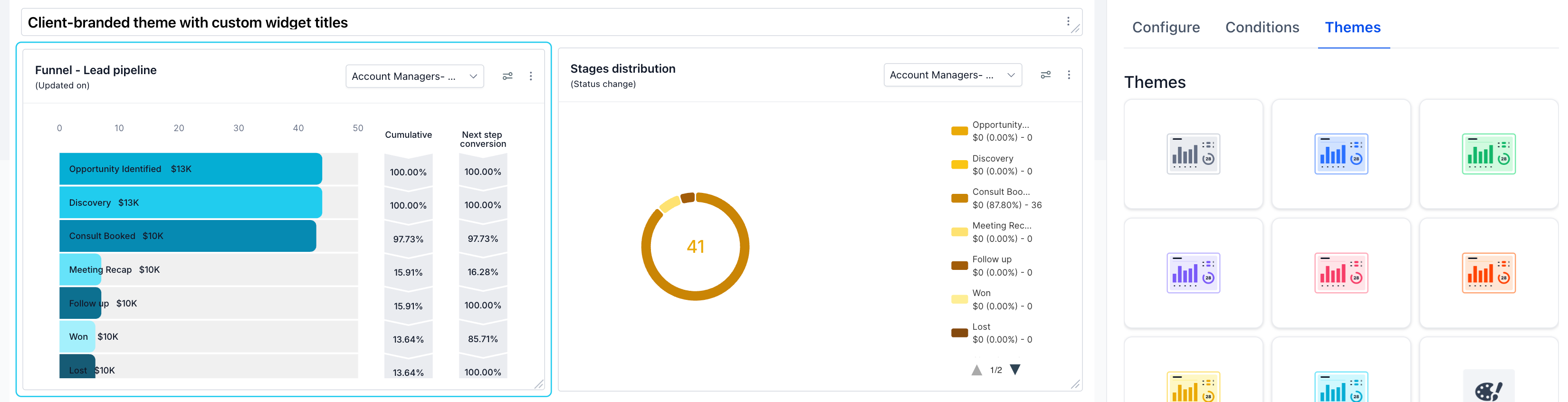
- In the Themes tab - apply a visual theme to match your branding
- Click Save - your configuration persists every time the dashboard opens

Why it matters
- Your dashboard, your data - stop seeing everyone's numbers every time you open the dashboard. Set Assigned user = Logged in user once, and every team member automatically sees only their own performance.
- Trusted numbers - the widget face now shows exactly which date property and date range it is calculating on, so two similar widgets showing different numbers no longer create confusion.
- Client-ready dashboards - rename widgets to client-friendly language, apply a matching theme, and duplicate widgets per segment. Turn a generic dashboard into one that feels built specifically for your client.
- Permanent segmentation without rebuilding - use custom fields, tags, or source conditions to permanently scope a widget to a specific segment. No more manual filtering every session.
- Year-over-year visibility - lock a widget to This Year with comparison vs Last Year. Every time your client opens the dashboard, they see their growth story at a glance.
What's Next?
- Configure what's shown in Funnel and Manual Actions widgets
- Dashboard Quick Filter support for general widgets
Notes
- Pipeline is available as a runtime filter on the widget face and is not included in Conditions.
- Condition fields available vary by widget type and the module it belongs to (Opportunities, Email, Contacts, etc.).
- General widgets do not currently respond to dashboard-level Quick Filters.
- Full guide and use cases: Configure and Filter General Widgets



