Your sub-account's customizations are now protected when you apply a snapshot
What changed
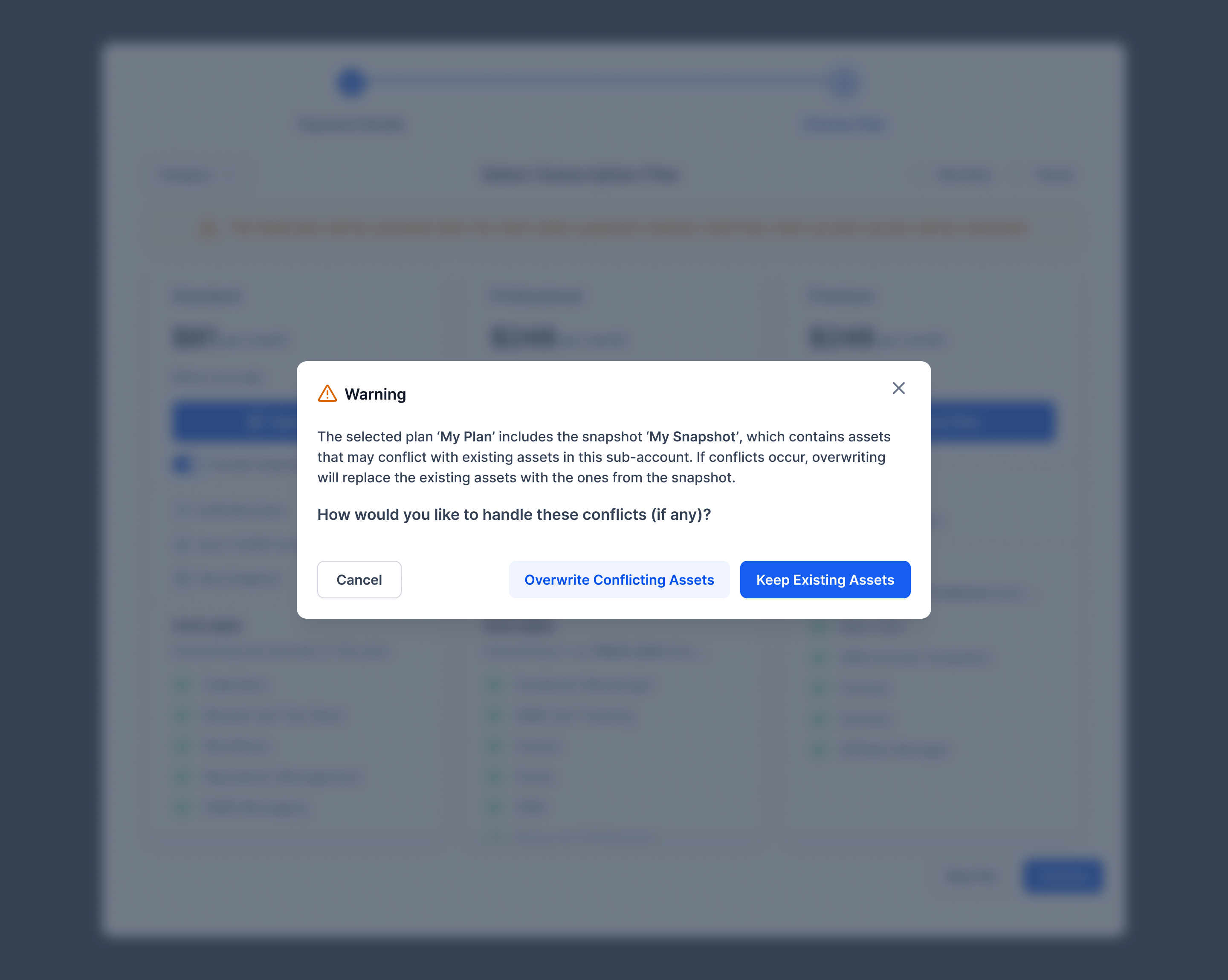
When you enable SaaS for a account and choose to attach a snapshot, we now check whether the snapshot would overwrite anything you've already customized in that account. If it would, you'll see a warning before any changes are made, and you can choose to either keep your existing assets or overwrite them with the snapshot's version. If there's no conflict, the snapshot applies just like before.
Why it matters
Previously, attaching a snapshot could silently overwrite funnels, websites, or other assets you'd already updated in a account - with no warning and no way to undo it. Now you're always in control: you'll see exactly when a conflict exists and get to decide what happens to your work.
Notes
- This applies to both SaaS V1 and V2 accounts.
- For bulk SaaS enablement, attaching a snapshot isn't available as an option yet, so we automatically protect your existing assets by default in that flow - no prompt, no risk of overwrite.
Coming soon
- The same conflict warning and choice you get in individual SaaS enablement, brought to bulk SaaS enablement once snapshot attachment is added there.
Need help with this?
If you'd like help setting this up or want to know what it means for your account, book a quick call and we'll walk you through it.
