Wait action enhancement: tiktok DM replies
What changed
You can now use TikTok Interactive Messenger as a reply channel in the "Wait → Until the contact replies" workflow action. This means your workflows in EveryCatch can pause and then continue based on a contact’s reply to your TikTok DMs.
How it works
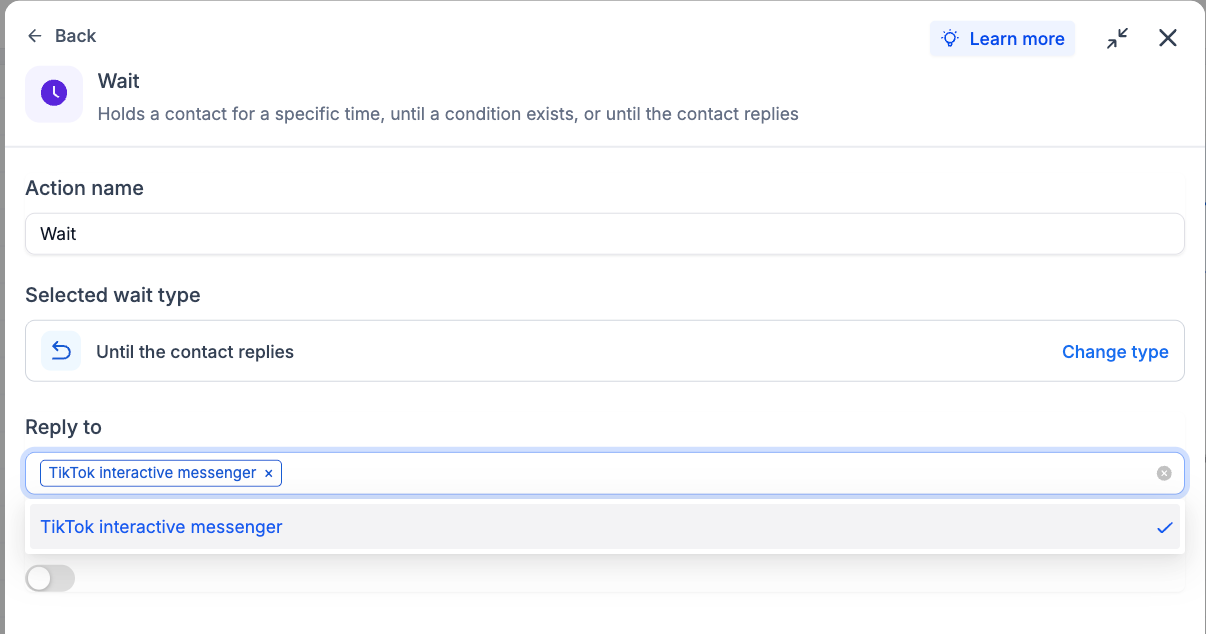
When a workflow reaches a "Wait until the contact replies" step, you can select TikTok Interactive Messenger in the "Reply to" setting. The workflow will stay paused at that step and will only move forward after the contact responds via TikTok DM.
How to use it
- Add a Wait action to your workflow.
- Select "Until the contact replies" as the wait type.
- In the Reply to field, choose TikTok Interactive Messenger.
Why we built it
Many businesses rely on TikTok to start and manage customer conversations, and they want those replies to shape what happens next. EveryCatch now lets you include TikTok DMs in the same reply-based automation you already use for other channels, so you can build cleaner conversational flows and follow-ups that react directly to TikTok responses.
Simple example
A fitness studio sends a TikTok DM inviting prospects to claim a free trial. The workflow then waits for a reply via TikTok Interactive Messenger before sending a follow-up message or assigning the lead to a team member for personal outreach.
Additional notes
- Available inside the "Wait → Until the contact replies" workflow action.
- Tracks and reacts to replies received through TikTok Interactive Messenger.
- Workflows move forward automatically as soon as a valid TikTok DM reply is received.
Preview
Need help with this?
If you'd like help setting this up or want to know what it means for your account, book a quick call and we'll walk you through it.
