User permissions support for AI studio
Summary
AI Studio now supports dedicated user permissions, giving admins and owners more control over who can access and manage AI Studio within their account. As part of this update, AI Studio has also been migrated to IAM V2 for improved permission management and access governance.
What changed
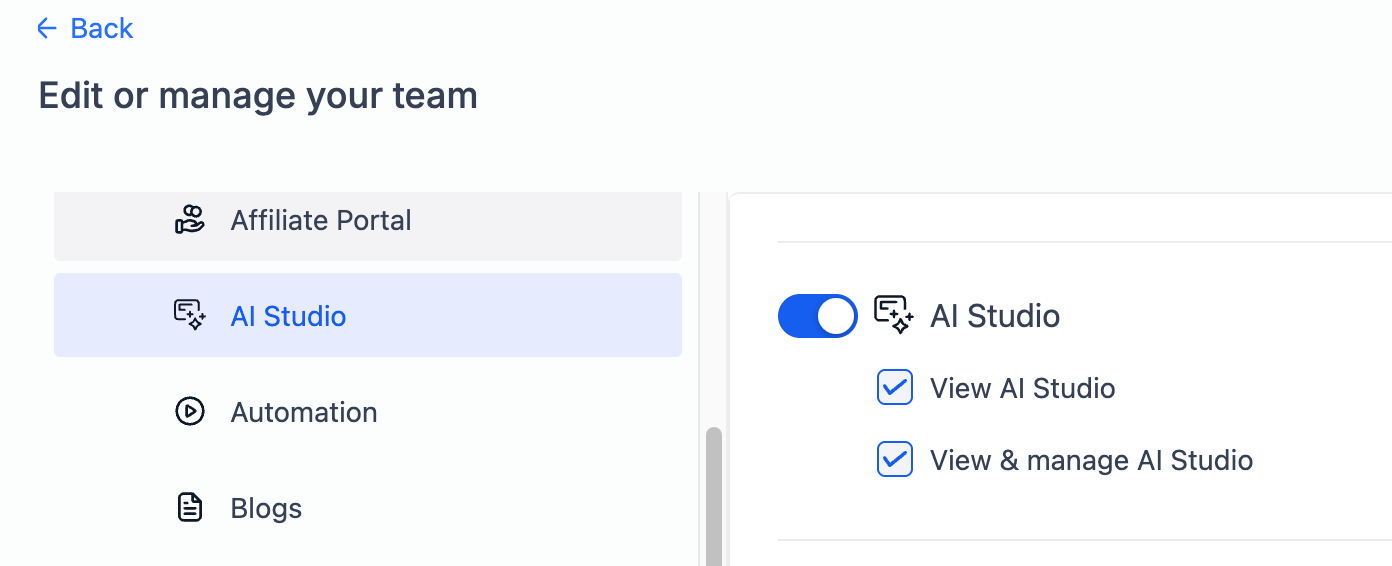
AI Studio is now powered by the IAM V2 permission architecture.Two new permission levels have been introduced
- View AI Studio: Provides read-only access to AI Studio.
- View & Manage AI Studio: Provides full read and write access to AI Studio.
Additional improvements include
- All AI Studio UI components and APIs are now protected based on assigned permissions.
- Only authorized users can create, edit, or manage AI Studio resources.
- Permission enforcement is now standardized through the IAM V2 framework.
Why this matters
- This update gives admins more granular control over team access and responsibilities. It also improves permission consistency across the platform and helps organizations maintain stronger operational security and governance.
- By limiting access based on user roles, teams can collaborate more safely while ensuring only the right users can manage AI Studio resources.
- This also delivers one of the most requested and highly upvoted AI Studio features from the community. Ideas board post: https://ideas.gohighlevel.com/ai-studio/p/add-user-permissions-for-ai-studio
Need help with this?
If you'd like help setting this up or want to know what it means for your account, book a quick call and we'll walk you through it.
