Smarter calendar sync for rentals
Overview
EveryCatch has improved how imported calendars control availability in Rentals, so your listings more accurately match what is actually bookable.
Many OTA platforms and external calendar tools send availability as date-only bookings without specific start and end times. Until now, EveryCatch treated these as blocked from 12:00 AM to 12:00 AM on those dates.
If your rental uses set check-in and check-out times (for example, a 3:00 PM start and 11:00 AM end), this could block your listing on adjacent dates and make it look unavailable when it should still be open for bookings.
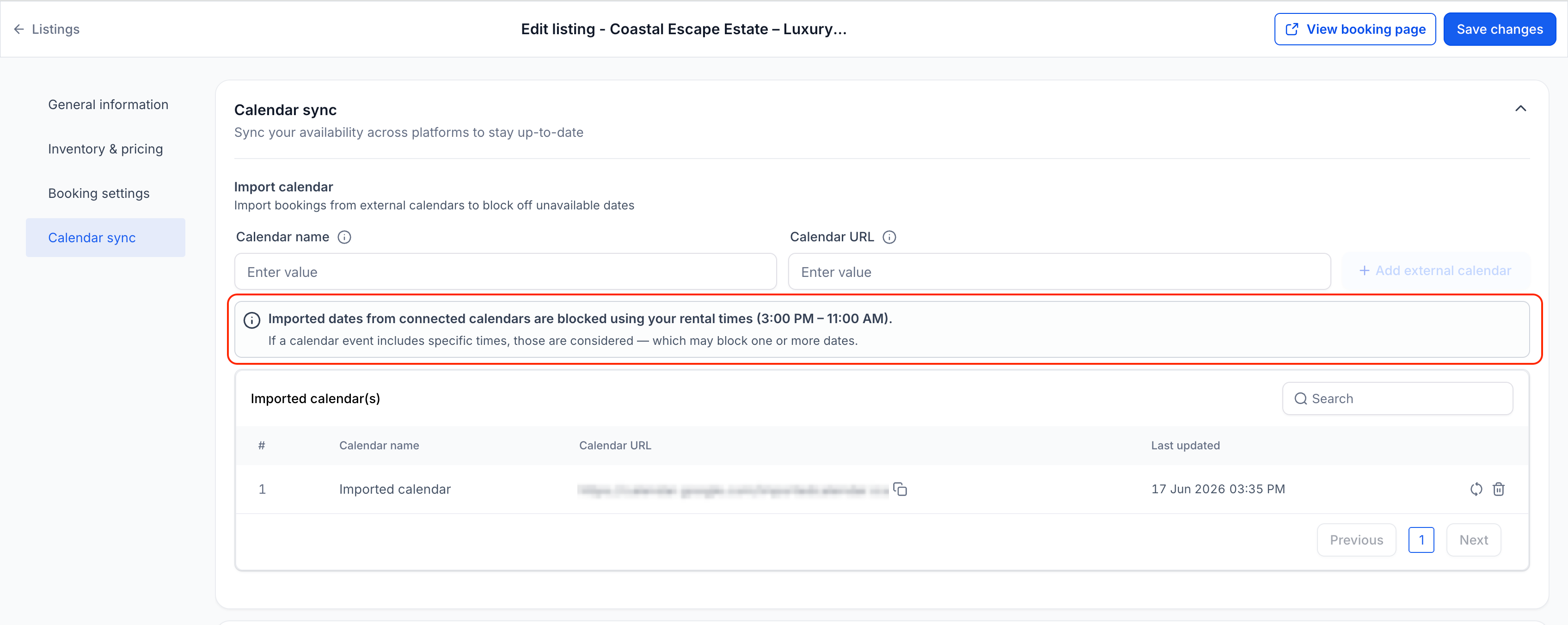
With this update, imported calendar bookings now follow your listing's booking period settings and rental times. Your booking page and calendar views will show availability that better matches how you actually operate the rental.
What changed
Imported dates now respect your rental times
For supported rental booking periods, imported calendar bookings that do not include specific times are now blocked using your configured rental times or rental hours instead of generic midnight-to-midnight blocks.
This currently applies to these booking periods:
- Date Selector mode
- Fixed Durations mode (Daily/Weekly/Monthly)
Example
If your rental uses 3:00 PM to 11:00 AM rental times and an imported calendar blocks April 15 to April 17, Rentals will now block availability from April 15 at 3:00 PM through April 17 at 11:00 AM.
Previously, the same event was treated as a midnight-to-midnight block, which could cause the listing to appear unavailable on the nights before or after those dates.
Timestamped bookings use exact times
- When imported calendar events include specific start and end times, EveryCatch now uses those exact times.
- This means shorter events, partial-day events, and overnight events only block the precise time range sent by the connected calendar.
- For booking modes that let customers select a time, imported events still use their exact timestamps. If the external calendar does not send exact start and end times, EveryCatch will continue to block the full day for that imported event.
Future imported events stay in sync
- When you change booking modes or rental times, future and ongoing imported events are automatically recalculated using the latest settings.
- This keeps your connected calendars aligned with your current rental configuration without extra manual work.
- Past imported events stay as they are and are not changed retroactively.
How to use
- Edit a rental listing in EveryCatch.
- Connect an external calendar using Calendar Sync.
- Set your booking mode and rental times for that listing.
- Imported bookings from the connected calendar will automatically be blocked using the new logic for that listing.
If you update your booking mode or rental times later on, future imported events for that rental will automatically adjust to follow the new configuration.
Why this matters
- Availability from connected calendars is more accurate and reliable.
- Better support for OTA platforms that sync date-only events.
- Reduces the risk of unintentionally blocking inventory on neighboring dates.
- Gives you clearer control and understanding of how synced calendars affect your bookings.
Need help with this?
If you'd like help setting this up or want to know what it means for your account, book a quick call and we'll walk you through it.
