Rentals is now available for everyone!
Overview
Rentals is now live for all EveryCatch users and ready for you to use in your locations.
Rentals is a new part of the EveryCatch scheduling suite, built for businesses that offer bookable inventory such as equipment, vehicles, rooms and spaces, vacation properties, event setups, and similar rental services.
Traditional appointment scheduling focuses on people and time slots. Rentals in EveryCatch is built around duration-based, inventory-driven bookings so you can control availability, pricing rules, booking types, and multi-item checkouts in a way that matches how you actually rent things out.
Whether you rent by the hour, day, week, or month, EveryCatch Rentals gives you the flexibility to model your rental operation accurately and keep bookings organized.
What changed
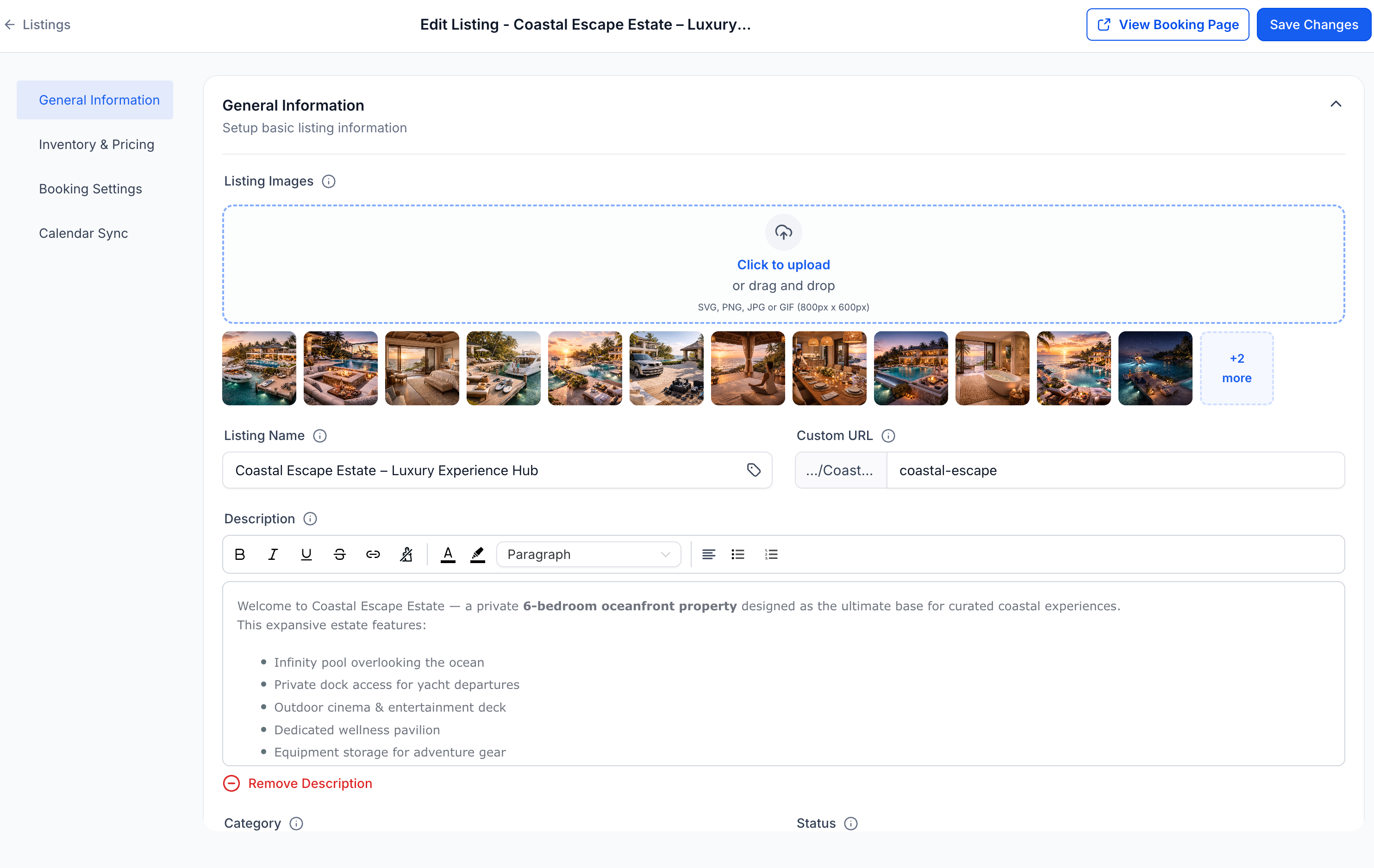
Customizable listings with variants and inventory
- Create separate listings in Rentals for each item or service you rent out, and configure:
- Pricing per hour, day, week, or month
- Quantity tracking for how many units you have available
- Variants such as size, type, or configuration
- Lead time, buffer time, and booking window rules for when and how far in advance bookings can be made
Inventory tracking and availability control
- Control the maximum number of units that can be booked for each listing at any time.
- EveryCatch then automatically:
- Checks availability across the dates the customer selects
- Prevents overbooking of your inventory
- Blocks inventory that is already reserved or unavailable
Flexible pricing models
- Set up pricing rules that reflect how you charge customers, with support for:
- Hourly, daily, weekly, and monthly rentals
- Day-based pricing for date-driven bookings
- Seasonal pricing for peak and off-peak periods
- Tiered pricing based on rental duration and quantity
- Security deposits so you can take a hold or upfront amount when needed
Flexible booking types
You can choose the booking flow that fits each listing and how your customers usually book.
- Date and time selector – Best for hourly or short-term rentals where customers pick a specific time range
- Date selector only – Ideal for day-based or night-based rentals where only dates matter
- Fixed duration bookings – Offer set packages such as a 4-hour rental, 3-day bundle, or 5-day bundle that customers can select quickly
Each listing in Rentals can have its own booking behavior, so you can mix and match these booking types across your catalog.
Multi-item bookings
Customers can now add multiple rental listings to a single checkout in EveryCatch, which works well for bundles, event setups, or any situation where several pieces of equipment or spaces are booked together.
Customer booking page
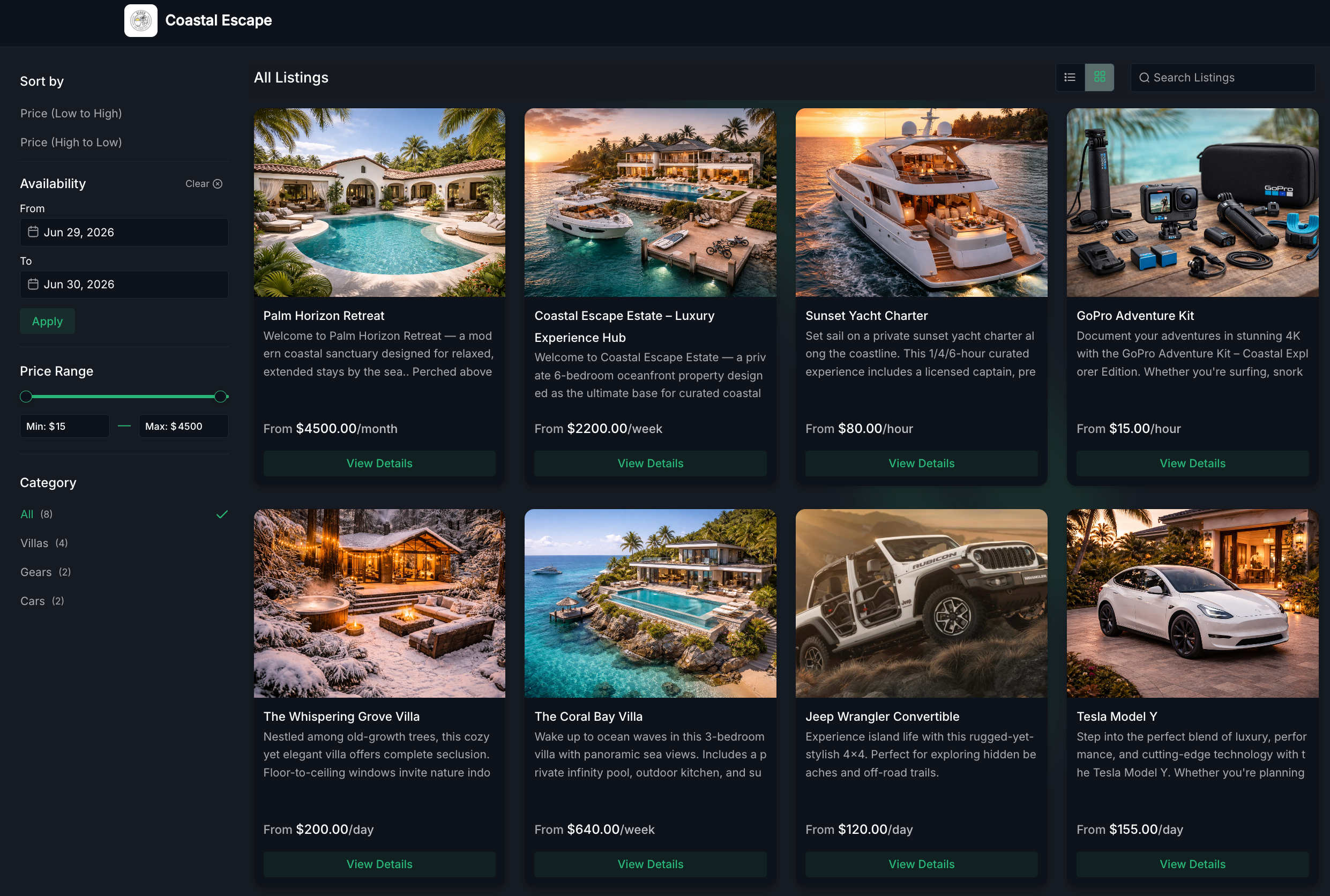
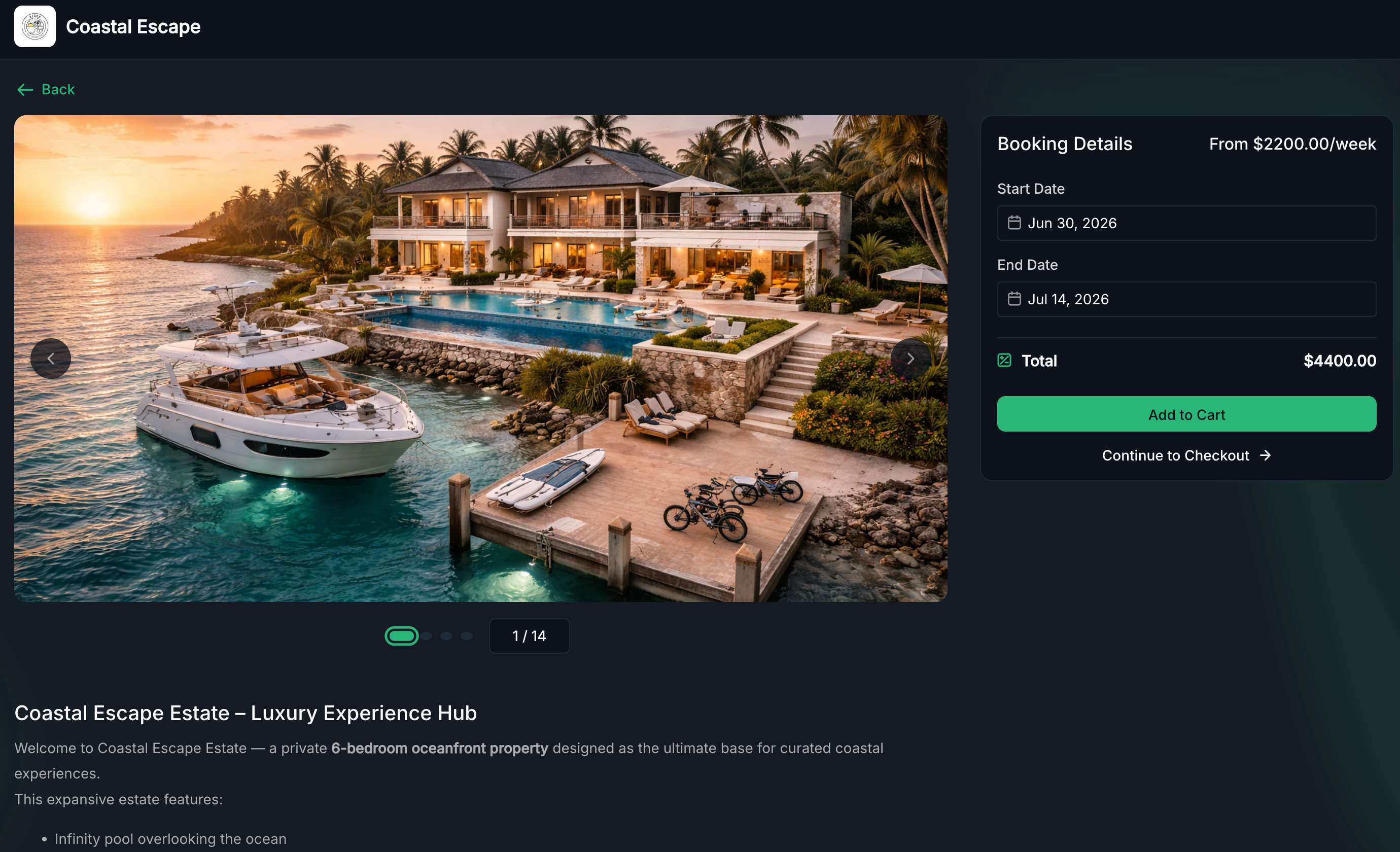
EveryCatch now gives you a dedicated, customizable public booking page for Rentals so customers can explore and book your inventory online.
- Displays your rental listings and categories in a clear layout
- Shows real-time availability based on your inventory and rules
- Provides a smooth booking experience aligned with your settings
This helps your rental business present a clean, professional booking experience without needing a separate tool or custom build.
Flexible booking management (admin experience)
Rentals includes a full booking management workspace inside EveryCatch so your team can handle everything in one place.
- Create bookings or blocked slots manually directly in the app
- Add multiple listings to a single booking record
- Edit dates, duration, quantity, or pricing when you need to make changes
- Automatically generate invoices for each booking
- Collect payments from within EveryCatch
- Track the full booking lifecycle from creation to completion or cancellation
- View and manage bookings from either the appointments list view or the calendar view
Dedicated rentals calendar view
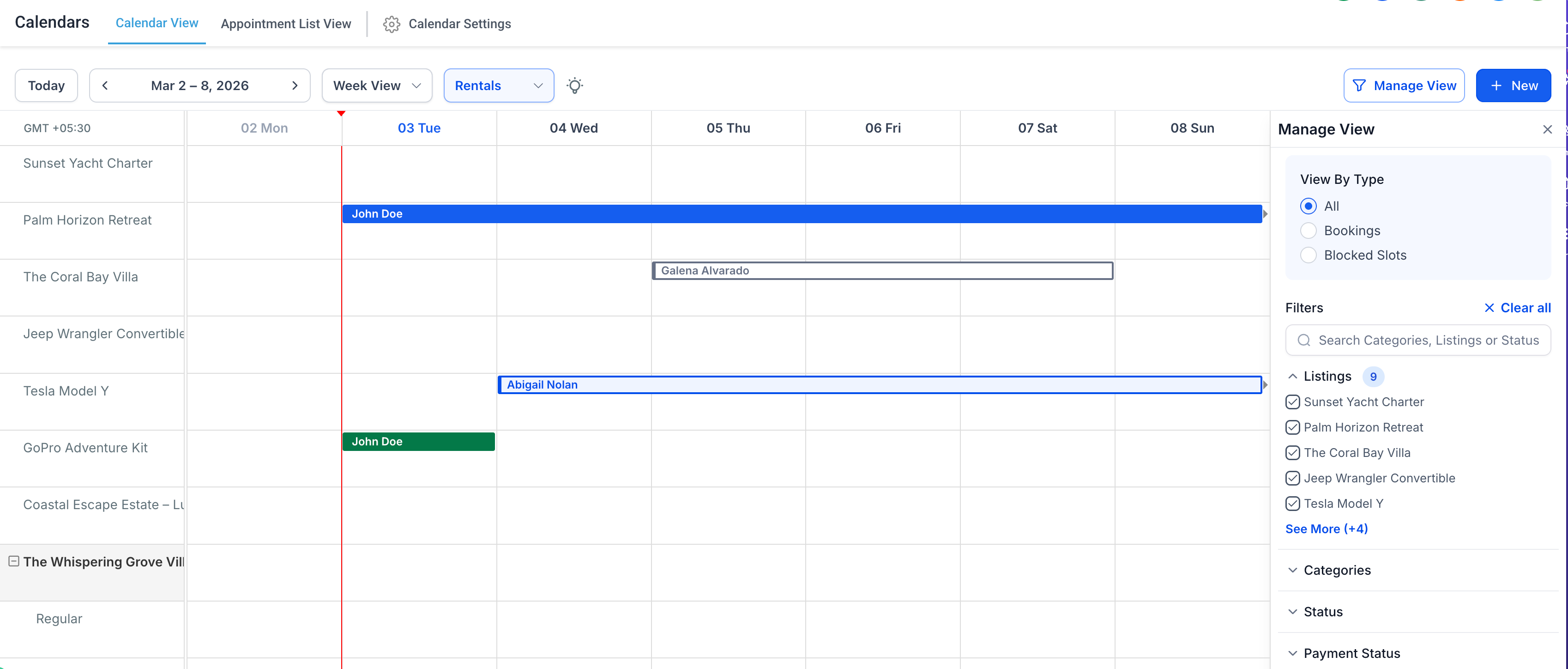
A dedicated Rentals calendar view in EveryCatch helps you monitor and manage bookings visually.
- See bookings across all listings in one unified grid
- Identify booking status quickly with color coding
- Filter by listing, category, booking status, or payment status
- Open and update bookings directly from the calendar
- Run daily rental operations from a single centralized view
How to get started
- Rentals will be turned on automatically for all locations you create going forward.
- Rentals will remain off by default for your existing locations until you choose to enable it.
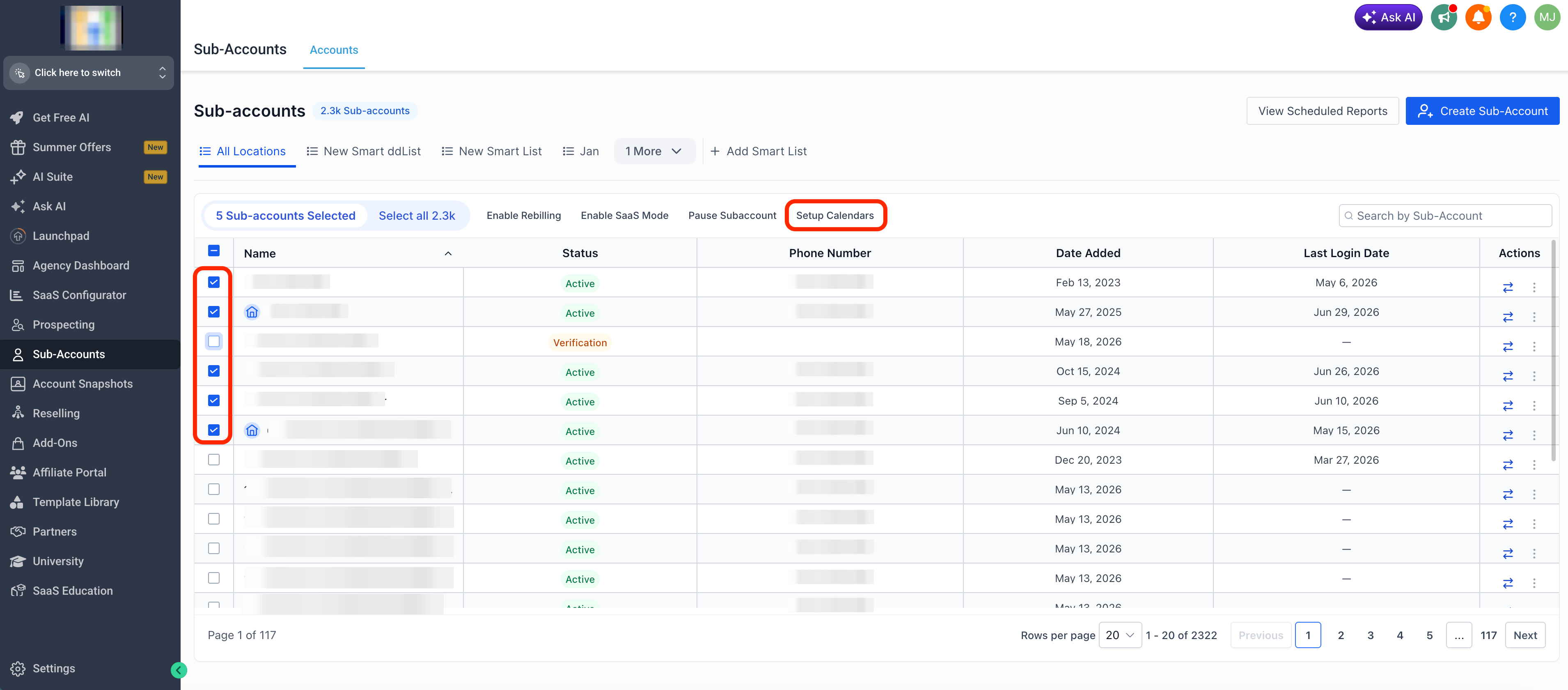
To enable or disable Rentals for one or more locations in EveryCatch, follow these steps.
- Go to Agency View → Subaccounts
- Select the location or locations where you want to enable or disable Rentals
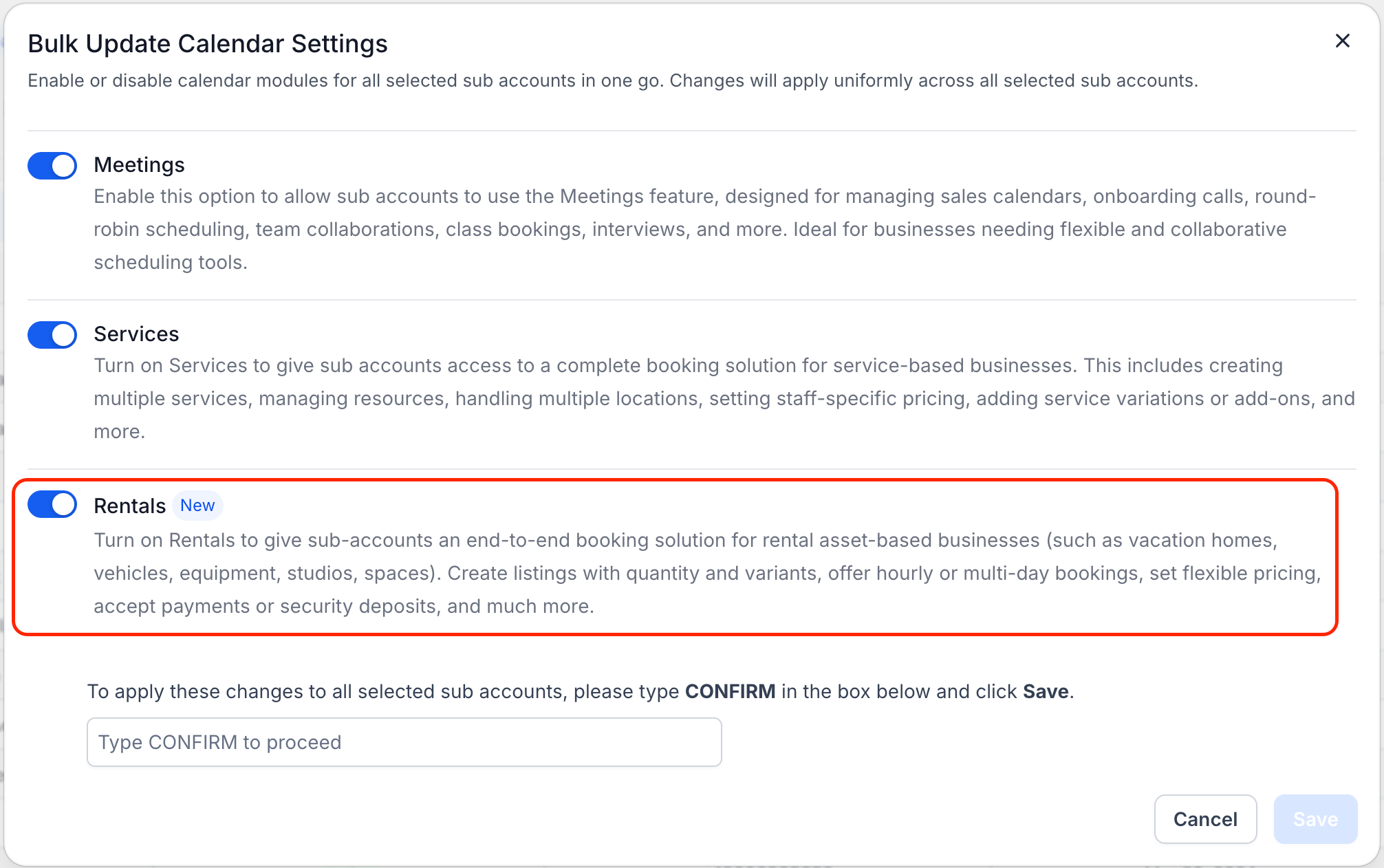
- Click on Setup Calendars
- Use the Rentals toggle to turn the module on or off for those locations
Start using rentals
After you enable Rentals for a location, you can start configuring your offerings and booking experience.
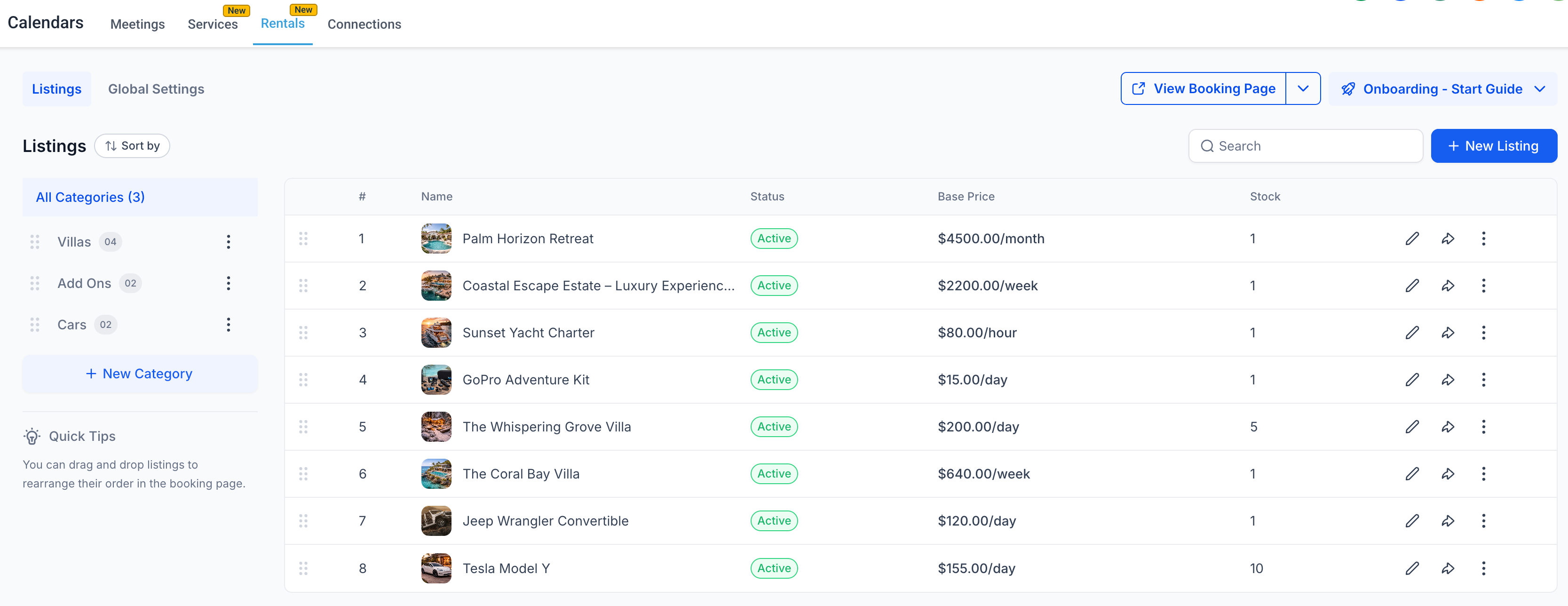
- Go to Calendars → Calendar settings → Rentals
- Create your first rental listing
- Set up pricing, inventory, availability rules, and booking behavior for that listing
- Adjust business-level rules for Rentals in Global settings
- Preview your customer booking page to confirm everything looks and works as expected
- Begin managing bookings from the appointments list view or the dedicated Rentals calendar view
Why this matters
Rentals in EveryCatch gives you a complete toolkit to run rental operations inside the same platform you already use.
- Offer hourly, daily, weekly, and monthly rental options in line with your pricing strategy
- Manage inventory, unit quantities, and variants with accurate tracking
- Support multi-item bookings in a single checkout so customers can reserve everything they need at once
- Handle payments, invoices, and blocked slots without leaving EveryCatch
- Sync availability with external tools through calendar sync functionality
- Operate your rental process without depending on separate specialist software
- Expand into or better support industries such as vacation rentals, equipment rental, event services, vehicle rentals, coworking spaces, mobility services, and similar rental-focused businesses
Need help with this?
If you'd like help setting this up or want to know what it means for your account, book a quick call and we'll walk you through it.
