RCS messaging in workflows (private beta)
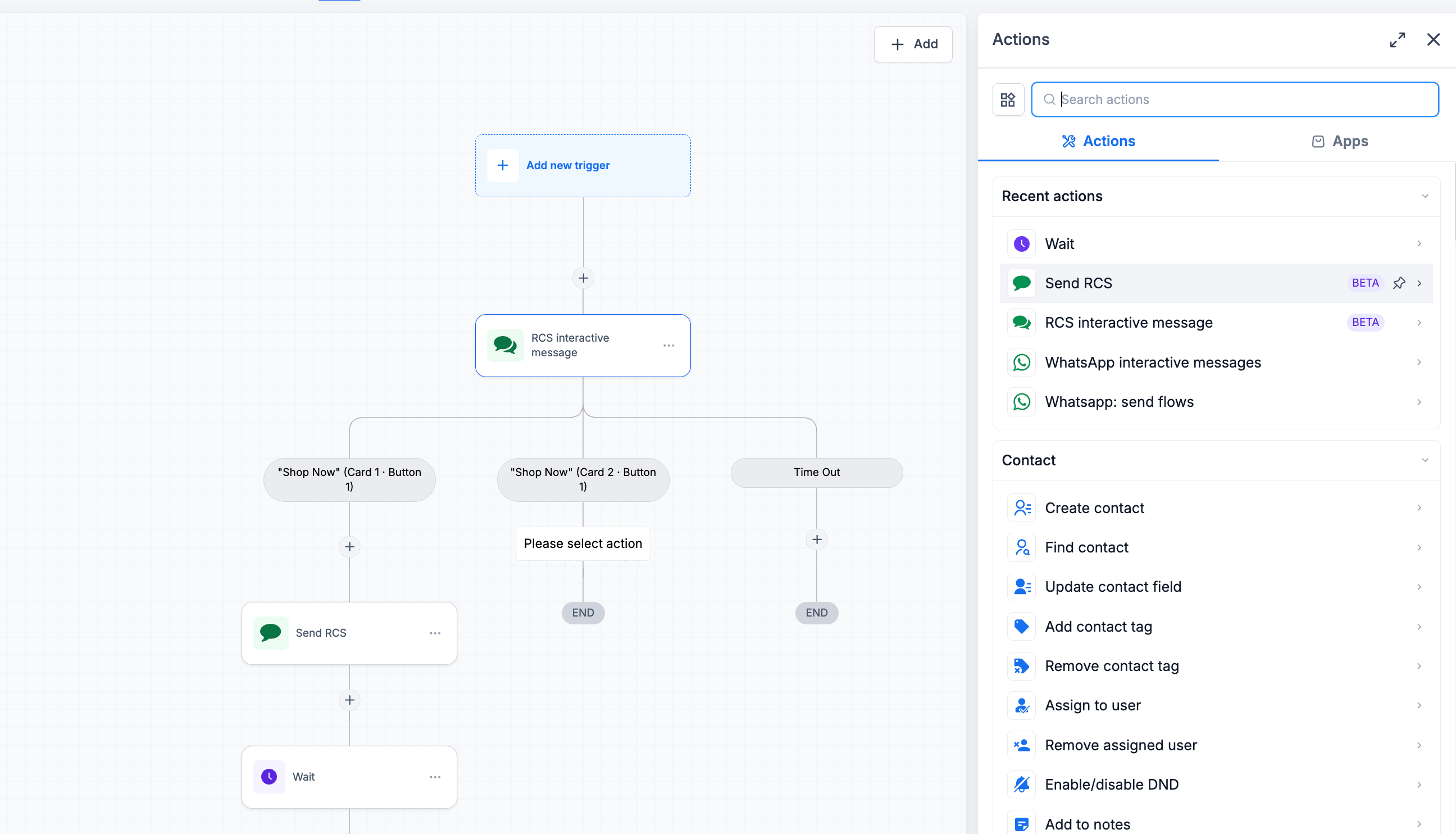
You can now use RCS messaging directly inside EveryCatch workflows to build richer customer journeys. The new Send RCS and RCS interactive message actions let you automate conversations with next-generation business messaging while staying inside your existing automation.
You can now
- Send standard RCS messages from workflows
- Build interactive RCS experiences with rich cards and buttons
- Trigger different workflow paths based on customer interactions
- Automate reminders, promotions, follow-ups, and customer engagement using RCS
- Create richer customer journeys with visually engaging, interactive messaging
Build richer customer journeys
With the new workflow actions, EveryCatch now lets you move beyond basic text messaging and create engaging RCS conversations that guide people through personalized journeys. You can design message flows with images, buttons, and quick replies, all coordinated from the same workflows you already use to manage your automation.
Available in private beta
RCS in workflows is currently available through our private beta program.
If you would like early access and want to help shape how RCS works in EveryCatch, contact your Customer Success Manager or reach out to the EveryCatch team to request access to the private beta.
Also available in the RCS private beta
If you are in the private beta, you can use RCS in several other areas across EveryCatch in addition to workflows:
- 1:1 RCS messaging from Conversations for direct customer chats
- Bulk RCS messaging for campaigns and outreach
- RCS template creation and management for consistent, reusable messages
How to use this feature
- Go to Automation → Workflows.
- Create a new workflow or open an existing one to edit it.
- Add either the Send RCS action or the RCS interactive message action to your workflow.
- Configure your RCS content, including any rich cards, buttons, or interactive elements you want to include.
- Publish your workflow so RCS messages start sending when contacts meet your trigger conditions.
Why it matters
- Automate rich, conversational customer experiences that feel like a guided interaction
- Increase engagement by using interactive RCS messages with buttons and structured replies
- Route contacts through different workflow paths based on the buttons they tap or responses they send
- Provide a modern, app-like messaging experience for your customers directly from EveryCatch workflows
What's next
We are actively expanding RCS capabilities in EveryCatch. Here is what we are planning next:
- RCS onboarding flows to simplify sender registration and provisioning through automated steps.
- General availability (GA) of RCS, currently planned for the end of Q3 2026, so all eligible EveryCatch customers can use RCS messaging.
Need help with this?
If you'd like help setting this up or want to know what it means for your account, book a quick call and we'll walk you through it.
