Opportunity owners and followers in workflow if/else conditions
What changed
You can now use opportunity owners and opportunity followers as conditions in your workflow If/Else branches in EveryCatch. This update lets you route contacts based on whether an opportunity has specific owners or followers assigned, removing the earlier gap where these fields were missing from branching logic.
How it works
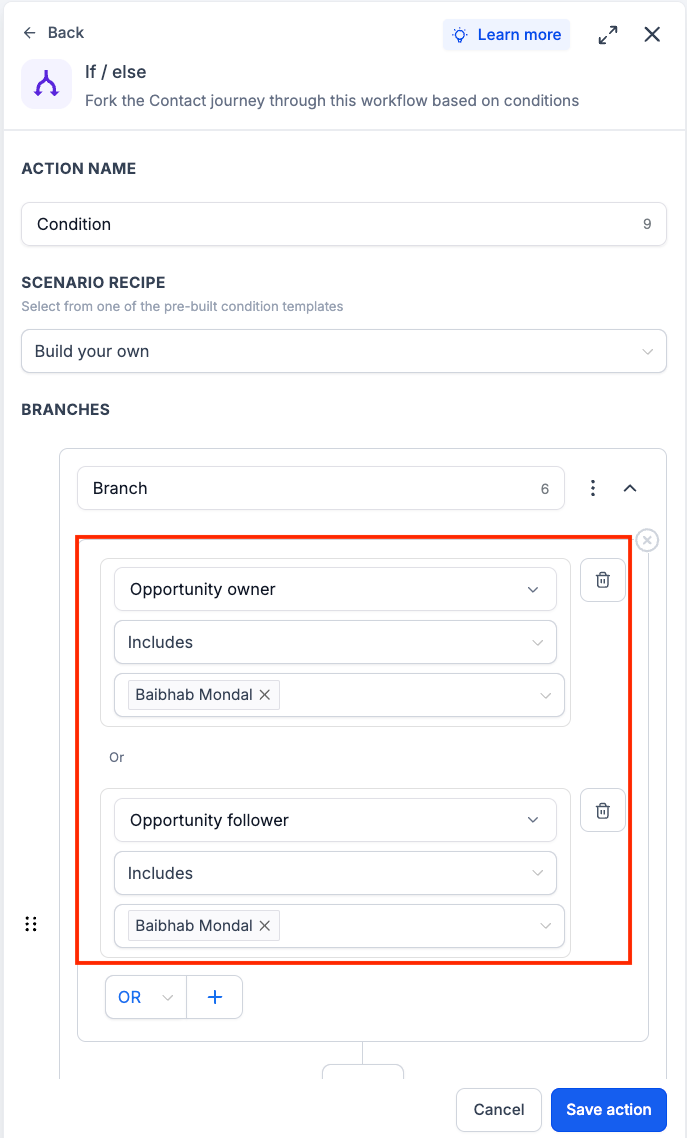
When an If/Else step checks an opportunity in EveryCatch, it can now look at the opportunity owner and opportunity follower fields. The workflow then sends the contact down the matching branch based on the condition you set, such as whether an owner is assigned or whether a specific team member is following the opportunity.
How to use it
- Add or edit an If/Else action in your EveryCatch workflow.
- Choose opportunity owners or opportunity followers as the field for your condition.
- Set up the condition you want to evaluate (for example, "has any owner" or a specific owner or follower) and save your workflow.
Why we built it
Many teams in EveryCatch assign owners and followers to opportunities as part of their sales, success, and account management processes. Workflows previously could not branch based on these assignments, which limited how precisely you could automate handoffs or alerts. With this update, you can use opportunity ownership data to automate routing, send targeted notifications, and trigger follow-up actions that match how your team already manages opportunities.
Simple use case example
- Send opportunities into a dedicated follow-up sequence as soon as an opportunity owner is assigned, while leaving unassigned opportunities in a separate nurturing path.
Additional notes
- Available specifically in If/Else workflow conditions in EveryCatch.
- Works with both opportunity owners and opportunity followers fields.
- Conditions use the owners and followers that are assigned to the opportunity at the exact time the workflow reaches the If/Else step.
- Existing workflows will continue to run as they do today unless you edit them to add these new conditions.
Preview
Need help with this?
If you'd like help setting this up or want to know what it means for your account, book a quick call and we'll walk you through it.
