Internal notifications: notify followers + opportunity owners
What changed
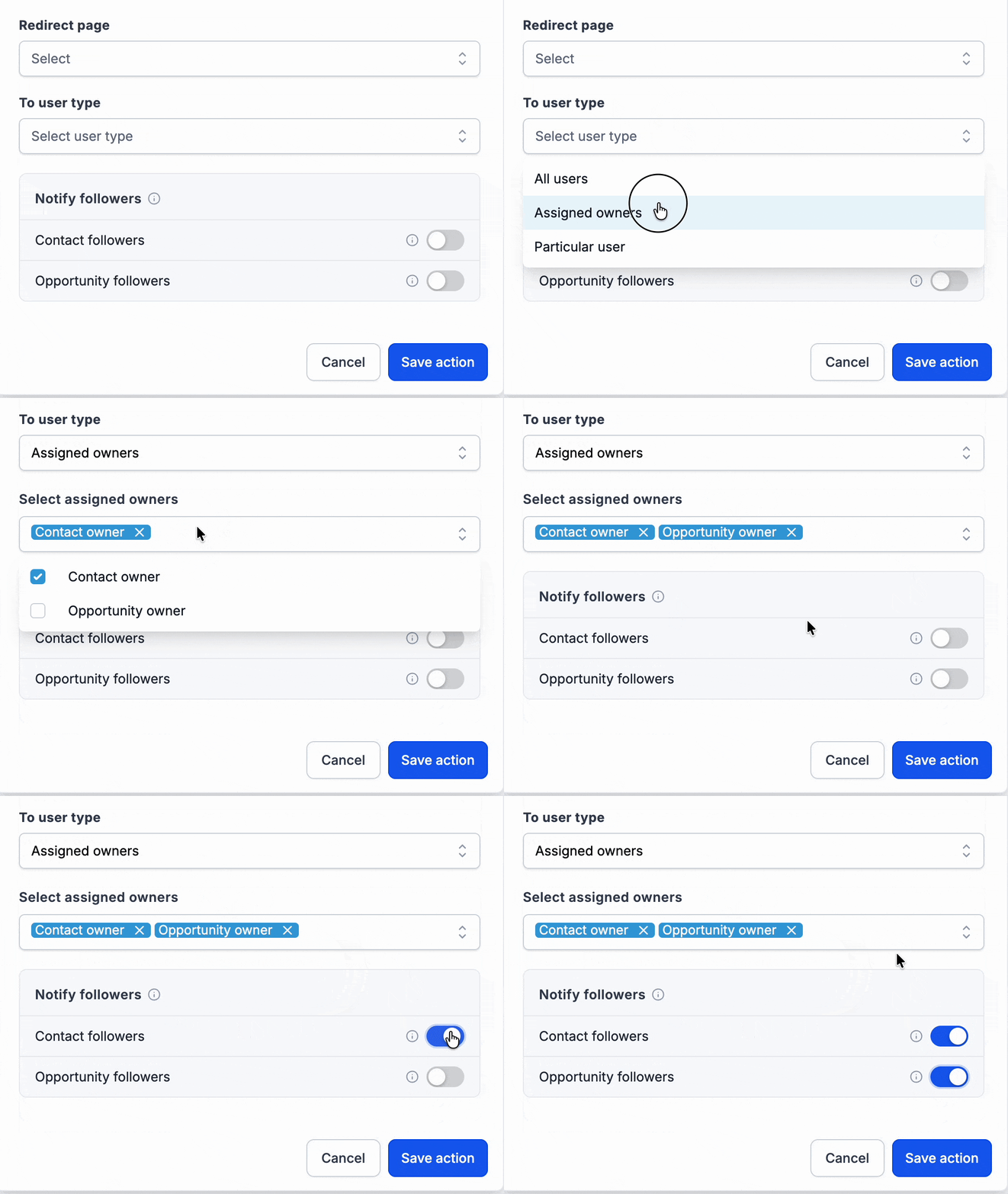
EveryCatch now lets you notify contact followers, opportunity followers, or both from the Internal notification workflow action. You can also choose Opportunity owner as a new recipient option in the existing "User type" dropdown.
How it works
A new Notify followers section appears directly below To user type in the Internal notification action. The follower checkboxes are additive, so they send notifications to followers in addition to the primary recipient you selected above. Followers are looked up at the moment the action runs, and EveryCatch automatically removes duplicate recipients before sending.
How to use it
- Open an Internal notification action in any workflow.
- Choose your To user type recipient, including the new Opportunity owner option if you want to use it.
- Turn on Contact followers, Opportunity followers, or both, depending on who should be notified.
Why we built it
Many teams work together on contacts and opportunities that belong to someone else in the pipeline. This update helps you keep lead generators, closers, mortgage advisors, renewal teams, and coverage teammates in the loop automatically, without manual @mentions, extra workflow branches, or separate notification steps.
Simple examples
- A real estate team leaves To user type set to Assigned user and turns on Contact followers so the lead generator, agent, and mortgage advisor who follow the contact all get notified when the lead replies.
- A sales team that covers for teammates on PTO turns on both Contact followers and Opportunity followers so whoever is following the record gets notified when a form is submitted or an opportunity stage changes, even if they are not the primary owner.
Additional notes
- Available for Email, In-app notification, SMS, and WhatsApp. Contact and opportunity follower toggles are separate options and you can enable either or both.
- If a user would receive the same notification from multiple settings, EveryCatch automatically sends only one copy to that person when the action runs.
- If no opportunity is in scope or the opportunity has been deleted, EveryCatch will skip opportunity followers for that run. The selected To user type recipient still receives the notification.
- Followers who do not have the required address or number for a specific channel are skipped for that channel. For example, a follower without an email address cannot receive an email notification.
- All of your existing Internal notification actions keep working as they are. They will only start notifying followers if you edit them to turn these options on.
Preview
Need help with this?
If you'd like help setting this up or want to know what it means for your account, book a quick call and we'll walk you through it.
