Book appointment action: now with timezone control
What changed
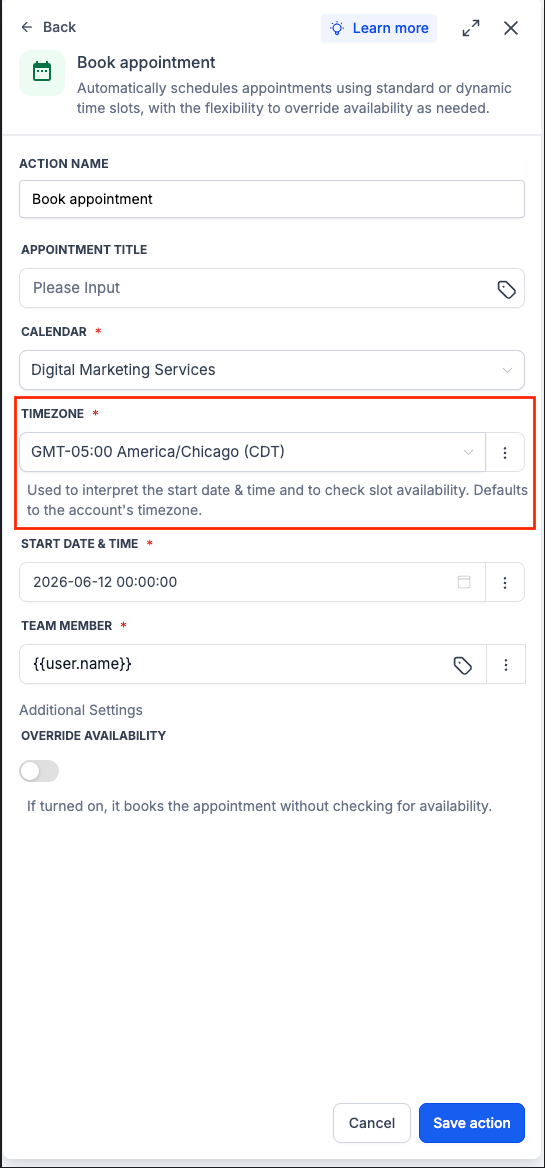
The Book appointment workflow action in EveryCatch now includes a Timezone field. You can select a fixed timezone or use a dynamic value, such as the contact’s own timezone, when scheduling through workflows.
How it works
When the action runs, EveryCatch reads the Start date & time using the timezone you selected, then books the appointment at that exact moment in absolute time. If you do not choose a timezone, EveryCatch will use your account’s default timezone.
How to use it
- Open the Book appointment action in a workflow.
- Set the Start date & time, then choose a fixed timezone or Contact timezone from the Timezone field.
- Save the action.
Why we built it
With dynamic appointment times, contacts in different regions could end up with meetings scheduled at the wrong local time. Timezone control gives you clear, reliable scheduling so each appointment is booked for the correct time in the right place.
Notes & limitations
- If you do not change the Timezone field, the action uses the account timezone by default. You can switch it to a specific timezone when needed.
- The selected timezone is used to interpret the Start date & time and to check calendar slot availability.
- If Override availability is turned on, EveryCatch books the appointment without checking calendar availability first.
- This update only affects the Book appointment workflow action.
Preview
Need help with this?
If you'd like help setting this up or want to know what it means for your account, book a quick call and we'll walk you through it.
