Blogs: new author layout
EveryCatch blogs now include a refreshed author layout so you can present author details in a modern, clear, and professional way. This helps your readers quickly see who is behind each post and build a stronger connection with your team.
You get better author visibility, stronger credibility, and a more engaging reading experience on every blog post.
- Choose between two author layouts
You can now pick the author layout that best matches your brand and publishing style.
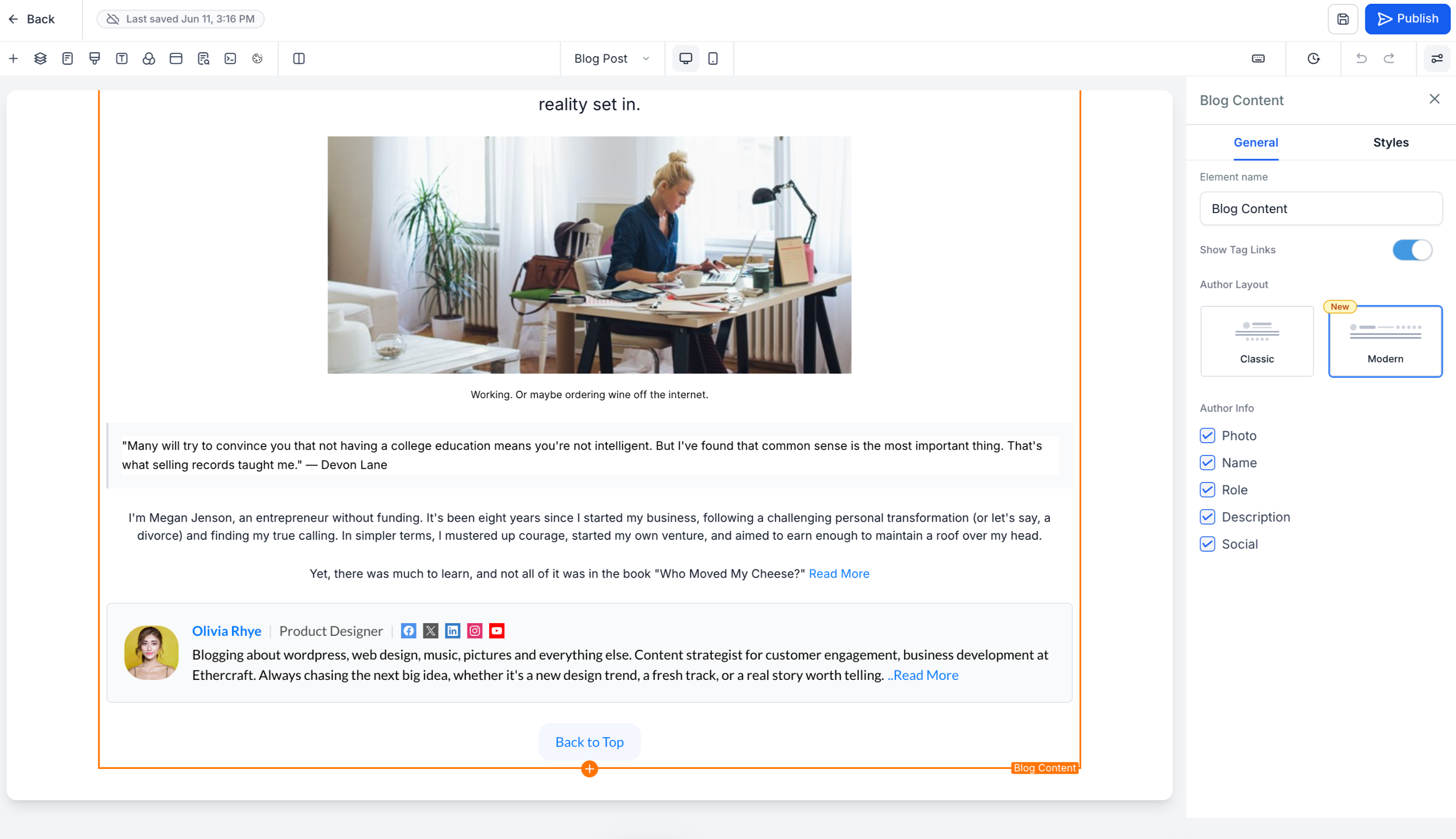
Modern preview (new)
- Card-based design for a clean, structured author section
- Improved visual hierarchy so key details stand out
- Optimized layout to encourage readers to explore the author profile
- Set as the default layout for all newly created blog posts
Classic preview
- Keeps the familiar author layout you have been using
- Available if you prefer to maintain your current look and feel
- Enhanced author profiles
Author information now appears in a richer, more structured layout so readers can quickly understand who wrote the post. You can include:
- Profile image
- Author name
- Designation or role
- Author bio
- Social media links
- Email address
This gives readers clear context about the author’s expertise and background at a glance.
- Expandable "read more" experience
When an author bio is long, EveryCatch automatically shows a shortened version to keep the page tidy. Readers can click Read more to expand and view the full bio without affecting the rest of the blog layout.
- Fully responsive across devices
The author section is designed to adapt smoothly to different screen sizes, including:
- Desktop
- Tablet
- Mobile
Your readers get a consistent, easy-to-read author experience whether they are on a computer, tablet, or phone.
- Go to Sites → Blogs
- Open Blog post settings for the post you want to edit
- Select your preferred author layout (Modern or Classic)
- Fill in the author details, social links, and email information you want to display
- Publish your blog
- Build trust and credibility by showcasing clear author branding
- Increase reader engagement with richer, more complete author profiles
- Give your blog a polished, professional presentation
- Highlight your team’s expertise and thought leadership in a consistent way
- The modern author layout is the default for all new blog posts
- Existing blog posts will keep their current layout unless you update them manually
- Dedicated standalone author profile pages are not included in this update
- Multiple authors per blog post are not currently supported
Need help with this?
If you'd like help setting this up or want to know what it means for your account, book a quick call and we'll walk you through it.
