Automatically associate CRM records with workflows
You can now use the new Associate records workflow action in EveryCatch to automatically link related records in your CRM based on matching field values.
This action works with Contacts, Companies, Opportunities, and Custom Objects, depending on the workflow type and the associations already set up in your EveryCatch account.
What changed
With the Associate records action, you can:
- Find records using one or more field-based filters
- Use merge fields from the enrolled record as filter values
- Choose whether to associate the earliest created, latest created, or all matching records
- Apply an existing association label when connecting records
- Create associations between different object types (for example, Contacts and Custom Objects)
How it works
- Add the Associate records action to a Contact, Company, or Custom Object workflow in EveryCatch.
- Select the object that contains the records you want to associate (for example, Companies or Opportunities).
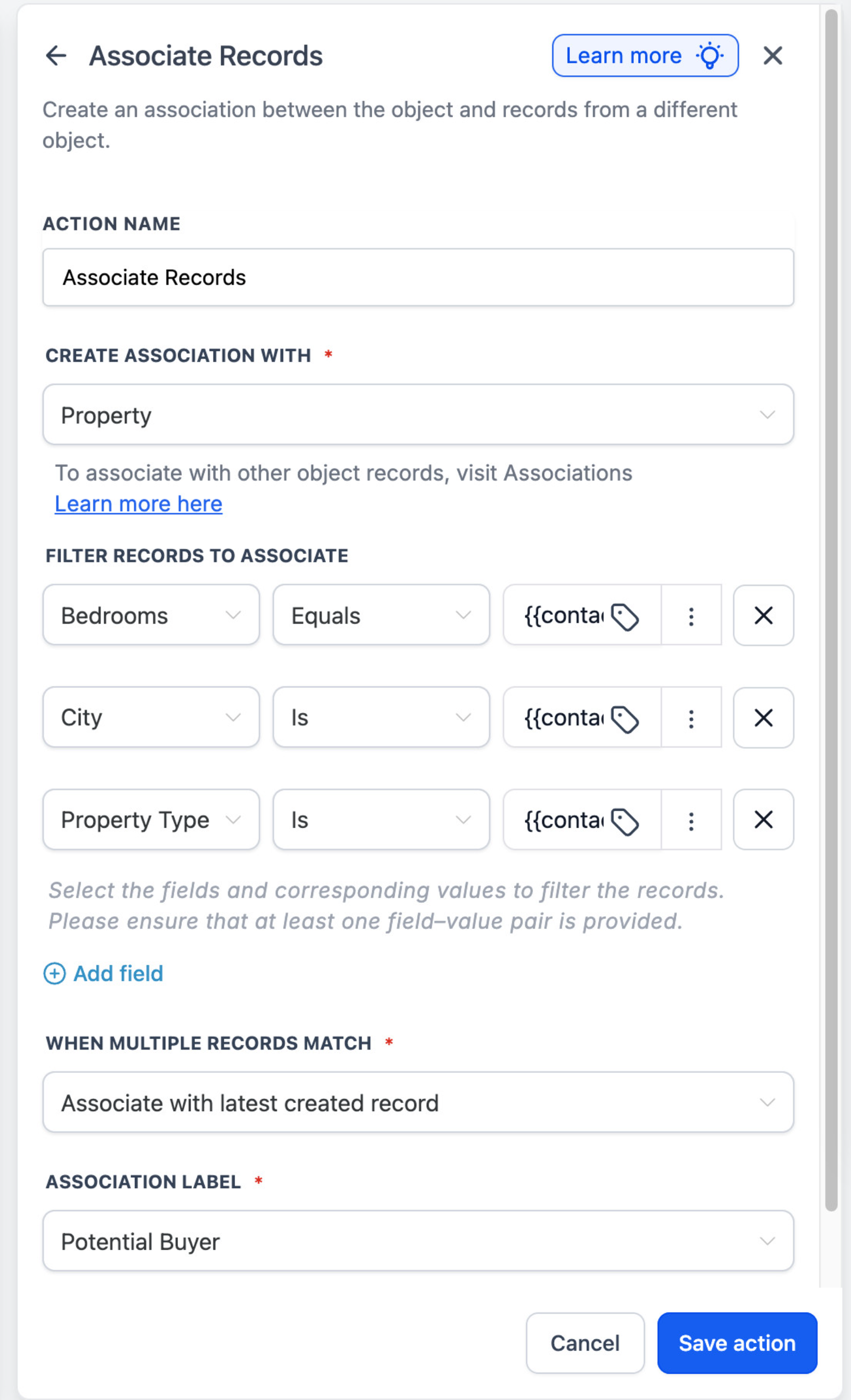
- Add filters to identify which records should match, using fixed values or merge fields from the enrolled record.
- Choose how to handle multiple matches: associate the earliest created record, the latest created record, or all matching records.
- Select an association label when your setup requires a specific relationship type.
- Save and publish the workflow so new and existing enrolled records start creating associations automatically.
When you add multiple filters, a record must meet every condition to qualify as a match.
Example
For example, a real estate agency can automatically associate a buyer record with Property records that match their preferred city, property type, and number of bedrooms, using those preferences as filter values in the action.
This helps your team create and maintain the right associations at scale, without needing to open each record and link them one by one.
Why it matters
The Associate records action helps your business:
- Cut down on manual record association work for your team
- Keep associations between CRM records accurate and consistent
- Build workflows that take actions across associated records, such as updating or notifying related records
- Automate processes across standard objects and Custom Objects in EveryCatch
Availability
Associate records is currently available as a Labs feature in EveryCatch. To turn it on, go to:
Settings → Labs → Associate Records - Workflow Action
Learn more: Help article
Need help with this?
If you'd like help setting this up or want to know what it means for your account, book a quick call and we'll walk you through it.
